
GiliSoft USB Encryption
Password-protected USB encryption for flash drives and external disks

Create a private encrypted area and a normal public area on the same removable drive, so sensitive files stay protected while everyday files remain easy to share.

Secure encrypted area Public sharing area Auto-lock on unplug


Windows XP/7/10/11 (32 bits &64 bits)

Download TrialVersion 11.0 BUY NOW$49.95 $59.95

GiliSoft USB Encryption box
USB Drive Layout
Private encrypted area
Password required
Public area
Ready to share

USB Encryption Software for Flash Drives and External USB Drives

GiliSoft USB Encryption protects files stored on USB flash drives, thumb drives, pen drives, memory cards, and external USB hard drives on Windows by creating a password-protected secure area on the removable device itself.
Each USB drive can contain both a secure encrypted area and a normal public area, so you can keep confidential files private while still sharing non-sensitive files in the same drive.
This makes USB Encryption a practical choice for anyone who needs portable USB security for office documents, client files, backups, travel data, and other sensitive removable-media content.

Core USB Encryption Features

Encrypt USB Flash Drives Securely

Protect confidential business files, client documents, personal records, and portable work data stored on removable USB media. Encryption helps reduce exposure when a drive is shared, carried outside the office, or misplaced.

Password Protect USB Drives

If you use a removable drive to back up your files, you do not want it to fall into the wrong hands. With USB Encryption, you can create a secure area to password protect sensitive files on USB storage. If someone gets hold of your external drive, they will not be able to retrieve your backup without the password.

Encrypted Area Inside the USB Drive

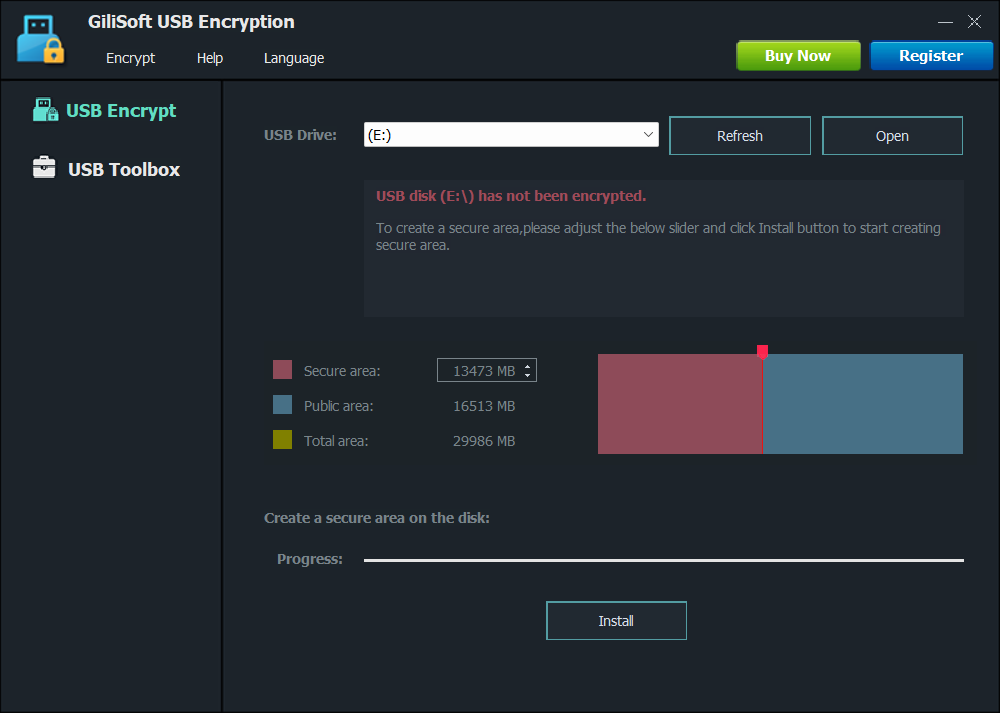
USB Encryption creates a secure area from free space on the USB drive itself. You can keep sensitive files in the encrypted area and non-sensitive files in the public area.

Automatic Encryption in the Secure USB Area

Files saved to the encrypted USB area are encrypted automatically. When authorized users open them, data is decrypted in real time for normal use.

Encrypted USB Data Locks on Unplug

When the USB drive is unplugged or the session is closed, the encrypted area is locked automatically until the correct password is entered again.

Supports Common USB Storage Devices

Supports USB thumb drives, USB flash drives, memory cards, and external USB hard drives. For best performance, use NTFS on the USB device before creating the encrypted area.

Use Encrypted USB Drives on Windows PCs

USB Encryption supports Windows XP through Windows 11 on 32-bit and 64-bit systems, making encrypted USB drives practical across office and home PCs.

Encrypt USB Drives up to 128TB

Supports very large USB storage capacity up to 128TB (Windows limit), so the same encryption workflow scales from small sticks to large external USB disks.

Protect Any File Stored on USB

Documents, photos, videos, archives, and folders can all be protected inside the encrypted USB area without strict file type limitations.

Fast Backup USB Files to Hard Disk

The Fast Copy feature can help you back up USB files to a hard disk, but the main product value remains password-protected encryption for data stored on the removable drive.

Reduce Exposure if a USB Drive Is Lost

Password-protected encrypted storage helps reduce the risk of data exposure if a removable drive is misplaced, borrowed, or used on a shared PC.

Easy Setup for Non-Technical Users

The workflow is straightforward enough for everyday business and home users who need USB encryption without learning a more complex security system.

Testimonials

USB Encryption helped us protect confidential files on shared USB drives without changing our daily file-sharing workflow.

- Olivia M., IT Security Lead

The encrypted safe area is easy to set up, and our team can carry project files securely between office and home.

- Kevin T., Systems Administrator

Password-protected USB access reduced accidental data exposure when drives were passed between departments.

- Rachel P., Compliance Manager

The separation of public and encrypted areas made it simple to keep sensitive files private while still sharing non-sensitive documents.

- Daniel K., IT Administrator

Automatic encryption in the secure area worked reliably, and users did not need extra steps to protect files.

- Brian C., Support Engineer

Auto-lock on unplug gave us peace of mind, especially when employees used USB drives on travel or public computers.

- Megan S., Operations Manager

Our consultants can keep client files in the encrypted area while leaving general handouts available in the public area.

- Laura D., Compliance Analyst

It gave our backup drives a simple password-protected layer without asking every user to manage complex encryption settings.

- Ethan W., Digital Asset Manager

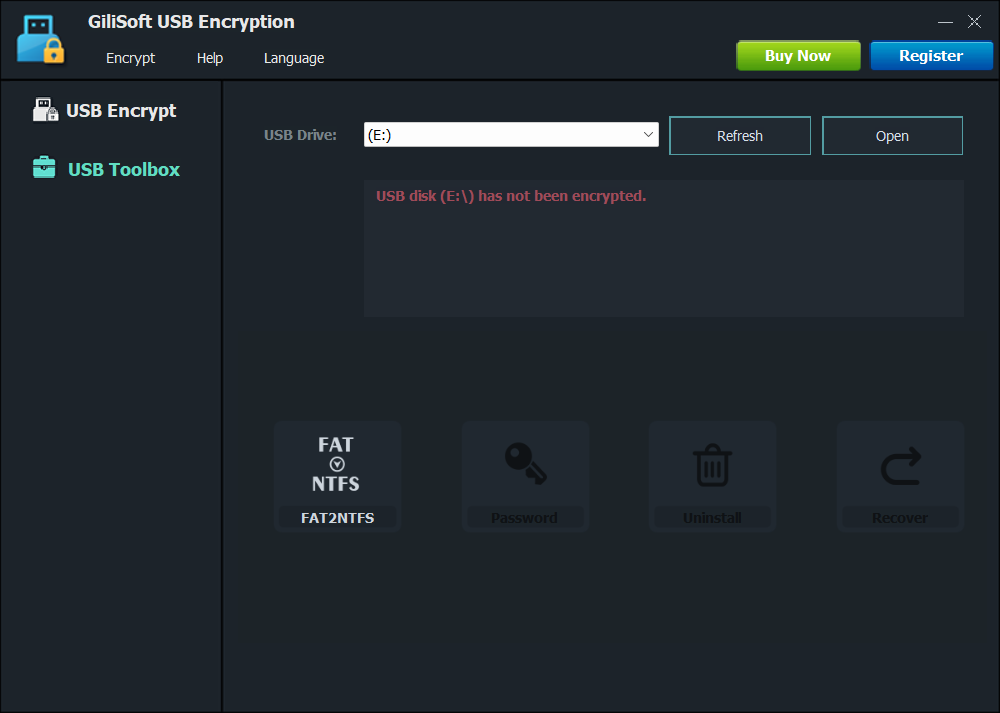
GiliSoft USB Encryption Screenshots

Awards

How-to Guides

Who Is This For?

USB Encryption is for people who need the data on a removable drive to stay protected, even when the drive is carried, shared, misplaced, or used on another Windows PC.

Teams carrying business files

Protect client documents, project archives, and internal reports when employees move files between office, home, travel, and field computers.

Users sharing removable media

Keep a public area for everyday file sharing while reserving a password-protected secure area for private files on the same USB device.

People worried about lost USB drives

If a thumb drive, memory card, or external USB disk goes missing, protected files inside the secure area remain unavailable without the password.

Remote and hybrid workers

Carry work files between office, home, and travel computers while keeping sensitive files inside a password-protected USB area.

Consultants and client-facing teams

Separate public handouts from confidential client files when one USB drive is used during meetings, site visits, or project delivery.

Backup drive users

Add password-protected storage to external drives that hold backups, archives, finance files, tax records, or personal documents.

Why USB Encryption Instead of BitLocker, EFS, or a Folder Lock Tool?

USB Encryption focuses on portable removable-media protection. It is different from whole-drive Windows encryption, endpoint USB policy, or local folder locking.

Tool or method Best for Important difference
USB Encryption Creating password-protected secure and public areas on USB flash drives, memory cards, and external USB disks. Best when protected data must travel with the removable drive.
BitLocker Encrypting full drives or removable volumes in Windows environments that already support that workflow. More system-level and all-or-nothing than a simple secure/public area workflow.
File Lock Pro Locking, hiding, and protecting selected local folders, files, or shared folders. Better for folder-level control; USB Encryption is better for securing the removable drive itself.
USB Lock Blocking USB ports, managing trusted devices, and controlling endpoint access policy. Controls device access on the PC; it does not encrypt stored data on the removable drive.

Common USB Encryption Use Cases

USB Encryption is useful when portable files need password-protected storage, but some non-sensitive files may still need to remain shareable.

Helpful related guides: password protect a USB flash drive, encrypt a thumb drive, protect client files on USB drive, and USB Encryption vs BitLocker.

USB Encryption FAQ

Can I password protect a USB flash drive on Windows?

Yes. USB Encryption creates a password-protected secure area on the USB drive so only authorized users can open the protected files.

Can one USB drive have both public and private areas?

Yes. You can keep everyday files in the normal area and confidential files in the secure encrypted area on the same removable drive.

What happens when the USB drive is unplugged?

The secure area locks automatically when the USB drive is unplugged or the secure session is closed.

Should I use USB Encryption, File Lock Pro, or USB Lock?

Use USB Encryption for password-protected storage encryption on the drive itself, File Lock Pro for file and folder locking, and USB Lock for USB port and device-access control.

Choose the Right GiliSoft Tool

Choose the product based on whether you need encrypted portable storage, endpoint USB policy, folder locking, or a broader security bundle.

Encrypt the USB drive itself

Use USB Encryption when the main goal is protecting the removable drive with a password-protected encrypted area.

View USB Encryption

Control USB ports and devices

Use USB Lock when the goal is blocking removable-device access, enforcing USB policy, and preventing data leakage.

View USB Lock

Protect selected files and folders

Use File Lock Pro for folder-level locking, hide mode, shared-folder protection, and selected file access control.

View File Lock Pro

Cover several encryption needs

Use Encryption Toolkit when you also need file, video, disc, private-disk, or full-disk encryption tools alongside USB protection.

View Encryption Toolkit

Comparing USB protection options? See free USB disk encryptor tools and best USB encryption software.

Review Notes

  Editors highlighted practical password-based USB encryption for portable storage protection.
    Coverage noted an easy workflow for creating a private encrypted area on removable drives.

GiliSoft USB Encryption is an effective tool that protects your data while

you're carrying it around. It's extremely easy to use and takes very little

of your time

  Reviewers praised strong protection against unauthorized access on lost or shared USB drives.
    Lab tests highlighted stable encryption behavior across common Windows environments.


GiliSoft USB Encryption provides an easy-to-use interface for Windows users who need password-protected removable storage.

  Independent write-ups described the tool as reliable for safeguarding confidential files on USB media.
    Commentary cited useful auto-lock behavior after unplugging the encrypted device.


All in all, GiliSoft USB Encryption proves to be a useful piece of software
when it comes to protecting important information from prying eyes.

SPECIAL OFFER | MEGA SALE
#1 Encryption Toolkit Suite
6 Powerful Tools in Ultimate Security Bundle