

Windows Keeps Showing an Error Code? Diagnose and Fix It
An error code is a clue, not a diagnosis. The same number can mean different things in Windows Update, an application, a driver installer, or a game. Capture the complete message and the action that triggers it before choosing a repair.
Quick answer
Write down the full code, exact message, affected app or Windows feature, and when it appears. Restart once, retry the same action, then use the matching publisher or Windows troubleshooter. Use DISM and SFC only when system-component damage is plausible. GiliSoft Total Repair can scan supported error-code, application, DLL, runtime, and Windows repair categories, but no tool can safely fix every code automatically.
Capture the Error Before Changing Anything
- Take a screenshot containing the complete message and code.
- Record what you clicked immediately before it appeared.
- Note the application, Windows feature, account, device, and network involved.
- Check whether the error began after an update, installation, driver change, or crash.
- Keep the time so Reliability Monitor or event records can be correlated later.
Choose the Repair Path That Matches the Context
| Where the error appears | First checks | Escalation path |
|---|---|---|
| Windows Update | Restart, check date/time and free space, run the Windows Update troubleshooter | Review update history and Microsoft's code-specific guidance |
| One desktop or Store app | Update, Repair, Reset, or reinstall the app | Contact the publisher with the exact code |
| Game or media app | Check app files, GPU/audio drivers, DirectX, and required runtimes | Use the game's verified repair process |
| Several Windows features | Check updates and protected system files | Run DISM then SFC; review recovery options |
| Disk, memory, or repeated blue-screen symptoms | Back up data and check hardware health | Stop software-only fixes if hardware is unstable |
Use Built-in Windows Troubleshooting First
- Restart and reproduce once.
A restart clears temporary states. Confirm whether the same action produces the same complete code.
- Open the matching troubleshooter.
Windows routes current troubleshooters through Settings and the Get Help app. Choose Windows Update, network, audio, compatibility, or another category that matches the symptom.
- Repair the affected app.
If one app owns the error, check its publisher, update it, and use Repair before Reset where Windows provides those options.
- Review recent changes.
Check update history, newly installed software, drivers, and configuration changes. Reverse only the change supported by evidence.
- Back up before broader repair.
Create a restore point where appropriate and protect important data before system-wide changes.
Scan Supported Error Codes with GiliSoft Total Repair
Open System Repair > Error Code Scan to review error conditions recognized by GiliSoft Total Repair. The screen may connect a code to a runtime, component, access, update, or DLL-related description.
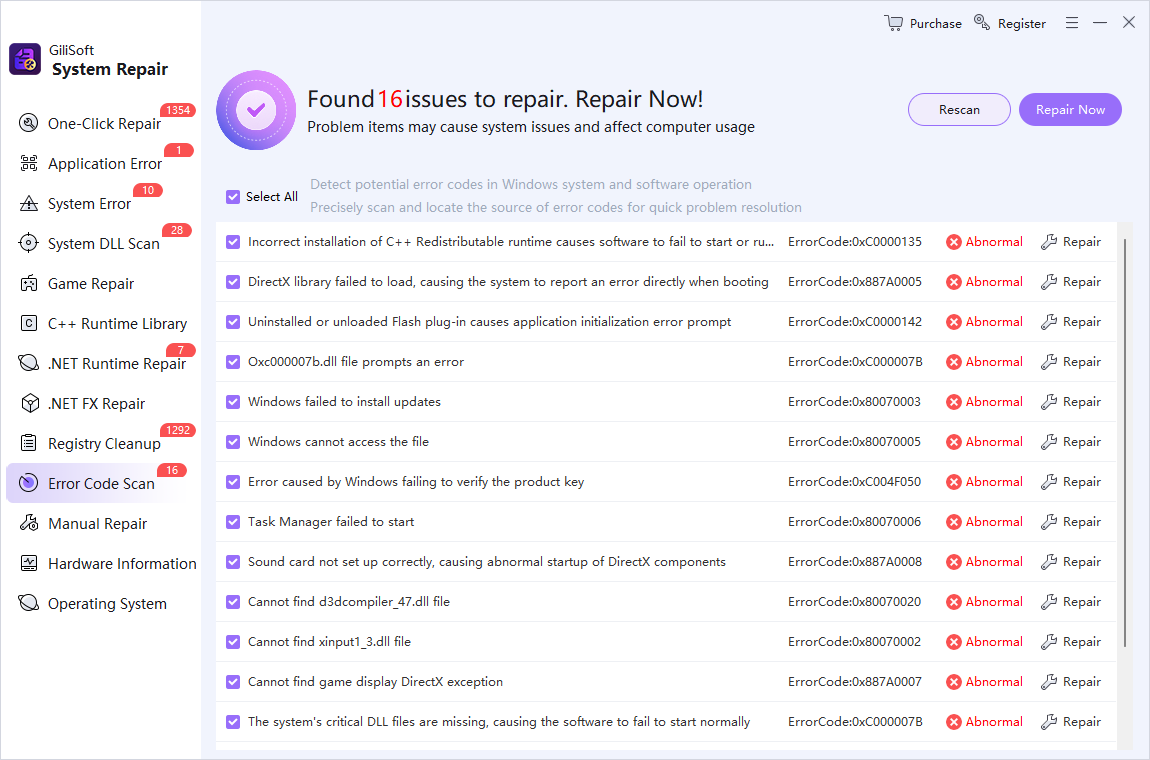
- Compare the detected code with your message.
Do not repair unrelated entries simply because they appear in the list.
- Read the associated component.
Check whether the result points to C++ runtime, DirectX, a DLL, Windows Update, access permissions, or another supported category.
- Select only relevant repairs.
Back up current work and create a restore point before changing shared components.
- Restart and repeat the original action.
Success means the original workflow completes without the same code, not merely that the scan count changed.
- Escalate with evidence.
If the code returns, give the complete message, context, and attempted steps to the app publisher or support technician.

Use DISM and SFC for Windows Component Damage
When several Windows features fail or the evidence points to protected system files, Microsoft recommends running DISM before SFC from an Administrator Command Prompt:
DISM.exe /Online /Cleanup-image /Restorehealth
sfc /scannow
Wait for each command to finish and record the result. Do not use these commands as a generic fix for account, licensing, server, network, or third-party application errors.
Know When the Error Is Outside Software Repair
Stop repeating scans when the error accompanies drive clicks, overheating, memory failures, electrical instability, malware alerts, or repeated blue screens. Back up accessible data and diagnose the hardware or security issue. Business-managed devices may also require an administrator because policy and access errors cannot be bypassed safely.
Windows Error Code FAQ
Why does the same Windows error code keep returning?
The underlying condition may still be present, such as a failed update, damaged app installation, missing runtime, driver problem, service failure, or hardware issue. Record when the code appears and fix the responsible component rather than dismissing the message.
What information should I record with an error code?
Capture the complete hexadecimal or decimal code, exact wording, application or Windows feature, action that triggered it, date and time, and recent updates or installations. A screenshot is useful when wording changes.
Should I download a DLL named in an error message?
No, not from an unknown DLL site. Verify the affected program and Windows components first. Use the publisher's installer, Windows Update, or documented DISM and SFC procedures when system files are involved.
Can DISM and SFC fix every Windows error code?
No. They repair supported Windows component-store and protected system-file problems. They do not fix every application, account, license, network, driver, storage, or hardware error.
Can Total Repair fix every error code?
No. Error Code Scan and related repair categories cover supported conditions shown by the product. An error can still require an app update, account change, driver, hardware service, administrator, or software publisher.
When should I use System Restore?
Consider it when the error began after a known system change and a suitable restore point exists. Review what will be affected, back up important files, and use Microsoft's recovery guidance rather than treating restore as the first response to every error.