
Function Iteration Improves the Closed Loop, Data Protection Covers All Angles
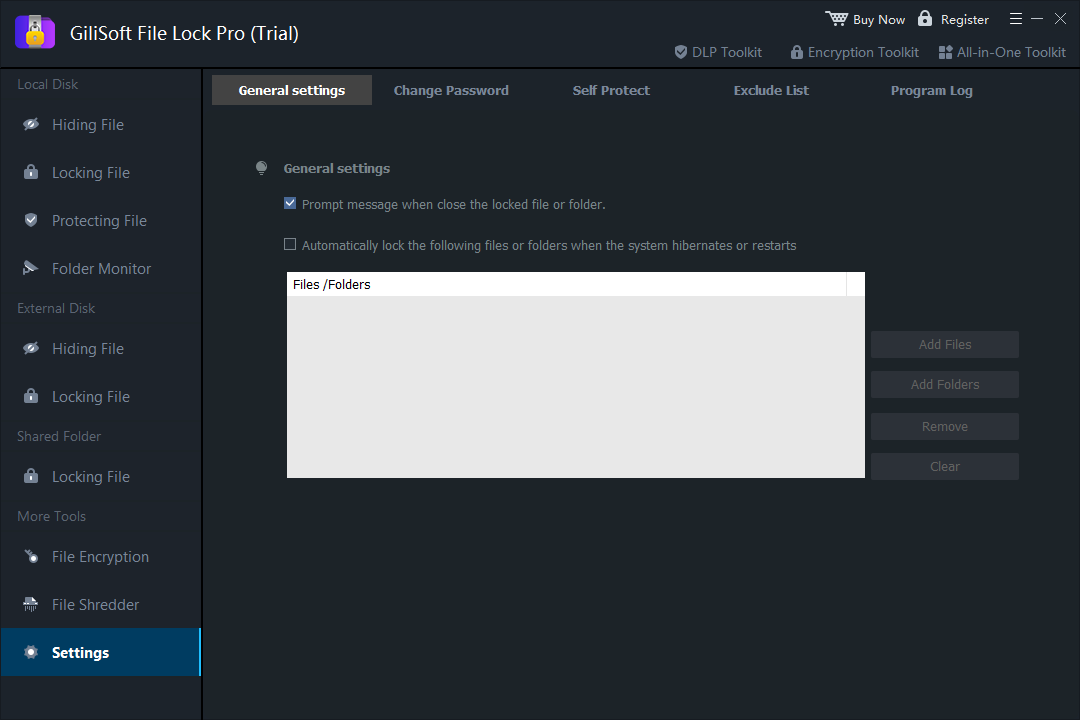
Recently, the professional file encryption and protection tool Gilisoft File Lock Pro released its latest version. Building on the powerful protection capabilities of earlier versions, the new update adds the “auto-lock specified files/folders after system hibernation or restart” feature. This upgrade perfectly connects the core logic of “active unlocking before use, manual locking after use, and auto-locking on shutdown,” officially forming a full-scenario data protection closed loop. It completely eliminates security risks caused by negligence and provides full-cycle security guarantees for personal privacy and enterprise core data from use to inactivity.
Key Highlights of the Latest Upgrade: Auto-Lock Fills Gaps, Closed-Loop Protection Without Vulnerabilities
- Full-scenario coverage, uninterrupted security: When the system enters hibernation, restarts, or shuts down, the software automatically locks preset targets. It fills the scenario gaps of traditional protection and achieves seamless connection between “unlock for use – lock when idle.”
- Zero operational burden, smarter and more worry-free: No manual intervention is required. After unlocking, users can edit files normally. The system automatically returns to the locked state after triggering hibernation/restart or other events, with the entire protection process running invisibly without affecting the user experience.
- Customizable precise protection: Users can freely select files/folders that need auto-locking. Whether it’s private documents, work materials, or sensitive data, targeted protection rules can be set.
Core Features of Earlier Versions: Laying a Solid Foundation for Protection, Iteration Based on Proven Capabilities
Since its launch, Gilisoft File Lock Pro has always focused on comprehensive protection. Earlier versions have built a rich and mature security function system:
- Multi-dimensional locking and hiding: Supports password locking and deep hiding of files, folders, and disk partitions. Hidden files cannot be searched even in Windows Safe Mode.
- Military-grade encryption technology: Adopts 256-bit AES military-grade encryption algorithm. It supports encrypting files into exclusive GFL format or EXE self-extracting format, and the EXE format can be decrypted and used on computers without the software installed.
- Refined permission control: Provides read-only protection, read denial, and other functions to prevent accidental modification, deletion, or copying of files. It also supports password protection for LAN shared folders.
- Auxiliary security tools: Includes practical features such as file shredding and deletion (multiple overwrites to ensure unrecoverability), folder operation monitoring, password recovery (via bound email), and software self-protection (anti-uninstallation, anti-tampering).
- User-friendly operation: Supports quick encryption/decryption via right-click menu and drag-and-drop locking. It is compatible with all Windows systems and adapts to local disks, U disks, mobile hard disks, and other external storage devices.
Typical User Scenarios: Closed-Loop Protection Adapts to Diverse Needs
- Personal privacy protection: When sharing a computer with family members, set auto-lock for private files such as bank statements and personal ID photos. Unlock to view and edit, and the files will be automatically locked after the computer hibernates or restarts. Combined with the “deep hiding” feature of earlier versions, dual protection ensures greater peace of mind.
- Enterprise office data security: When employees use office computers to process core data such as contracts, customer information, and financial statements, set auto-lock rules. Files are automatically locked after the computer hibernates, restarts, or shuts down. Combined with the “permission control + file shredding” features of earlier versions, it prevents resigned employees from copying data and leaking core information, safeguarding business secrets.
- Mobile office scenario protection: Users who frequently transfer work files via U disks or mobile hard disks can set auto-lock for sensitive data in external storage devices. Files are automatically locked when the device is plugged/unplugged and triggers computer hibernation/restart. Combined with the “encrypted compression” feature of earlier versions, data will not be illegally accessed even if the device is lost.
Core Advantages of the Product: Closed-Loop Protection + Comprehensive Capabilities, More Reliable Security
- Closed-loop protection logic: Combines the “active unlocking before use, manual locking after use, auto-locking on shutdown” from earlier versions with the new “auto-locking on hibernation/restart” to form a full-scenario, gap-free protection chain.
- Industry-leading encryption strength: Military-grade AES encryption algorithm combined with multiple protection modes effectively resists brute-force attacks, illegal access, and other risks, ensuring data cannot be tampered with.
- Adaptability to diverse scenarios: Meets the needs of personal users protecting private files, enterprises guarding business secrets, and securing data in external storage devices.
- Easy to use: Simple interface with right-click quick operations and drag-and-drop locking allows users to easily control data security without professional knowledge.
Conclusion: Continuous Iteration, Making Data Security Simpler
From the multi-dimensional basic protection of earlier versions to the closed-loop capability upgrade of the latest version, Gilisoft File Lock Pro has always focused on core user needs and continuously improved data security solutions. This upgrade not only fills the protection gap in system hibernation/restart scenarios but also translates the concept of “full-cycle security” into easy-to-use features, completely reducing users’ operational costs and security risks.
Currently, the latest version of Gilisoft File Lock Pro is officially launched. Users can download and update it through the official website to experience closed-loop data protection services. In the future, Gilisoft will continue to deepen its focus on the data security field, launch more feature upgrades tailored to user needs, and provide more professional and comprehensive file security guarantees for global users.
Contact Information
Official Website: https://www.gilisoft.com/Support Email: support@gilisoft.com