
Free Slideshow Maker for Windows: MP4 Export and Limits
A free slideshow maker can arrange photos, short clips, captions, transitions, and music into a video for family events, lessons, product showcases, or social sharing. The important differences are offline access, watermark rules, export quality, template control, and how comfortably the tool handles a larger local photo collection.
Quick answer
Many free slideshow makers can combine photos and music and export MP4, but free export does not always mean watermark-free or full-resolution output. Make a short test video first and check the actual file for watermark, resolution, sound, and playback. GiliSoft Slideshow Maker is a commercial Windows product with a downloadable trial, not an unlimited free editor; verify its current trial export terms before planning a longer project.
Compare Free Slideshow Maker Options
| Option | Best for | Limit to check |
|---|---|---|
| Windows photo or video tools | Simple local photo videos with basic music and titles | Feature availability can change between Windows versions |
| Online template makers | Fast social posts, invitations, and branded layouts | Uploads, account requirements, premium assets, and privacy |
| Mobile slideshow apps | Quick vertical videos and phone-first sharing | Small-screen editing, watermark rules, and export limits |
| Presentation software | Slides, captions, narration, and classroom material | Less natural timeline control for photo-driven videos |
| Open-source video editors | Offline timeline editing and flexible export | More setup and a steeper learning curve |
| GiliSoft Slideshow Maker trial | Test a local timeline, music, transitions, and MP4 workflow | Commercial product; confirm the current trial export terms in the app |
Create a Photo Slideshow Video in 6 Steps
- Collect the photos and music
Use local copies you are authorized to edit and share. Put them in one project folder before importing.
- Choose the aspect ratio
Select 16:9, 9:16, or another destination ratio before arranging portrait and landscape photos.
- Arrange the timeline
Order the photos and set durations that match the story, narration, or music.
- Add transitions, text, and music
Use a consistent transition style, keep captions readable, and balance music under speech.
- Preview the complete slideshow
Check framing, timing, text, audio level, and the opening and final scene.
- Export and verify the MP4
Open the finished file outside the editor and review it from start to finish on the target device.

What Can a Free Slideshow Maker Export?
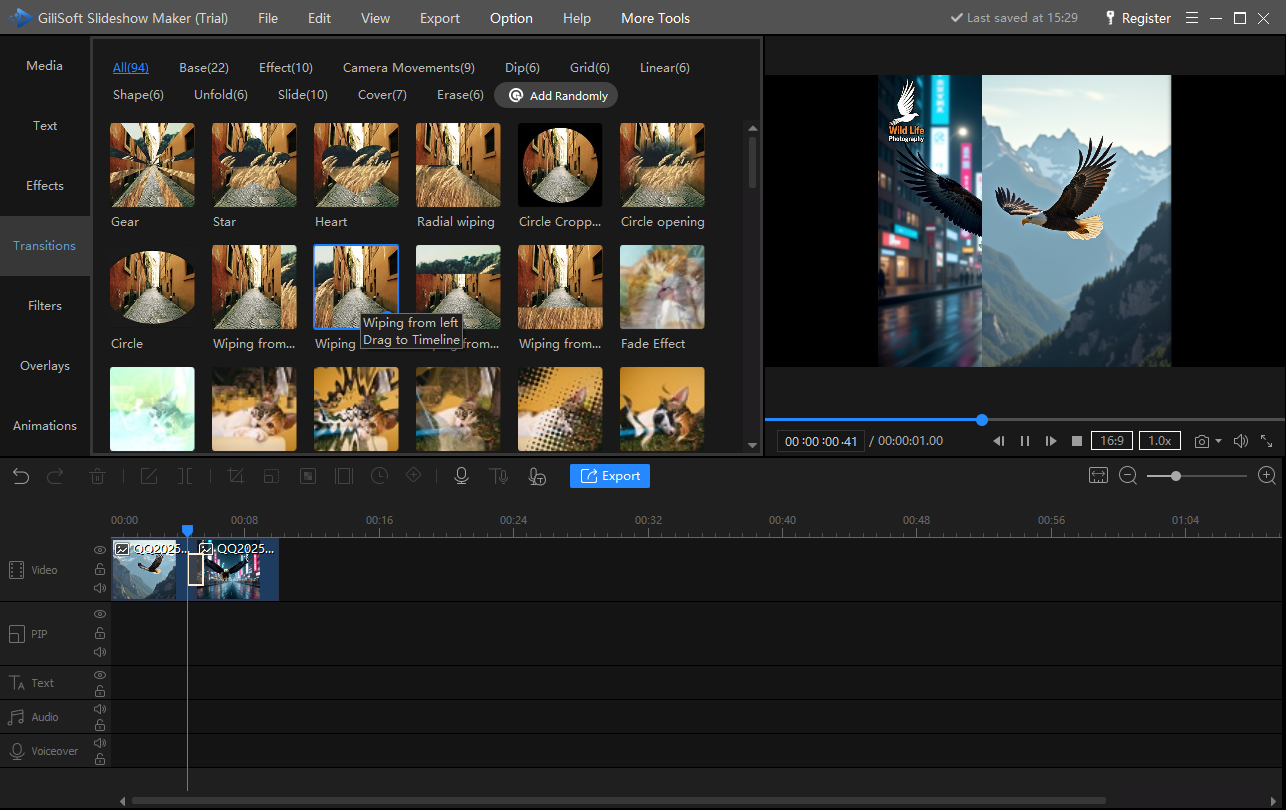
MP4 is a common output, but the free tier may change the finished file. Export a short sample with music and check these details before editing a large photo collection:
- Watermark: confirm whether the exported video includes a logo or end card.
- Resolution: check whether 1080p or another required size is available without payment.
- Project length: some tools limit duration, number of photos, or music tracks.
- Privacy: online tools require uploads; use a local workflow for confidential family or client photos.
- Templates and assets: free access may exclude particular themes, stock music, or transitions.
- Export format: verify MP4 compatibility with the intended TV, phone, website, or social platform.
When GiliSoft Slideshow Maker Fits Better
GiliSoft Slideshow Maker is a commercial Windows product with a downloadable trial, not a permanently free slideshow maker. It is a better fit when the project needs local media handling, a repeatable timeline, photos and video clips in one sequence, transitions, captions, music, narration, and controlled video export without depending on a browser service. Test a short export in the installed trial to confirm its current limits.
| Need | Free option may be enough | Consider GiliSoft Slideshow Maker |
|---|---|---|
| One short personal slideshow | Yes, when basic templates and export are sufficient | When you need more timeline and transition control |
| Private local photos | Use an offline desktop tool | Local Windows workflow without browser uploads |
| Photos, clips, text, and several audio elements | Possible in a full video editor | Focused slideshow workflow in one project |
| Repeatable projects | Check project-saving and asset limits | Use a consistent local editing and export process |
Frequently Asked Questions
Can I make a slideshow with music for free?
Yes. Many free tools can combine photos, transitions, text, and music, although export resolution, templates, watermark removal, or project length may be limited.
What is the best free slideshow maker for Windows?
The best choice depends on whether you need a quick template, offline timeline control, no watermark, HD export, or support for larger local photo collections.
Can a free slideshow maker export MP4?
Many can export MP4, but resolution, bitrate, watermark, duration, and account requirements vary by tool.
Is GiliSoft Slideshow Maker completely free?
No. GiliSoft Slideshow Maker is a commercial Windows product with a downloadable trial. Test an export in the trial and check the current license terms before starting a longer project.
How do I avoid black bars around photos?
Choose the project aspect ratio first, then crop, fit, or use a background treatment consistently for portrait and landscape photos.
How long should each photo remain on screen?
Start around three to five seconds, then adjust for captions, narration, visual detail, and the rhythm of the music.


