


Gilisoft Movie DVD Creator

Burn video to DVD discs, ISO files, or DVD folders

Create DVD menus and chapter-based playback structure

Support MP4, MOV, AVI, WMV, MKV, and more

High-speed DVD authoring engine with flexible output options

Trim, crop, subtitle, watermark, and basic video preparation tools

Reliable quality for archive, family, school, and business DVD projects


XP/Vista/7/8/10 (32 Bits &64 Bits)

Download Trial Buy Now$39.95 $49.95

What Does Gilisoft Movie DVD Creator Do?

GiliSoft Movie DVD Creator helps you turn MP4, MOV, AVI, WMV, MKV, and other common video files into DVD discs, ISO images, or DVD folders on Windows. It is designed for users who still need disc-based delivery, archive-friendly video projects, or menu-based DVD playback for family, event, school, and business use.
Movie DVD Creator also includes menu templates, chapter navigation, subtitle loading, trimming, cropping, watermarking, and basic enhancement tools so the DVD project can be prepared and burned inside one workflow. Fast and easy to use, it keeps DVD authoring practical for users who want more than a simple file burner.

Core DVD Authoring Features

Full Formats Supported

No need to install extra video codecs. Create DVDs from almost all popular video formats, including AVI, XviD, DivX, MP4, MPG, MPEG, WMV, ASF, RM, RMVB, MOV, QT, M1V, M2V, M4V, DAT, VOB, MOD, DV, 3GP, 3G2, FLV, F4V, OGM, H.264/AVC, MKV, M2TS, M2T, MTS, and TS.


Free DVD Menu Templates

GiliSoft Movie DVD Creator features a library of professionally designed DVD menu backgrounds and frames. You also can use your own photos and graphics as menu backgrounds, arrange chapter buttons anywhere on the screen and customize menu titles and captions.

Multiple Output Options

Convert and burn all popular video formats, HD videos and camcorder videos taken by iPhone, other smart phone and DV to DV. Besides burning DVD-format discs, the DVD movie creator also allows you to convert videos to DVD folders and ISO files.

Powerful Video Editing Function

Crop video files to remove the black edge; Trim video length to capture your favorite clips; Adjust brightness, contrast, saturation and effect of the videos; Add subtitle, watermark to the video.

Excellent Output Movie Quality

According to the DVD disc capacity, automatically calculate bit rate for burning as many movies as possible. You can always find a perfect balance between the DVD movie storage and picture quality.

All DVD Discs & DVD Players

It can convert and burn on all DVD discs with high speed. All popular DVD discs: DVD" and DVD"; DVD-R, DVD+R, DVD-RW, DVD+RW, DVD+R DL, DVD-R DL, DVD-RAM. Support PAL and NTSC TV Standards.

Create DVD from Videos, Photos and Music

Author complete DVD projects from mixed media sources. Combine video clips, photo slides, and background music into one structured disc for family archives, event collections, and business delivery.

Custom Menu Background and Navigation

Personalize menu themes with your own images, title text, and chapter arrangement. This helps create branded or event-specific DVD menus that are easier to navigate on TV players.

Subtitle and Audio Track Support

Load subtitle files and select audio tracks before burning so the final DVD matches language and accessibility needs for different viewers and playback environments.

PAL and NTSC Output Standards

Choose PAL or NTSC output according to your playback region and device requirements, reducing compatibility problems when sharing DVDs internationally.

One-Click Burn to Disc, ISO, or Folder

Export projects directly to physical DVD, ISO image, or VIDEO_TS folder from one workflow, making it easy to switch between archive storage and physical distribution.

Chapter-Based Playback Structure

Automatically or manually define chapter points so viewers can jump to key scenes quickly, improving navigation for long-form recordings and multi-segment content.

Customer Testimonials

We use Movie DVD Creator to compile event footage into menu-based discs, and delivery quality has been consistent.

- Olivia M., Event Media Coordinator

The broad input-format support helped us author DVDs from mixed camera and phone sources without conversion headaches.

- Kevin T., Studio Systems Administrator

Menu templates and custom backgrounds made our family and school archive discs look much more professional.

- Rachel P., Documentation Manager

ISO and DVD folder export options are practical when we need digital backup and physical disc delivery together.

- Daniel K., IT Administrator

Built-in trimming and subtitle tools saved us from jumping between multiple apps before burning final DVDs.

- Brian C., Support Engineer

More Functions You May Need

Real-time Preview

Preview videos and photos while editing so you can confirm menu layout, transitions, and output quality before burning.

Simple Editing Controls

Trim basic clips, adjust volume, add subtitles or watermarks, and prepare source videos without leaving the DVD authoring workflow.

Adjust DVD Settings

Tune letterbox behavior, disc size, and output quality so projects fit your target DVD format and playback needs.

Flexible DVD Output

Burn to recordable or rewritable discs and choose DVD disc, ISO image, or DVD folder output with menu and no-menu options.

Who Is This For?

Families and archive projects

Turn family videos, wedding clips, travel footage, and event memories into menu-based DVD discs or ISO backups for longer-term playback and storage.

Schools, events, and training teams

Create DVD projects for school programs, training materials, event recaps, or other offline playback needs that still benefit from chapter navigation.

Why Choose Movie DVD Creator?

DVD authoring, not just simple file burning

Movie DVD Creator is built for authored DVD output with menus, chapters, and playback structure rather than simply copying video files onto a disc.

Disc, ISO, and DVD folder output in one workflow

Build one project and choose the output path that fits your archive, burner, or delivery workflow without rebuilding from scratch.

Common DVD Authoring Use Cases

Burn MP4 and mixed video files to DVD

Create DVD projects from MP4 and other common formats when the final delivery still needs disc playback. See Windows DVD Maker for Windows 10, Windows DVD Maker for Windows 11, and burn videos to DVD with menu.

Create DVD menus for family and training videos

Use menu templates, custom backgrounds, and chapter navigation for more organized video discs. See DVD menu creator for Windows, Windows DVD menu maker, burn MP4 to DVD with menu, and burn home videos to DVD.

Export ISO or DVD folders for backup and later burning

Save authored DVD projects as ISO files or DVD folders when you want archive copies or delayed disc production. Related pages: create DVD ISO from video files and create DVD folder from video files.

Prepare event footage for TV playback

Trim and organize source clips before creating a disc that is easier to navigate on standard DVD players. If you are replacing Microsoft’s old tool, start with Windows DVD Maker alternative, video to DVD creator for Windows, or movie DVD maker for Windows 11.

Movie DVD Creator FAQ

Can Movie DVD Creator burn video to DVD, ISO, and DVD folders?

Yes. It supports output to physical DVD discs, ISO files, and DVD folders from one authoring workflow. Related pages: create DVD ISO from video files, create DVD folder from video files, and DVD authoring software for Windows.

Does it support DVD menu creation and chapter navigation?

Yes. It includes menu templates, custom menu backgrounds, and chapter-based playback structure. See also DVD menu creator for Windows, burn MP4 to DVD with menu, and burn videos to DVD with menu.

Can it create DVD projects from MP4 and other common formats?

Yes. It is built to handle MP4 and a broad range of common video formats for DVD authoring. Related pages: video to DVD creator for Windows, Windows DVD Maker for Windows 10, and Windows DVD Maker for Windows 11.

Is Movie DVD Creator suitable for family, event, and training discs?

Yes. It fits archive discs, event footage, school presentations, training materials, and other menu-based DVD projects. Related pages: create a family video DVD, burn wedding videos to DVD, create a school event DVD, and burn training videos to DVD.

Media Review

Editors highlighted strong DVD authoring compatibility across mixed video sources. Coverage noted practical menu tools and stable disc-writing performance.

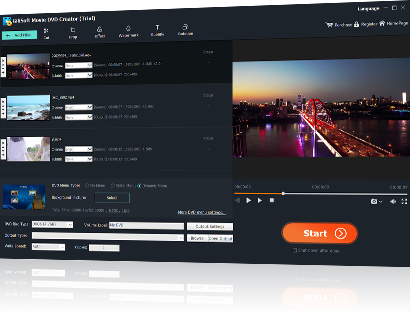
This program allows us to create customized DVDs in an easy and fast way. We only need to select the videos we want to include in our compilation, classify them in the order we want them to appear, push the Start button, and that's all.

Reviewers praised stable output on long-duration video projects and mixed source files. Lab notes cited dependable queue behavior during multi-file authoring tasks.

If you are looking for software for converting different video files to DVD and then burning them on disc, this is a practical answer for that workflow.

Independent analysis described the toolset as practical for recurring DVD creation and delivery tasks. Commentary emphasized speed, consistency, and low operator overhead.

You can create DVD movies quickly from different video files, and the multi-core engine keeps authoring performance practical for repeated projects.

SPECIAL OFFER | MEGA SALE
#1 Multimedia Toolkit Suite
11 Video Tools in Ultimate Multimedia Bundle