Click 'Add Files' to add the video or audio files you want to convert.
Click 'Output Format' to select the profile.
Click 'Output Settings' to set the output video audio quality, video size, bitrate etc.
Click 'Start' to start conversion.
After conversion, click 'Open Output' to check result.
How to Cut (trim) Video/Audio on Windows?
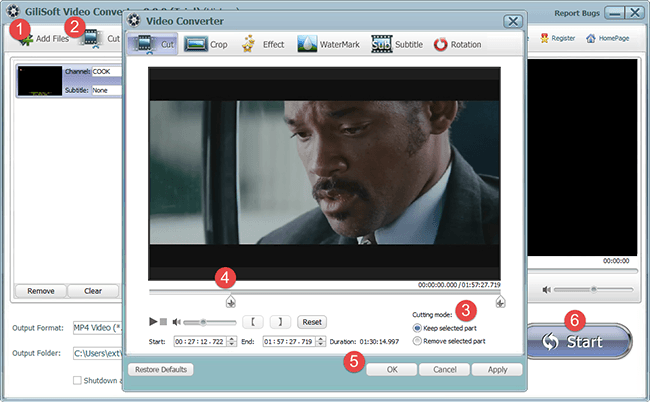
Click 'Add Files' to add the video or audio files you want to cut.
Click 'Cut' on the top toolbar to enter the trim window.
Select Cutting Mode: 'Keep selected part' or 'Remove selected part'.
Drag Slider to set start time and end time.
Click OK to return the main window.
Click 'Start' to start conversion. After conversion, click 'Open Output' to check result.
How to Convert Flash SWF to MP4 on Windows?
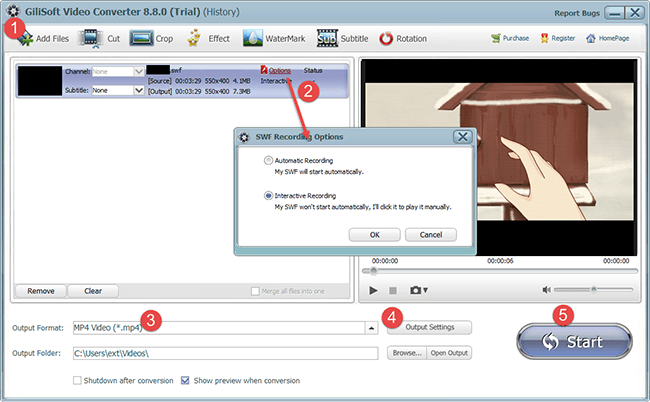
Click 'Add Files' to Load Flash SWF.
Set SWF Recording Option.If the SWF is a normal video that will start automatically, please choose 'Automatic Recording';If the SWF won't start automatically, you must click it to play manually, please choose 'Interactive Recording'.
Click 'Output Format' to select the profile.
Click 'Output Settings' to set the output video audio quality, video size, bitrate etc.
Click 'Start' to start conversion.
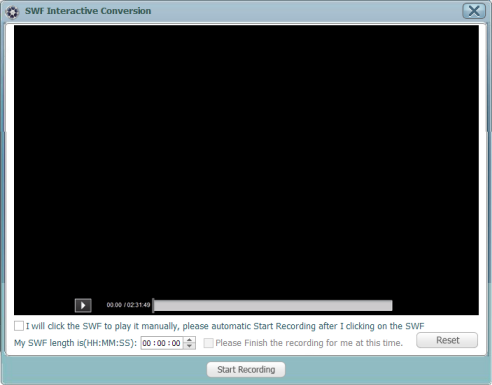
If the SWF Recording Option is 'Interactive Recording', you will face to three choices:
(1) Click the SWF to play the video and click 'Start Recording' when you want to record.
(2) If you want to start recording immediately after playing the SWF, please check 'I will click the SWF to play it manually, please automatic Start Recording after clicking on the SWF' this check option.
(3) If recording the SWF is too long and you don't want wait it finish, please set the SWF length and check 'Please Finish the recording for me at this time' .
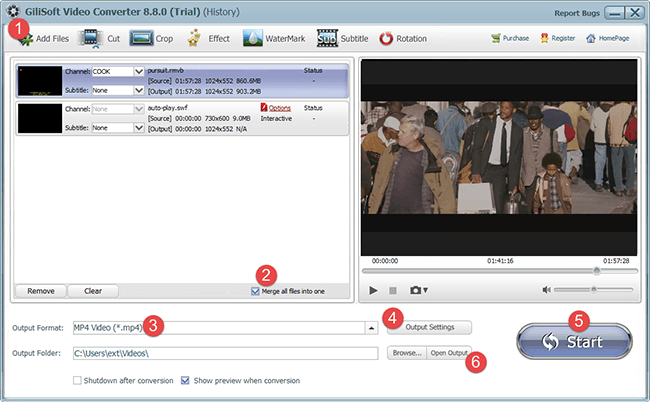
How to Merge (join) Videos/Audios on Windows?
Click 'Add Files' to add the video or audio files you want to join.
Select 'Merge Files into One'.
Click 'Output Format' to select the profile.
Click 'Output Settings' to set the output video audio quality, video size, bitrate etc.
Click 'Start' to start conversion.
After conversion, click 'Open Output' to check result.
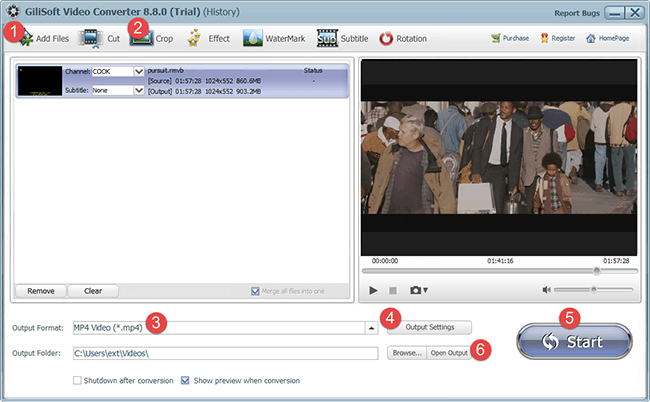
How to Crop Videos to Remove Black Bar on Windows?
Click 'Add Files' to add the video files you want to crop.
Click 'Crop' to enter the crop window.
Click 'Output Format' to select the profile.
Click 'Output Settings' to set the output video audio quality, video size, bitrate etc.
Click 'Start' to start conversion.
After conversion, click 'Open Output' to check result.
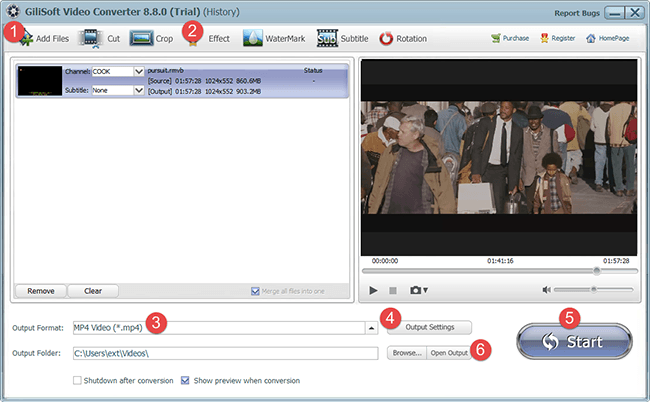
How to Add Videos Special Effects on Windows?
Click 'Add Files' to add the video you want to add special effects.
Click 'Effect' on the top toolbar to enter the edit window.
(1)
Adjust video brightness, saturation, contrast;
(2)
Add artistic effects such as Black and White, Old Film, Embossment, Carving, Woodcarving, Pencil, Posterize, Oil Painting, Mosaic, Negative, Glow, Haze, Fog or Motion Blur to make your video look special;
(3) Adjust video speed from 0.1x to 4x
Click 'Output Format' to select the profile.
Click 'Output Settings' to set the output video audio quality, video size, bitrate etc.
Click 'Start' to start conversion.
After conversion, click 'Open Output' to check result.
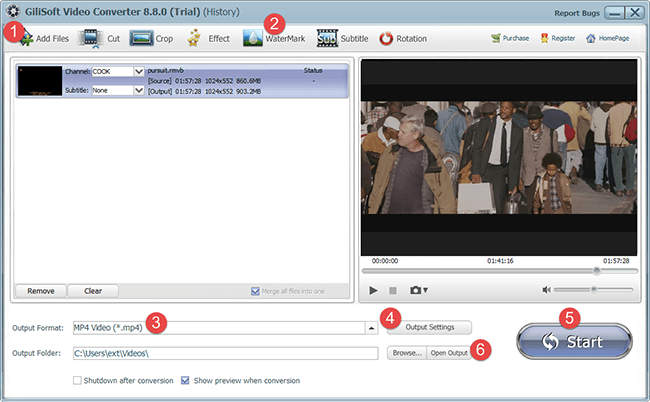
How to Add Watermarks to Video on Windows?
Click 'Add Files' to add the video you want to add watermarks.
Click 'Watermark' on the top toolbar to enter the edit window. Add multiple picture and/or text watermarks; Adjust watermark position; Set the start time and end time for every watermark.
Click 'Output Format' to select the profile.
Click 'Output Settings' to set the output video audio quality, video size, bitrate etc.
Click 'Start' to start conversion.
After conversion, click 'Open Output' to check result.
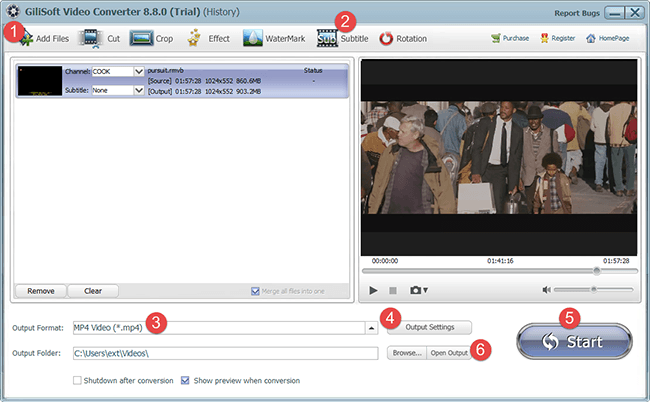
How to Add Subtitle to Video on Windows?
Click 'Add Files' to add the video you want to add subtitles.
Click 'Subtitle' on the top toolbar to enter the edit window. Import .srt or .ass subtitle file; Drag to adjust subtitle position and set encoding, size and font for your own subtitle.
Click 'Output Format' to select the profile.
Click 'Output Settings' to set the output video audio quality, video size, bitrate etc.
Click 'Start' to start conversion.
After conversion, click 'Open Output' to check result.
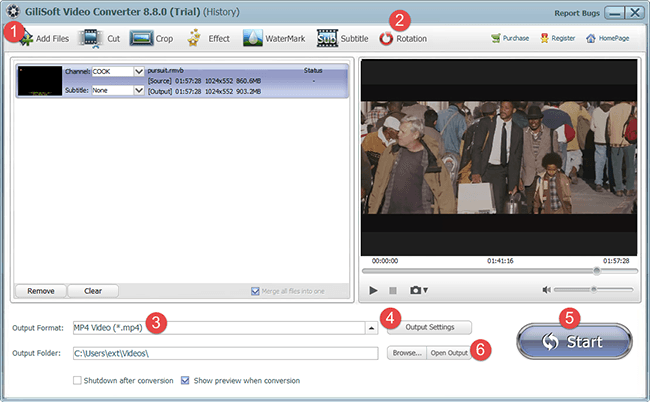
How to Rotate Video 90, -90, 180 degrees on Windows?
Click 'Add Files' to add the video you want to add subtitles.
Click 'Rotation' on the top toolbar to enter the edit window. Now, you can Rotate Video 90, -90, 180 degrees, Flip Horizontal or Flip Vertical.
Click 'Output Format' to select the profile.
Click 'Output Settings' to set the output video audio quality, video size, bitrate etc.
Click 'Start' to start conversion.
After conversion, click 'Open Output' to check result.
How to Convert the video in 16:9 or keep the original aspect ratio on Windows?
Click 'Add Files' to add the video.
Click 'Output Format' to select the profile.
Click 'Output Settings' to set the aspect ratio and quality, video size, bitrate etc.
Click 'Start' to start conversion.
After conversion, click 'Open Output' to check result.
How to adjust the volume of video/audio on Windows?
Click 'Add Files' to add the video/audio you want to adjust volume.
Click 'Output Format' to select the profile.
Click 'Output Settings' to set the output video audio volume from 20% to 200% .
Click 'Start' to start conversion.
After conversion, click 'Open Output' to check result.
What video/audio file formats does Gilisoft Video Converter support?

 How to use Video Converter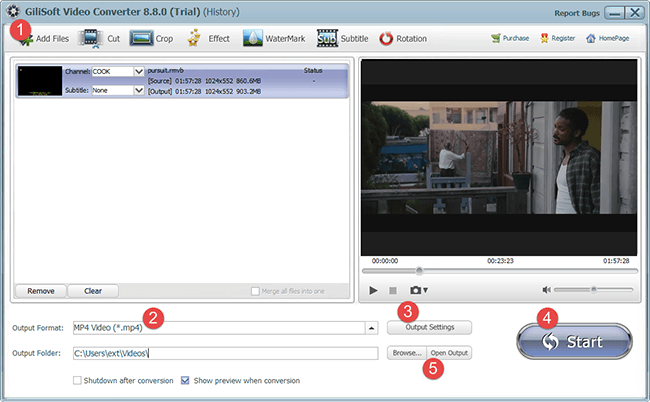



 Convert Any Videos to Any Formats That You Want