
Products
Testimonial
  • "We are very pleased with your program and your support and will definitely continue working with it. Please keep me informed as to any updates and future product."
    -------------- Phil Grinevitch
GiliSoft Video Converter

GiliSoft Video Converter
An all-in-one Video converter tool for assisting you to convert videos/audios among formats like AVI, WMV, MP4, MKV, FLV, 3GP, MPG,SWF etc. GiliSoft Video Converter is easy, fast, reliable, and loaded with features. It's capable of converting videos of all popular formats like AVI, MPEG, WMV, DivX, MP4, H.264/AVC, AVCHD, MKV, RM, MOV, XviD, 3GP,SWF and audio MP3, WMA, WAV, RA, M4A, AAC, AC3, OGG. Now you can convert video, audio to play on your PSP, PS3, iPod, iPhone, Apple TV, Xbox, Google phones, iPad and other digital multimedia devices.


Product Information

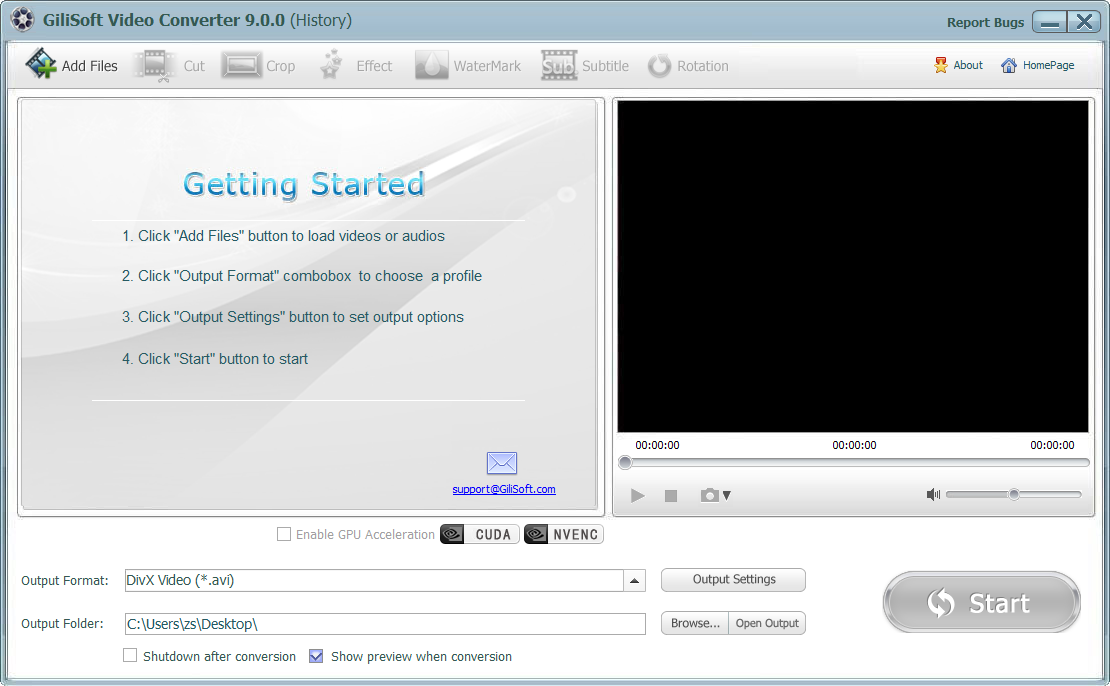
Screenshot:


Features and Benefits:

•Convert Flash(swf) to video (New feature)

•Convert video to video
Convert videos various formats;
Convert HD videos to common formats;
Converted video are compatible with iPad, iPod, iPhone, PSP, PS3, Android phones, etc.

•Convert video to audio
Extract audio from video as m4a, wma, wav, mp3, aac, ac3, ape, mka, ogg, etc;

•Convert audio to audio
Convert audios to various formats;

•Cut/trim video
Trim your video files to convert your favorite movie clips;

•Cut/trim audio

•Crop Video
Crop video to create ideal video with different screen size;

•Rotate Video

•Add watermark to Video
Add either text or image as watermark to coin and color your video files;

•Add subtitle to Video
Add and edit subtitle with .MKV as source file and plug-in subtitle in SRT format to your video.

•Preview and capture pictures

•Edit videos freely as you wish
Set video brightness, contrast, saturation and volume as you like.

•Advanced setting and optimized profiles
Configure output video/audio settings such as Resolution, Frame Rate, Encoder, Sample Rate, and Bit Rate to produce exactly the wanted video/audio for mobile devices;

• Supports XP/Vista/Windows 7/8 (32&64)

    [History]

    Version: 8.0.0
    1 Fixed some display issue.
    2 Upgrading software registration system.
    3 Fixed rmvb output problem.
    4 Fixed swf can not seek when play.

    Version: 7.7.0
    1 Fixed some output format issue.
    2 Fixed some subtitle issue.
    3 Fixed some issue where swf file(s) convert to swf file(s).
    4 Set Default Video codec as "mpeg4" for Common Video, AVI Video(*.avi) to avoid WMP unable to play the output issue.
    5 Fixed some issue when install.
    6 Fixed some language issue.
    7 Fixed an issue where it failed to convert to rmvb file.
    8 Fixed an issue where the corp area did't take effect when converting to rmvb file.

    Version: 7.6.0
    1 Fixed some display issue.
    2 Fixed some issue when uninstall.

    Version: 7.5.0
    1 Supported to import Macromedia SWF file.
    2 Fixed some output setting issue.

    Version: 7.1.0
    1 Fixed some issue when add watermask.
    2 Fixed some issue when crop video.
    3 Fixed some issue when rotate video.

    Version: 7.0.1
    1 Fixed bug - Output size always display (N/A).

    Version: 7.0.0
    1 Add a reporting bugs feature.
    2 Supported to check new version automatically.
    3 Supported to view the history of version update.

    Version: 6.9.0
    1 Update Video Output Format(ApppleTV, AMV,MTV,WMV).
    2 Add m2ts Output Format.
    3 Optimized the default profile for Common Video.
    4 Show more detail information about Output-Settings (Bitrate,Frame rate, Sample rate).
    5 Fixed some launch failure issue after installtion.

    Version: 6.8.0
    1 Fixed some display ratio issue.
    2 Supported to "Video Effect"(Black and White, Old Film, Oil Painting, Fog...).

    Version: 6.7.0
    1 Fixed some video effect issue when adjust brightness,contrst,saturation.
    2 Supported to merge all videos to one file.
    3 Supported to cut the middle segment of one file.

    Version: 6.6.0
    1 Supported to add more watermask.
    2 Supported to add png when import picture watermask.
    3 Supported to adjust transparency when add watermask.