Easy Cutter for Fast Trimming
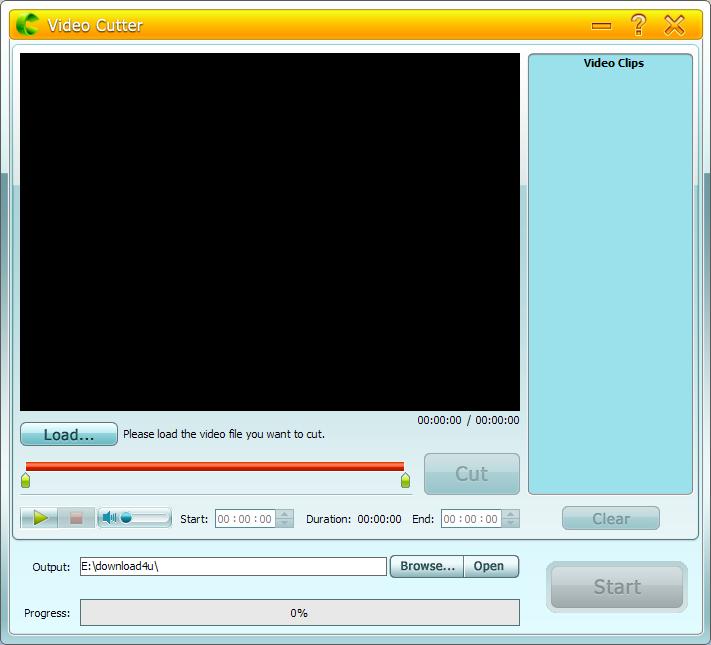
The simple cutting mode is built for quick everyday work. Drag the scissors markers to define the section you want, or enter exact start and end values when you already know the target duration.


GiliSoft Video Cutter is a focused video trimming tool designed to help you remove unwanted parts from large video files quickly and cleanly. It supports a wide range of popular formats including MPEG, MP4, AVI, WMV, MOV, Flash video, DivX, and Xvid, so you can cut source footage without spending time converting files first. The program is simple enough for everyday use, but still practical when you need accurate start and end points for real delivery work.
1. Cut or trim unwanted parts of videos and keep only the scenes you want.
2. Easy Video Cutter: drag the scissors icon to set clear beginning and end points.
3. Batch Video Cutter: process multiple clips in one workflow to save time.
4. Advanced Video Cutter: choose more precise settings when you need finer control.
5. Export to formats that work well across common media players and devices.
6. Maintain efficient performance with low resource usage during routine trimming jobs.


The simple cutting mode is built for quick everyday work. Drag the scissors markers to define the section you want, or enter exact start and end values when you already know the target duration.
Add multiple files and trim them in one session instead of repeating the same steps file by file.
Set matching clip lengths for recurring tasks, or export different segments for different delivery needs.
Batch output supports common formats and device-friendly presets.
Use advanced cutting modes such as "Keep selected part" and "Remove selected part" when basic trimming is not enough.
Fine-tune footage with crop and rotation tools while preparing a clean final segment.
Add subtitles, effects, or watermarks during export when the clip needs presentation-ready finishing.
The workflow stays straightforward for beginners and efficient for repeat users.
Load a file, mark the segment, preview it, and export the result in just a few steps.
What you preview before output is exactly the section you keep.
Trim many popular video formats without adding extra conversion steps first.
It works well with HD movies, camera footage, tutorials, demos, and home videos.
Supported source types include MKV, MTS, MOV, TS, MPEG, AVI, WMV, MP4, and more.
Export clips that play smoothly in Windows Media Player, PowerDVD, WinDVD, KMPlayer, VLC, and other common players. You can also choose output formats that are easier to move to phones, tablets, and other portable devices.

Preview the selected section before export, confirm the timing, and reduce rework when preparing highlights, lessons, demos, or short clips.
Use ready-made output presets for common platforms and devices when you need to publish cut videos quickly with dependable compatibility.

We use Video Cutter to remove long intros and mistakes from training recordings before sharing them internally, and it saves us a lot of cleanup time.
The Easy Cutter mode is simple enough for non-editors on our team, but still accurate enough to pull the exact segment we need from larger MP4 files.
Batch Cutter is useful when we have several webinars to trim in one day. Removing repeated countdowns and pauses is much faster now.
The advanced cutting options help when we need to keep one section and remove another without exporting the same source file over and over.
For a focused trimming tool, it does exactly what we need: preview, mark the range, and export a clean clip without unnecessary complexity.

Remove countdowns, pauses, mistakes, and dead time before sharing a polished final clip.
Pull highlights, excerpts, and targeted scenes out of long source videos without opening a full editing project.
Cut a video down to the useful part when a full edit suite would feel too heavy for the job.
Trim MP4, AVI, MOV, WMV, MPEG, and other common files from one focused Windows workflow.
Use a focused workflow when the job is simply removing unwanted footage and exporting the exact section you need.
Trim intros, trailers, mistakes, blank space, or repeated sections from recordings and exports without overcomplicating the task.
Cut many common video file types from one place instead of converting each source before trimming.
Choose Video Cutter when precise trimming is the real need. Move to Video Cutter Joiner only when joining and wider editing steps become part of the job.
Cut out extra footage and keep only the usable section for upload, review, or sharing.
Handle older archive formats and keep only the clips that still matter.
Prepare cleaner tutorial, demo, webinar, and training clips by cutting away dead time and mistakes.
When a long recording needs to become shorter segments, trimming and splitting can work together.
After trimming away the unwanted parts, combine the remaining clips into one smooth output when needed.
Stay with a lighter tool when the job is clip extraction, not a complete edit timeline.
Yes. GiliSoft Video Cutter is designed for focused trimming work, so you can load a video, set the range you want, preview it, and export the exact clip you need.
Yes. It supports a broad set of common source formats including MP4, AVI, MOV, WMV, MPEG, MKV, and more.
Use Video Cutter when your main task is trimming and removing unwanted footage. Use Video Cutter Joiner when you also need joining and broader edit-oriented workflows.
Yes. It fits webinars, training recordings, tutorial clips, demos, home videos, and any workflow where you need to remove extra footage and keep only the useful segment.

 Editors highlighted the product as a practical option for trimming commercials, trailers, blank sections, and other unwanted footage from long videos. Coverage noted a useful balance between quick clipping and more controlled segment selection.
Write-ups emphasized that GiliSoft Video Cutter keeps trimming work approachable while still supporting a broad range of source formats and export needs.

Reviewers praised the software for preparing short deliverables from larger source files without forcing users into a complicated editing workflow. Lab observations mentioned dependable preview and clear control over in and out points.
The overall impression was that Video Cutter handles common trimming tasks efficiently, especially when users need a specific section rather than a full edit project.

Independent write-ups described the cutter workflow as efficient for making short highlights, lessons, demos, and social-ready segments from longer recordings. Commentary emphasized predictable results across repeated trim-and-export cycles.
Coverage also noted that the program can help users cut a video such as an MP4 file without always forcing a slower re-encode-first workflow.


Enter your email address to get our latest newsletter