
- Searching locking folder software must stop when you see GiliSoft File Lock Pro.
----------------Boom
Locking Folder in windows XP/7
Do you want to lock and password protect your important folders in Windows XP/7? Do you want to block some important folders so that they can not be accessed by other users. Every time the blocked folder will be accessed, it will ask for password. Therefore the folder will be locked permanently unless you remove the lock yourself.
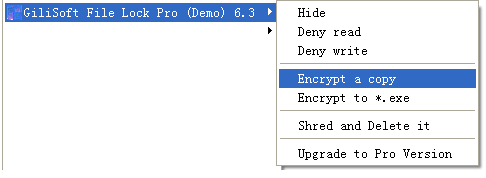
In fact,GiliSoft File Lock Pro provide five ways to lock folder for windows users:
1: Deny reading contents of folder.
2: Deny writing data to folder.
3: Hide folder from eyes.
4: Encypting folder
5: Delete and shred folder
To lock a folder and prevent from reading contents of folder, please right-click on that folder and select "Deny read". Using the way to lock folder,people only can read the folder name but can not view contents.
To lock a folder and prevent from modifying data of folder,prevent from changing folder name,prevent from deleting folder,please right-click on that folder and select "Deny write". Using this way to lock folder,people can view contents but can not modifying any original information.
To lock a folder and hide folder from eyes,please right-click on that folder and select "Hide".Using the way to lock folder is the safest way because none can see and none can change it.
To lock a folder and encrypt it to be "*.gfl" format file or "*.exe" file.If you want to share the encypted files with people who have not GiliSoft File Lock Pro,please choose "*.exe" format.
After encrypt the folder,you already have a encrypted copy.You might want to delete the source files. To prevent some one from recovering the source data,you can safe delete that folder by this way: right-click on that folder and select "Shred and Delete it "
Download GiliSoft File Lock Pro (Folder Lock Software ) Windows Version

 Buy GiliSoft File Lock Pro
