Block USB and SD Storage
Block flash drives, external disks, memory cards, and selected non-system partitions from reading or writing data on controlled Windows PCs.


Data leakage often starts with unmanaged flash drives, external disks, memory cards, phones, and other removable devices connected to office PCs. GiliSoft USB Lock controls which devices can read data, write data, or open another transfer channel.
Block USB storage, SD cards, CD/DVD media, phone transfer, USB tethering, and selected device classes while keeping approved company hardware available through trusted-device rules. It can also restrict unknown USB network adapters and allow reviewed adapters through a separate whitelist.
Choose USB Lock when the main goal is device control and removable-media policy. If the goal is encrypting the drive itself, compare USB Encryption; if the goal is locking local folders or shared folders, compare File Lock Pro.


Block flash drives, external disks, memory cards, and selected non-system partitions from reading or writing data on controlled Windows PCs.
Add company drives to a trusted-device whitelist so approved media stays usable while personal and unknown devices remain blocked.
Apply tighter read or write restrictions when a removable device may be connected but should not become an unrestricted path for copying business files.
Export a trusted-device list and import it on additional computers instead of registering the same approved drives separately on every endpoint.
Control Android and iPhone data connections and block USB hotspot use so phones do not create an unmanaged transfer or internet channel.
Restrict CD/DVD/Blu-ray media, card readers, printers, Bluetooth, modems, and selected peripheral ports where company policy requires it.
Review blocked attempts, approved-device activity, and policy events to see when removable-media access was allowed or denied.
Use password protection, recovery email, invisible mode, and failed-password handling to reduce unauthorized policy changes.
Restrict USB Wi-Fi and USB Ethernet adapters from creating an unapproved network connection on a managed Windows PC.
Register reviewed USB network hardware by device identity so approved adapters remain available while unlisted devices are blocked.
USB Lock also includes website and program restrictions for shared or managed PCs. These controls supplement the product's main job: controlling removable devices and transfer channels.

USB Lock helped us enforce removable-media policy on shared office computers without interrupting approved workflows.
Block USB/SD Drives gave us cleaner control over copy-out risks, especially on front-desk and support machines.
CD and media lock controls made policy enforcement clearer for both administrators and non-technical staff.
Trusted device whitelist rules let approved company USB drives work normally while blocking unknown devices.

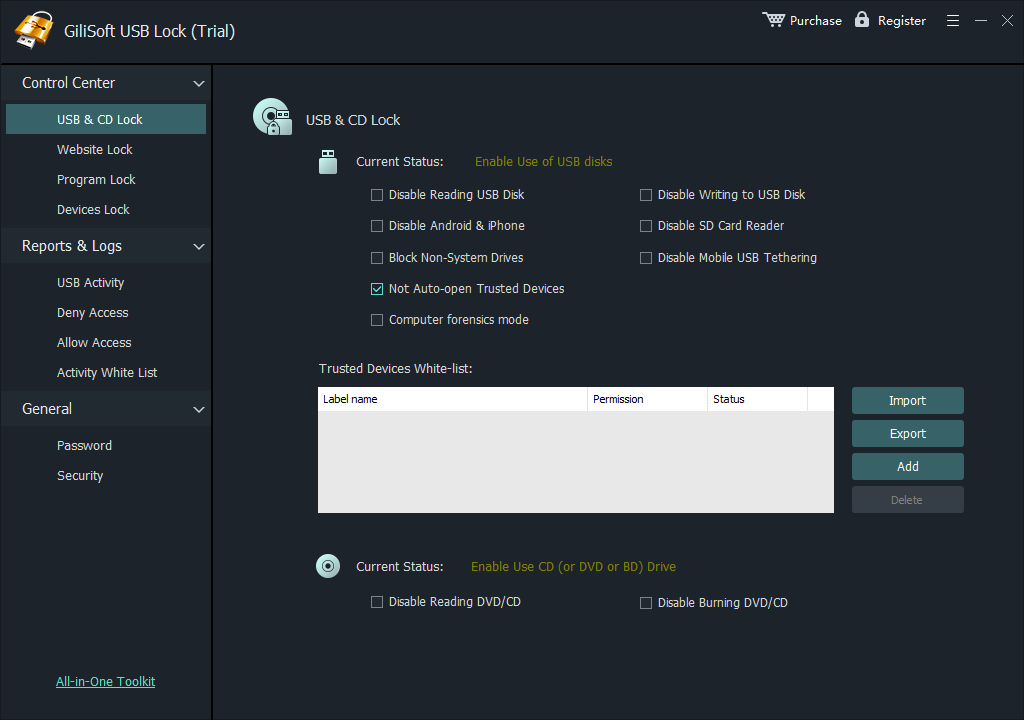
Control USB storage, optical drives, card readers, and other removable-device channels from one policy screen.
USB Lock is for Windows users and teams that need to control removable-device access, trusted USB devices, and USB-based data transfer channels without turning every endpoint into a manual support task.
Reduce unauthorized data transfer from office PCs by blocking unknown USB storage devices while keeping approved company media available for normal work.
Keep approved company USB drives working while blocking personal or unknown removable devices through whitelist rules, exportable lists, and repeatable endpoint policy.
Control removable media, CD/DVD access, mobile-device connections, and other local device channels on shared desktops and laptops used by several people.
Keep public or semi-managed computers usable while preventing students, guests, or temporary users from copying data through removable devices or phone connections.
Protect high-exposure workstations where sensitive files, customer records, or internal documents should not leave through personal storage devices, card readers, or phones.
Apply straightforward allow, block, and logging rules without building a full enterprise endpoint-management stack or manually checking every removable device.
USB Lock gives administrators direct control over removable devices on Windows PCs: block unknown media, preserve access for approved company devices, and review access events without encrypting every drive.
Keep personal and unregistered drives unavailable while approved company devices continue to work through the trusted-device list.
Apply policy to USB storage, phones, optical media, card readers, Bluetooth, printers, and selected peripheral channels from the same product.
Export and import whitelist entries so additional PCs can recognize approved drives without repeating the complete setup manually.
Use access records to review denied devices, allowed events, and policy activity during support checks or internal incident follow-up.
USB Lock helps when removable-device access should be managed by policy instead of left open to every flash drive, phone, external disk, or media device.
Stop unknown flash drives and external disks from becoming an uncontrolled path for copying files out of business computers, shared desktops, or front-desk PCs.
Keep trusted company drives available while preventing unapproved removable devices from connecting to managed PCs. For multi-PC setup, see USB Lock whitelisting instructions.
Close USB-based mobile data channels and phone hotspot workflows that bypass normal network and endpoint policy on controlled office, lab, or shared computers.
Apply removable-media controls to front-desk PCs, training-room computers, lab machines, and shared workstations where users change frequently.
Restrict access to optical media, card readers, and selected peripheral channels where removable data movement is a concern but the computer still needs daily use.
Use deny and allow logs to understand when device access was attempted, blocked, or approved during normal operation, policy review, or support follow-up.
Helpful related guides: allow only approved USB devices, USB Lock whitelisting instructions, prevent USB data leakage, and block phone and USB transfer.
For offices, labs, schools, service counters, and other multi-PC environments, GiliSoft can provide volume licensing, Team/OEM options, and custom development for deployment requirements that go beyond a single computer.
Contact sales@gilisoft.com to discuss the number of PCs, approved-device rules, and any organization-specific requirements.
Yes. USB Lock can block unauthorized USB storage devices and allow only approved drives through whitelist and policy controls.
Yes. You can whitelist approved company devices while leaving unknown removable devices blocked on managed PCs.
Yes. Build a trusted-device list, export it, and import the same whitelist on other machines. See USB Lock whitelisting instructions.
Yes. USB Lock can block unapproved removable devices, keep approved devices available, and reduce copy-out risk on office and shared PCs.
Yes. USB Lock can restrict phone data transfer, connected-device access, and selected portable-media channels on Windows PCs.
Yes. USB Lock can disable USB Ethernet devices while allowing selected adapters through a dedicated whitelist.
Yes. Connect the approved adapter, select it in USB Ethernet Lock, and add its device identity to the USB Ethernet whitelist before enforcing the block policy.
No. USB Lock controls ports and device access. Use USB Encryption if you need password-protected encryption on the removable drive itself.
Choose the product based on what needs to be controlled: devices, encrypted portable storage, local files, or automated PC operation.
Use USB Lock when the main need is endpoint USB control, device blocking, whitelist policy, and data-leak prevention.
Use USB Encryption when the removable drive should contain a secure encrypted area protected by password.
Use File Lock Pro for folder privacy, password-based access control, hide mode, and shared-folder protection.
Need to stop AI agents or scripted tools from controlling a PC? Review GiliSoft AI Agent Lock. Need several protection layers together? Compare GiliSoft Encryption Toolkit.


Enter your email address to get our latest newsletter