
Identify Which Audio Is Missing First
Do not change every setting at once. Play the saved file in another player, then determine whether computer audio, microphone narration, or both are absent.
| Symptom | Likely cause | First check |
|---|---|---|
| Computer sound is missing | Computer Sound is off, the app is muted, or output is routed elsewhere | Recorder source menu and Windows Volume mixer |
| Microphone is missing | Wrong input, muted mic, or Windows access is blocked | Recorder microphone choice and Privacy & security settings |
| Both sources are missing | Video-only capture, disabled device, or broader Windows audio problem | Source selection and a normal Windows playback test |
| Only one application is silent | Per-app mute, different output device, or protected playback | That application in Volume mixer and its own audio settings |
| Audio existed before export | The final file or editing/export workflow omitted the audio track | Play the original recording before processing |
Fix a Screen Recording with No Sound
Test the original recording file
Open the unedited recording in another player and raise its volume. This separates a recording problem from a player or export problem.
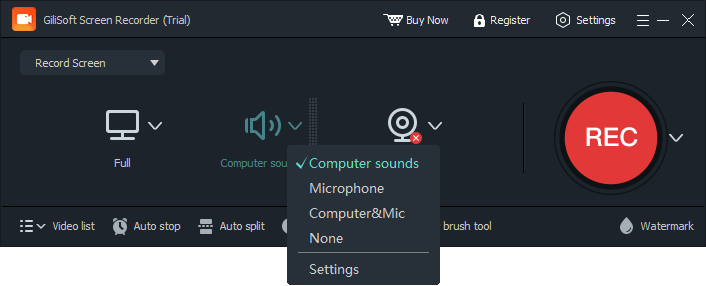
Check the recorder audio source
Choose Computer sounds, Microphone, or Computer & Mic according to what the video needs. Do not assume a previous selection was retained.
Check Windows output and Volume mixer
Select the intended speaker, headset, HDMI, or Bluetooth output and make sure the target application is not muted.
Check microphone access and input
For missing narration, enable Windows microphone access for desktop apps, select the intended input device, and run the Windows microphone test.
Restart after device changes
Reconnect USB or Bluetooth audio devices, restart the target application and recorder, and test again.
Update audio components only if needed
When Windows itself has sound problems, run its audio troubleshooter and check updates or the audio driver before changing advanced formats or services.
Prevent Silent Recordings
Record a 10-second sample
Use the exact application, microphone, headset, and playback device planned for the real session.
Watch for device switching
Connecting HDMI, Bluetooth, or a headset can change the active Windows input or output device.
Check both sources separately
Test computer sound and microphone independently before combining them.
Review the saved file immediately
Listen to the beginning and a later section before closing the session or clearing temporary material.
When the Problem Is Outside the Recorder
- If Windows cannot play ordinary audio, resolve the Windows output problem first.
- If the microphone fails the Windows input test, check its connection, permission, input volume, and driver.
- If only one browser tab or application is silent, inspect that application and Windows Volume mixer.
- If an edited file is silent but the original has sound, review the editing or export audio-track settings.
- If protected media refuses audio or video capture, use an authorized source rather than trying to bypass protection.
Frequently Asked Questions
Why does my screen recording have video but no sound?
The recorder may be set to video only, Computer Sound may be disabled, or the target application may be muted or routed to another output device.
Why is my microphone not in the recording?
The wrong microphone may be selected, it may be muted, Windows microphone access may be disabled, or another application may be using it.
Can I record computer sound and microphone together?
Yes. Choose Computer & Mic, use headphones to reduce echo, and test the balance before the full recording.
Why is only one application silent?
That application may be muted in Windows Volume mixer, using another output device, or playing protected content.
Should I reinstall the audio driver first?
No. Start with source selection, mute state, devices, permissions, and a short test. Consider driver repair after confirming Windows itself has an audio problem.
Why does the exported video have no sound?
Play the original recording. If it has audio, the editing, conversion, or export workflow may have excluded or muted the audio track.
More Screen Recording Guides
Continue with the workflow or troubleshooting guide that matches the next recording task.