Input Interception
Block injected keyboard and mouse operations while preserving normal physical input from the real user at the computer.


AI Agent Lock protects Windows PCs from machine-driven operation. It is designed for the new class of risk where AI agents, scripts, RPA tools, remote-control workflows, or injected input try to operate the computer like a person.
The product goal is simple: block machines, not humans. Normal physical keyboard and mouse use stays available, while suspicious automation channels such as scripted clicking, clipboard access, screen capture, command-line abuse, and process-based control can be restricted, logged, and reviewed.
Use AI Agent Lock when the main risk is automated computer control. If the job is locking files and folders, compare File Lock Pro. If the job is USB device policy, compare USB Lock.


Block injected keyboard and mouse operations while preserving normal physical input from the real user at the computer.
Stop non-human window switching, closing, minimizing, maximizing, and scripted interface manipulation attempts.
Monitor clipboard reads and writes so copied data is harder for automated tools and AI-assisted processes to abuse quietly.
Optionally clear clipboard content after changes during protected sessions to reduce lingering sensitive data exposure.
Detect and block listed AI automation, script, RPA, and remote-control processes that should not operate the PC.
Restrict screenshot, recording, OCR, and capture behavior as part of broader anti-automation protection.
Reduce remote input and assistive-control channels through system policy, registry, or service controls when stronger lockdown is needed.
Block command shell startup paths that scripted abuse often relies on, helping reduce easy automation entry points.
Observe suspicious automation behavior before applying harder blocking rules, useful for rollout and false-positive control.
Review blocked actions, affected modules, process names, counters, and realtime events from the product interface.

AI Agent Lock gives us a clearer way to stop automated control without locking real users out of their PCs.
The block-machines-not-humans model is easy to explain to office users and simple to test.
Audit mode and logs help us understand suspicious automation before enforcing stronger rules.
Screen capture and injected-input protection are useful on shared and semi-public Windows devices.
It fills a different gap than file locking or USB control: stopping software from operating the computer like a person.
Preview the updated AI Agent Lock interface: dashboard status, protection modules, whitelist and blacklist rules, settings, and realtime logs.
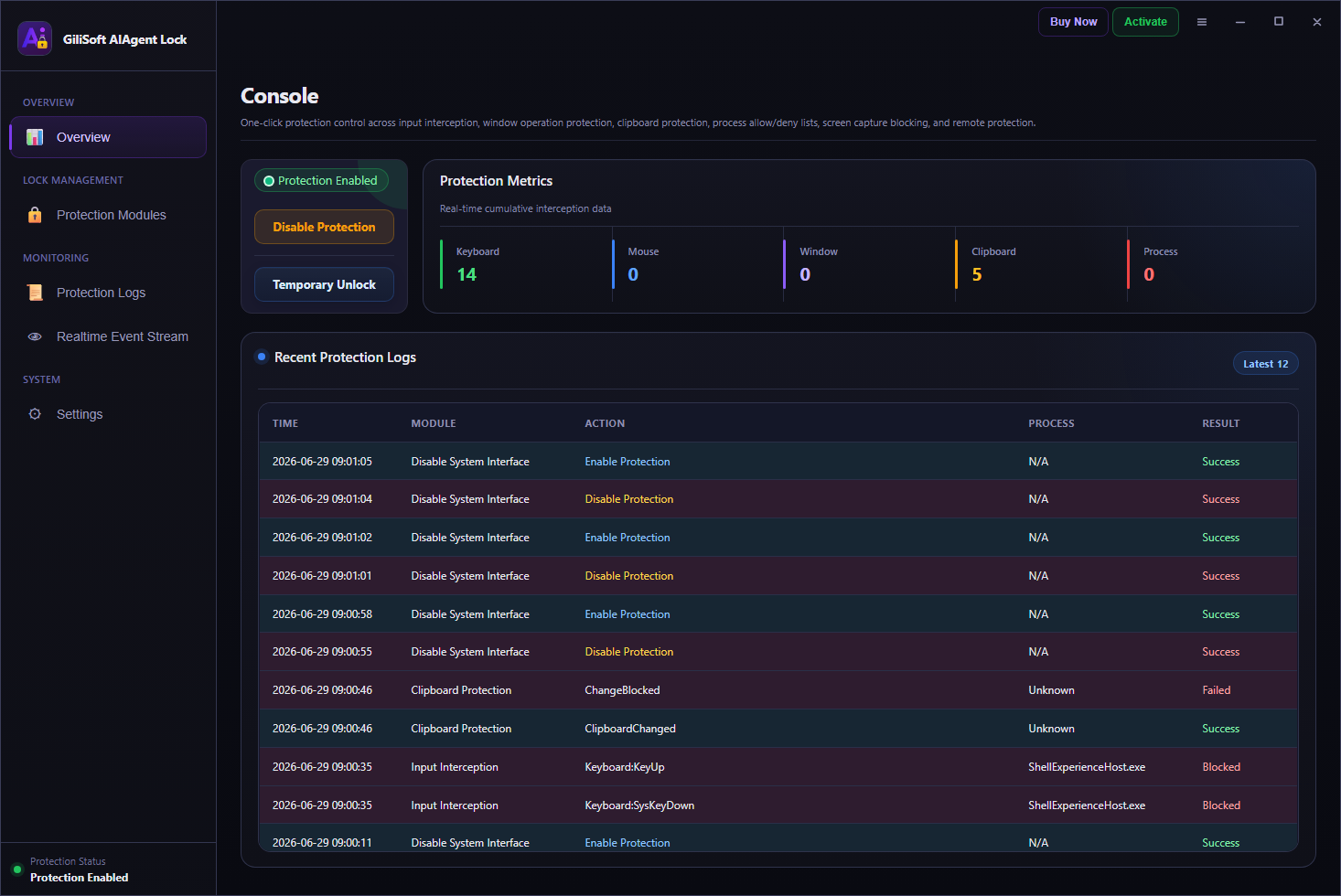
Review protection status, quick statistics, enabled modules, and recent block activity from the main dashboard.
AI Agent Lock is for Windows users and teams who are less worried about ordinary people using the keyboard and more worried about automated tools operating the computer in the background.
People who want to reduce AI-driven clicking, typing, clipboard reading, screen capture, or scripted control while keeping normal manual use available.
Teams that need a practical way to restrict unattended automation, RPA misuse, remote-control behavior, and machine-operated tampering on workstations.
Schools, labs, kiosks, front-desk PCs, and training-room systems where automated misuse may be a stronger risk than on one private desktop.
Administrators who need to observe suspicious automation first, then move gradually from audit mode to stronger blocking rules.
Finance, HR, legal, support, or operations PCs where clipboard abuse, screen capture, or unattended scripted control creates extra risk.
Organizations that want real users to keep working normally while reducing what AI agents, scripts, and RPA-style tools can do locally.
These GiliSoft tools protect different parts of a Windows security workflow. AI Agent Lock is the right fit when the risk is machine control rather than USB device access, local folder privacy, or simple application launch blocking.
Choose it when scripts, RPA tools, AI agents, injected input, clipboard access, or screen capture attempts are the main concern.
Choose USB Lock when the problem is unauthorized USB drives, phones, external disks, trusted-device rules, or USB data leakage.
Choose File Lock Pro when the main task is locking, hiding, encrypting, or password protecting local files and shared folders.
Choose EXE Lock when the main goal is preventing specific programs from launching without the right password or permission.
AI Agent Lock is useful when you need a local Windows protection layer against automated operation, not a general file locker or USB port manager.
Stop automated tools from clicking, typing, switching windows, reading clipboard content, or capturing the screen without real user intent.
Reduce the chance that unattended scripts, RPA tools, or remote-control workflows manipulate business devices and operational tasks.
Add anti-automation controls to kiosks, front-desk PCs, training-room systems, school labs, and public-access Windows devices.
Reduce quiet clipboard scraping, screenshot workflows, OCR capture, and recording behavior during sensitive local work.
Restrict CMD, PowerShell, and automation-friendly startup paths when scripts should not be able to operate freely.
Use audit mode, counters, block logs, process names, and realtime events before moving from observation to active blocking.
If your main problem is USB device control, compare GiliSoft USB Lock. If your main problem is folder or file access, review GiliSoft File Lock Pro. If the risk is AI agents or scripted tools operating the PC, AI Agent Lock is the more direct fit.
It is designed to block AI agents, automation scripts, RPA tools, injected input, screen capture attempts, command-line abuse, and machine-driven PC control.
No. The intended model is to block machines, not humans, so normal physical keyboard and mouse use remains available.
Yes. It is designed as a lightweight local Windows protection tool rather than a cloud-only control product.
No. File Lock Pro protects files and folders. AI Agent Lock focuses on automated computer operation by AI agents, scripts, and RPA-style tools.
AI Agent Lock is one part of a broader Windows protection workflow. Use the guide below to choose the product that matches the problem you are trying to solve.
Use AI Agent Lock when the main goal is stopping machine-operated control while preserving normal human use.
Use USB Lock for endpoint USB control, device blocking, trusted-device policy, and data-leak prevention.
Use File Lock Pro for folder privacy, password-based access control, hide mode, and shared-folder protection.
Need to block selected applications from launching? Review GiliSoft EXE Lock. Need several protection layers together? Compare GiliSoft Encryption Toolkit.


Enter your email address to get our latest newsletter