Recover Data from Formatted Drives
Recover files after accidental quick format or full format on internal and external drives. The scan engine locates recoverable documents, photos, videos, and archives so you can restore critical data quickly.

Restore documents, photos, videos, archives, and office files from hard drives, SSDs, USB drives, memory cards, formatted volumes, inaccessible drives, and deleted or lost partitions.

GiliSoft Data Recovery helps Windows users recover files after accidental deletion, emptied Recycle Bin cleanup, Shift+Delete, quick formatting, lost partitions, RAW drive errors, inaccessible volumes, USB drive problems, and memory card file loss.
Use it before repair, reformatting, or writing new files to the affected device. The scan process is designed to locate recoverable documents, photos, videos, archives, and office files while keeping recovery decisions clear for non-technical users.
The goal is practical recovery: choose the drive or location, scan for lost files, preview recoverable data when available, and restore selected files to a safe destination instead of guessing through complicated recovery utilities.

Recover files after accidental quick format or full format on internal and external drives. The scan engine locates recoverable documents, photos, videos, and archives so you can restore critical data quickly.
When a partition turns RAW, shows 0 bytes, or cannot be opened, Data Recovery scans the device at sector level and extracts recoverable files without requiring immediate reformatting.
Restore files from drives that cannot be accessed due to logical errors, sudden power loss, or file system corruption. This helps recover important data before further repair operations.
Find and recover files from deleted or lost partitions caused by accidental deletion, formatting mistakes, partition table errors, or malware incidents, with support for common Windows storage layouts.
Retrieve files deleted with Shift+Delete or removed from Recycle Bin. The software scans for recoverable file records and helps restore data before overwritten sectors reduce recovery success.
The guided process makes data recovery simple for beginners: choose location, run scan, preview results, and recover selected files. Read-only mode avoids writing data to the source drive during scanning.
Supports HDD, SSD, USB flash drives, external hard drives, memory cards (SD, microSD, CF), and many removable storage devices commonly used on Windows PCs.
Compatible with NTFS, FAT16, and FAT32 file systems, covering most Windows desktop and removable media recovery scenarios.
Use deep scan mode to search damaged or partially corrupted storage media more thoroughly, improving the chance of finding recoverable files in complex data-loss cases.
Preview recoverable files when available and restore only the data you need, which saves time, reduces clutter, and helps verify recovery results before exporting.

We recovered an accidentally deleted project folder from an NTFS drive in one scan, which saved a full day of rebuild work.
The formatted-drive recovery module brought back client documents after a mistaken quick format on an external HDD.
When a USB device turned RAW and showed 0 bytes, this tool still found photos and spreadsheets we thought were gone.
It handled an inaccessible partition smoothly and let us preview files before recovery, which reduced unnecessary restore attempts.
Lost partition scan helped us recover archived invoices after a partition table issue, with original folder names preserved.
Even files deleted from Recycle Bin were recoverable, and the recovery process was simple enough for our non-technical staff.
Preview the updated recovery workflow: choose a recovery mode, scan deleted or formatted storage, search lost partitions, recover from Recycle Bin cleanup, and handle USB or memory card file loss.
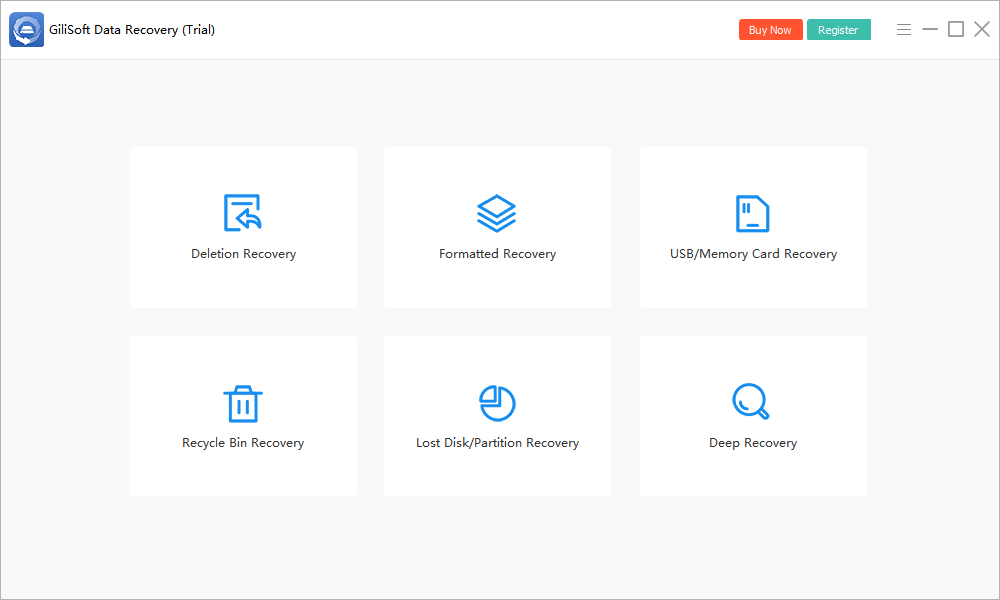
Start from clear recovery categories for deleted files, formatted drives, deep recovery, lost partitions, Recycle Bin cleanup, USB drives, and memory cards.
Click the screenshot to enlarge.Recover documents, photos, videos, archives, and office files after accidental deletion, Shift+Delete, or emptied Recycle Bin cleanup.
Scan formatted, RAW, inaccessible, or suddenly unreadable drives before repair, reformatting, or new data writes reduce recovery chances.
Recover project folders, invoices, client documents, photos, and shared files from HDDs, SSDs, external drives, USB disks, and memory cards.
Choose a location, run a scan, preview recoverable files, and restore selected data without learning a complex forensic recovery tool.
It covers deleted-file recovery, formatted-drive recovery, RAW-drive recovery, inaccessible drive recovery, and lost partition recovery in one product.
The scan process avoids writing recovery data back to the source drive, helping reduce risk while you look for recoverable files.
Preview files when available and restore only the items you need, so urgent recovery jobs stay cleaner and easier to verify.
Clear recovery categories help users decide whether they are dealing with deletion, formatting, RAW errors, removable media, or partition loss.
Restore files after Shift+Delete, Recycle Bin cleanup, or accidental folder deletion on local and external drives.
Scan drives that were formatted, show RAW, display 0 bytes, or cannot be opened normally before repair or reformat actions.
Restore photos, videos, and documents from USB flash drives, external disks, SD cards, and microSD cards after deletion or file-system errors.
Search for recoverable files when a partition disappears, is deleted by mistake, or becomes unavailable after disk or partition table problems.
Yes. It can scan for deleted file records even after the Recycle Bin has been emptied. See Recycle Bin recovery or Shift+Delete recovery.
Yes. It supports formatted-drive recovery for common Windows storage scenarios including internal and external drives. See recover files after quick format or external hard drive recovery.
Yes. It can scan RAW and inaccessible drives to locate recoverable files before repair or reformat actions. See RAW drive recovery or unreadable drive recovery.
Yes. It supports USB flash drives, external hard drives, SD cards, microSD cards, and other removable media. See USB drive recovery, corrupted USB recovery, or memory card photo recovery.
Yes. The process is guided so users can choose a location, scan, preview files, and recover selected data without advanced recovery skills.
Yes. Preview support helps users verify recoverable files and restore only the data they actually need, especially for Word documents, Excel files, or video files.

 Editors praised the scan process for being clear and easy to follow in common data-loss incidents. Coverage noted that file previews help users verify results before recovery.
GiliSoft Data Recovery provides practical recovery tools for deleted files, formatted drives, USB disks, external drives, and memory cards in everyday Windows recovery tasks.

Reviewers highlighted reliable RAW-drive and inaccessible-partition recovery performance. Testing feedback emphasized consistent scan results across different disk conditions.
As a Windows data recovery solution, it focuses on deleted-file recovery, RAW partition recovery, and lost partition recovery while keeping the source drive untouched during scanning.

Independent reviews described the product as practical for IT support and small business users. Commentary pointed to strong usability for selective recovery in urgent restore scenarios.
Dedicated modules for deleted files, formatted volumes, and lost partitions give users a focused recovery path when restoring important business files.


Enter your email address to get our latest newsletter
Data Recovery
Recover Deleted Files on Windows 11
Recover Files from Formatted Drive
Recover Files from RAW Drive
Lost Partition Recovery Software
Recover Files after Quick Format
Recover Files from Unreadable Drive
Recover Files from USB Drive
Recover Files from SD Card
Recover Photos from Memory Card
Recover Files after Emptying Recycle Bin
Recover Files after Shift Delete