Block All Internet Activity
Disable internet activity immediately when a shared, family, school, or office PC should remain completely offline.


Uncontrolled internet access can create distraction, overuse, and exposure to unwanted websites. GiliSoft WebLock helps you decide when a Windows PC can go online, which websites should stay available, and which online destinations should remain blocked.
Use three clear policy modes: disable all internet activity, block selected websites and services, or keep harmful content blocked. Exceptions can allow trusted programs, services, websites, and IP addresses when the rest of the connection is restricted.
Administrators can temporarily unlock internet access until restart, for a specified time, until the computer becomes idle, or until the screen saver starts. Password-protected settings and blocked-access logs help keep policy changes and review in one place.

Disable internet activity immediately when a shared, family, school, or office PC should remain completely offline.
Restrict chosen websites, programs, network services, or destinations while leaving approved online activity available.
Keep adult, malicious, and other risky website categories blocked as a standing protection rule on the Windows PC.
Add approved Windows applications to the exception list so essential software can remain online under a restrictive policy.
Build focused exceptions for approved websites, e-mail, FTP, remote desktop, web browsing, or trusted network addresses.
Unlock until restart, for a specified time, until the computer becomes idle, or until the screen saver starts.
Set a password so unauthorized users cannot casually change WebLock rules or remove internet restrictions.
Review blocked events by time, process, event, and details, then refresh, export, or clear the log when needed.

WebLock lets our reception PCs reach approved business sites while distracting destinations remain unavailable.
Program and website exceptions give our shared computers a clear internet policy without blocking the tools staff actually need.
The temporary unlock options are useful when a restricted PC needs brief online access for maintenance or support.
Password-protected settings and exported block logs make the policy easier to review across training-room computers.
We can block harmful content for a family PC while keeping learning sites and communication services available.

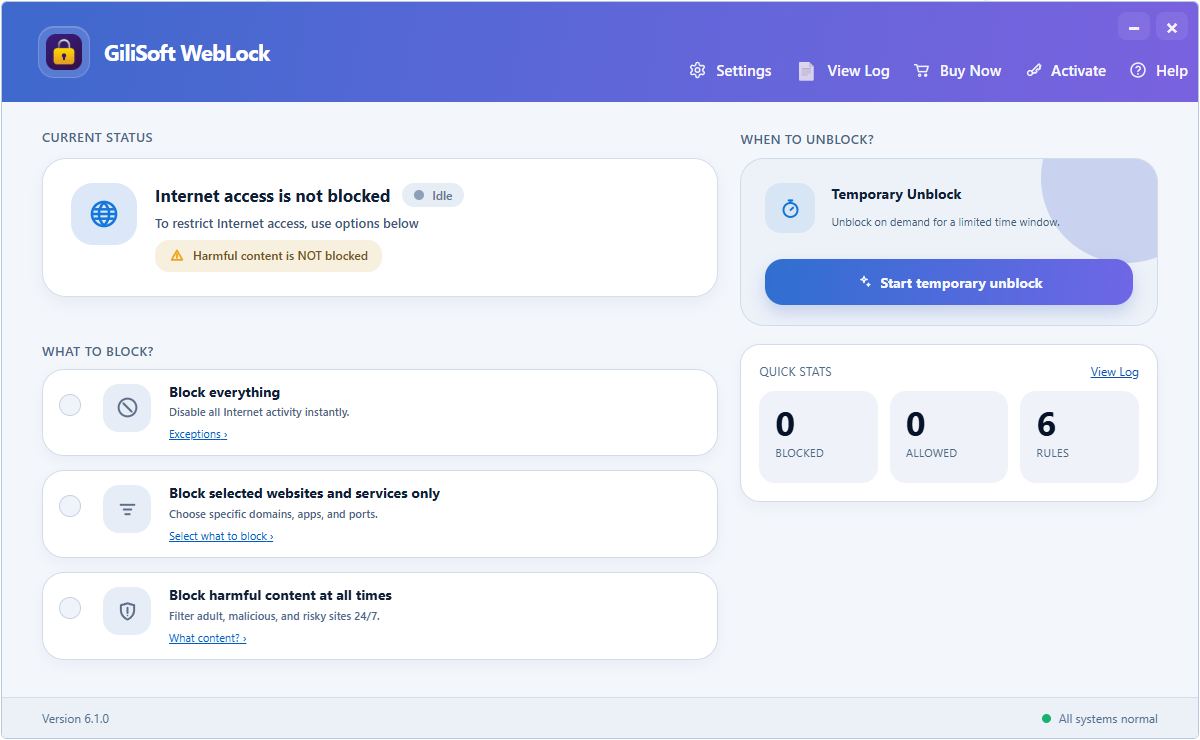
Choose the access policy. Block all internet activity, restrict selected websites and services, or keep harmful content blocked.
Block harmful sites and keep useful resources available so family internet rules stay consistent without complicated monitoring software.
Allow work-related websites and applications while cutting down access to entertainment, social media, and other off-policy browsing destinations.
Use website restrictions, approved-program exceptions, and password-protected internet rules to keep shared PCs aligned with the intended usage policy.
Keep kiosk, classroom, reception, and training-room computers focused on approved online resources without leaving the full internet open.
Reduce distracting websites during focused work sessions while keeping essential business, study, and communication sites available.
Temporarily restore access for maintenance, review blocked events, and export logs without permanently removing the internet policy.
Switch between blocking all internet activity, restricting selected websites and services, or keeping harmful content blocked without building the policy from scratch.
Allow trusted programs, websites, services, and IP addresses so essential work or learning resources remain available while broader restrictions stay active.
Unlock the internet until restart, for a specified period, until the computer becomes idle, or until the screen saver starts.
Password protect WebLock settings, then review blocked events by time, process, event, and details when an administrator needs an audit trail.
Keep e-mail, approved learning sites, or business platforms available while blocking everything else on controlled Windows PCs.
Website whitelist software | Allow only work websites | Allow only work-related websites
Restrict access to social media, gaming, streaming, or other time-consuming online destinations on work, study, or shared family computers.
Block online entertainment at work | Block social media websites on a PC | Increase productivity by limiting web browsing
Allow required applications to use the network while a restrictive policy blocks other programs and online destinations.
Internet access control software | Employee internet restriction software
Give an administrator or support technician short-term access without deleting the policy or leaving the computer permanently unrestricted.
Restrict internet access on Windows | Password protect internet access
Stop unauthorized users from enabling unrestricted browsing on front-desk, lab, family, or shared office computers.
Password protect internet connection | Internet access control software | Website blocking software download
Allow e-mail, approved educational sites, or work tools while blocking adult, hazardous, or otherwise unwanted web content.
Block adult content on Windows | Parental internet control software | Website blocker software for Windows
Yes. You can unlock access until the next restart, for a specified period, until the computer becomes idle, or until the screen saver starts.
Restrict internet access on Windows | Password protect internet access
Yes. You can allow approved websites and block everything else, which is useful for work-only, study-only, or family-safe browsing setups.
Website whitelist software | Allow only work-related websites
Yes. It can block specific websites or categories while leaving the remaining internet available when a full shutdown is not necessary.
Block websites on Windows | Website blocker software for Windows
Yes. Exception lists can allow approved Windows programs, websites, services, and IP addresses while the selected restriction policy remains active.
Website whitelist software | Allow only work-related websites
Yes. It fits homes that want to block harmful sites and keep approved services available for school or communication.
Parental internet control software | Prevent internet addiction for kids | Block adult content on Windows
Yes. It fits businesses that want to reduce employee distraction, allow work-related browsing, and control online access more clearly.
Employee internet restriction software | Block online entertainment at work | Keep employees focused and productive
WebLock focuses on access control. Its log records blocked events with the time, process, event, and details so administrators can review policy enforcement.
Use WebLock when the goal is internet and website control. Use USB Lock when the goal is port, removable-device, or endpoint media control.
Use WebLock when the main need is online policy: block modes, approved-program and website exceptions, temporary unlock, and blocked-event review.
Use USB Lock when the risk is unmanaged devices, copy-out channels, or removable-media policy rather than browsing behavior.
Use File Lock Pro when the goal is file and folder privacy, hide mode, or password-based access protection on the local PC.
Use EXE Lock when the goal is blocking selected Windows applications or requiring password verification before they can open.

 Editors highlighted the clear choice between blocking all access, restricting selected destinations, and filtering harmful content.
Program, website, service, and IP exceptions keep the policy practical for shared Windows PCs.
WebLock is strongest when the goal is clear browsing policy without a complex network-management system.

Reviewers praised the combination of website restrictions and precise exception lists in one focused application.
Temporary unlock options make short maintenance and support sessions easier to manage.
The product stands out when a team or family needs to decide which online resources should remain available.

Independent write-ups described this category as a practical middle ground between full network systems and unrestricted access.
Password-protected settings and exportable blocked-event logs are especially useful on shared PCs.
WebLock is a focused choice for Windows internet access rules, exceptions, and policy review.


Enter your email address to get our latest newsletter