Convert Almost All Video Files
Import common video sources such as MP4, MOV, AVI, MKV, FLV, WMV, M2TS, VOB, TS, RMVB, MXF, 3GP, MPEG, and other everyday camera, web, and media files.

Convert video and audio files on Mac for phones, tablets, web upload, HTML5 playback, 4K delivery, and everyday sharing, with batch conversion, trim, merge, crop, subtitles, watermark, effects, and audio extraction tools.
GiliSoft Video Converter for Mac helps Mac users convert video and audio files into practical formats for playback, upload, archiving, and device delivery. It supports popular source formats, device presets, audio extraction, HTML5 video output, 4K conversion, and common finishing edits before export.
Use it when a Mac video file needs to play correctly on phones, tablets, web pages, media players, or client review systems. For Windows users, see GiliSoft Video Converter for Windows.

Import common video sources such as MP4, MOV, AVI, MKV, FLV, WMV, M2TS, VOB, TS, RMVB, MXF, 3GP, MPEG, and other everyday camera, web, and media files.
Export Mac videos to popular formats such as MP4, MOV, AVI, MKV, H.264, H.265, WMV, FLV, 3GP, and other targets for phones, tablets, media players, and web sharing.
Extract audio from video or convert media to common audio formats such as MP3, M4A, WAV, WMA, AC3, and DTS for reuse in editing, listening, or publishing.
Choose device-ready presets for iPhone, iPad, Apple TV, phones, tablets, game consoles, and other playback environments without manually tuning every export setting.
Convert videos to HTML5-friendly formats such as H.264, OGG, and WEBM so web playback and online publishing are easier to manage.
Convert 4K source videos to practical delivery formats, or prepare standard videos for higher-resolution export when project settings require it.
Merge several clips into one file, trim unwanted parts, and keep only the useful sections before saving the converted video.
Adjust speed, brightness, saturation, contrast, aspect ratio, volume, crop, rotation, picture-in-picture, watermark, subtitles, and visual effects before export.
Process multiple videos in one run to reduce repetitive manual steps during recurring Mac conversion tasks.
Export videos with practical presets for phones, tablets, web platforms, and media players while keeping quality predictable.
Improve everyday conversion efficiency when Mac users handle frequent media updates or repeated export tasks.
Produce reliable output files for clients, upload platforms, family sharing, and internal review cycles.

Video Converter for Mac helped us keep export formats consistent for client previews and internal video sharing.
Batch conversion saves time when we prepare multiple training clips for different playback devices.
The device presets reduced manual setting checks and made routine Mac video exports easier for our team.
Audio extraction is useful when we need a soundtrack or voice track from an existing video file.
The converter is straightforward enough for daily format cleanup before upload or archive delivery.
Preview the Mac conversion workflow: import video files, choose output profiles, adjust settings, trim or personalize clips, and export videos for devices, web playback, archive use, or client delivery.
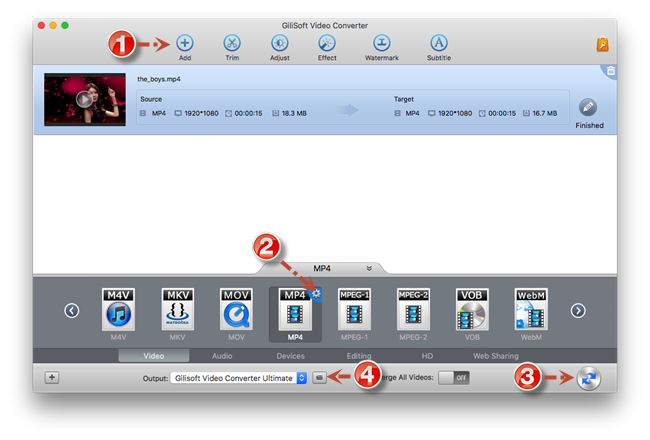
Import multiple media files and process repeated conversion tasks in one queue instead of converting each video one by one.

 Editors highlighted strong format compatibility for Mac video and audio conversion. Coverage noted clear presets for web, mobile, and playback-device targets.
The product is most useful when Mac users need predictable export formats without moving into a full video editor.

Reviewers praised conversion stability on large files and long-duration media assets. Lab notes cited dependable queue behavior during multi-file batch processing.
Batch conversion, device profiles, and common editing controls help reduce manual preparation before export.

Independent analysis described the converter toolset as practical for daily delivery tasks. Commentary emphasized speed, consistency, and low operator overhead.
The interface stays approachable for users who need conversion, audio extraction, trimming, merging, and export presets in one Mac tool.


Enter your email address to get our latest newsletter