Create Multiple Variants from One Video
Prepare alternate output versions from the same authorized source while keeping the original file unchanged.


GiliSoft Video UniReel helps creators and media teams repurpose videos they own or are authorized to edit. Start with one source, choose controlled visual and timing changes, and generate alternate versions without rebuilding every edit manually.
Use frame extraction and interpolation, mirror, filter, effect, background, border, speed, transition, screen adjustment, and optional segment deletion for variation. Then finish the output with built-in cutting, subtitles, watermarks, music, text, and audio tools.

Prepare alternate output versions from the same authorized source while keeping the original file unchanged.
Use frame extraction, frame interpolation, and speed controls to vary timing and motion while checking playback quality.
Choose controlled mirror, filter, and visual effect changes that suit the subject instead of applying the same treatment to every output.
Refresh presentation with borders, backgrounds, screen adjustment, and transitions while keeping faces, products, and captions visible.
Delete unnecessary sections, adjust the screen, and use cut, split, join, crop, or rotate tools before export.
Finish each variant with captions, subtitles, watermarks, music, audio changes, and the output settings required for delivery.

Preparing alternate versions from the same approved footage now takes much less repetitive editing.
We can test a small group of changes, preview the result, and reuse the setup across similar campaign clips.
The built-in subtitle, watermark, and audio tools are useful because each variant can be finished before export.

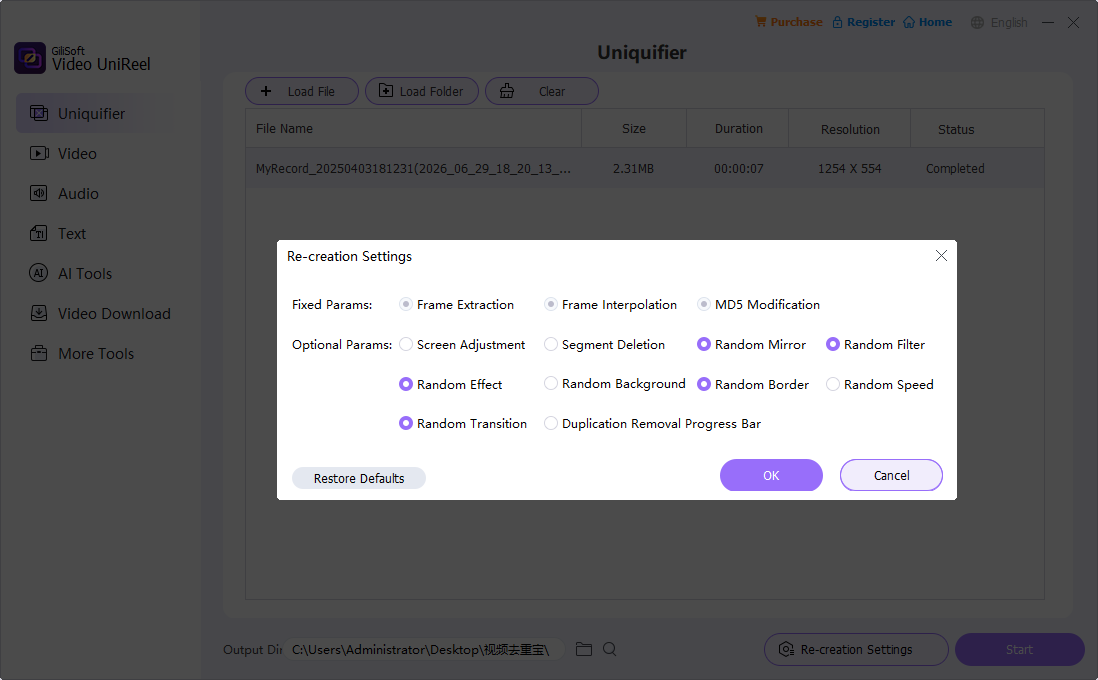
Frame extraction, frame interpolation, MD5 modification, random mirror, random filter, random effect, random border, random speed, random transition, and optional segment deletion are the core controls.
Turn an owned source video into alternate versions with controlled frame, mirror, filter, effect, border, and speed changes.
Prepare alternate versions of campaign clips with parameter changes first, then use subtitles, watermark, music, or crop tools for final polish.
Create refreshed lesson clips from existing training videos, then add subtitles, text, branding, or audio adjustments when needed.
Apply a repeatable set of variation and finishing controls when several authorized clips need consistent output treatment.
Choose frame extraction, interpolation, mirror, filter, effect, border, background, speed, and transition options that fit the source.
Generate a representative sample, check motion, faces, text, framing, and audio, then refine the settings before the complete job.
Cut unwanted sections and add subtitles, watermarks, music, text, or audio changes without moving through several utilities.
Export each result as a newly generated file, then play it outside UniReel to confirm duration, synchronization, framing, and visual quality.
Create multiple variants from an authorized source with parameter-based visual and timing changes.
Use a full multitrack timeline for detailed editing, compositing, effects, titles, and audio work.
Convert formats, compress files, process batches, and prepare device-compatible video output.
Capture new screen footage, system audio, microphone narration, webcams, tutorials, and demonstrations.


Enter your email address to get our latest newsletter