Remove Watermarks, Stamps, and Objects
Use the removal workspace to mark watermarks, logos, date stamps, text overlays, labels, or small unwanted objects in photos you own or are authorized to edit.

Clean your own or authorized images on a Windows PC with local photo cleanup, batch processing, watermark tools, object removal, portrait touch-up, and practical enhancement options.
GiliSoft MarkEase is a photo-focused cleanup tool for removing watermarks, logos, date stamps, text, small unwanted objects, and distracting background elements from images you own or are authorized to edit. It is built for product photos, portraits, screenshots, scanned images, old archives, and image sets that need cleaner output before reuse.
Use it to clean single photos, process repeated image batches, add new text or logo watermarks, repair older photos, improve portraits, and export practical image formats without moving your everyday photo cleanup into a credit-managed video tool.
Because routine image processing stays on your PC, MarkEase is a better fit when private portraits, internal business visuals, product drafts, or client assets should remain under your control. Need video cleanup instead? See ClipMark for video-first watermark removal or Watermark Remover for a broader mixed image-and-video option.

Use the removal workspace to mark watermarks, logos, date stamps, text overlays, labels, or small unwanted objects in photos you own or are authorized to edit.
Clean selected areas and background distractions so product photos, screenshots, portraits, and archive images are easier to reuse.
Start from the MarkEase workspace and choose removal, watermarking, shape annotation, crop, filter, or export tasks from one image-focused interface.
Crop photos and adjust framing before publishing product images, screenshots, portraits, scanned photos, or campaign visuals.
Save cleaned or edited photos after removal, crop, watermark, shape, and filter work for listings, campaigns, documents, client delivery, or archives.
Add names, dates, copyright notes, labels, or short instructions from the watermark workspace when the final image needs ownership or context.
Place a brand logo, creator mark, campaign label, or visual signature on photos before publishing, sharing, or sending them to clients.
Use shape tools to add arrows, rectangles, and visual callouts for product details, interface areas, tutorials, and support images.
Use filter and finishing tools when cleaned photos need a more polished look before export or reuse.
Keep routine image cleanup on your PC when portraits, internal assets, product drafts, or client photos should not be uploaded casually.
Use MarkEase for repeated image sets when similar cleanup, watermark, crop, filter, or export steps need to be applied consistently.
Clean and prepare images while keeping practical quality for reuse, publishing, delivery, and archiving.

MarkEase helped us remove date stamps and logos from product photos quickly while keeping image quality good for listings.
Batch cleanup significantly reduced manual retouching time when preparing large image sets for marketing campaigns.
The local-processing approach is important for us because client images never leave our internal environment.
Removing text overlays and minor background distractions is straightforward, even for non-design teammates.
Watermark removal plus batch export made our archive cleanup faster and more consistent.
Preview the MarkEase workspace for local photo cleanup: remove watermarks and objects, add text or logo watermarks, draw shape callouts, crop images, apply filters, and export finished photos.
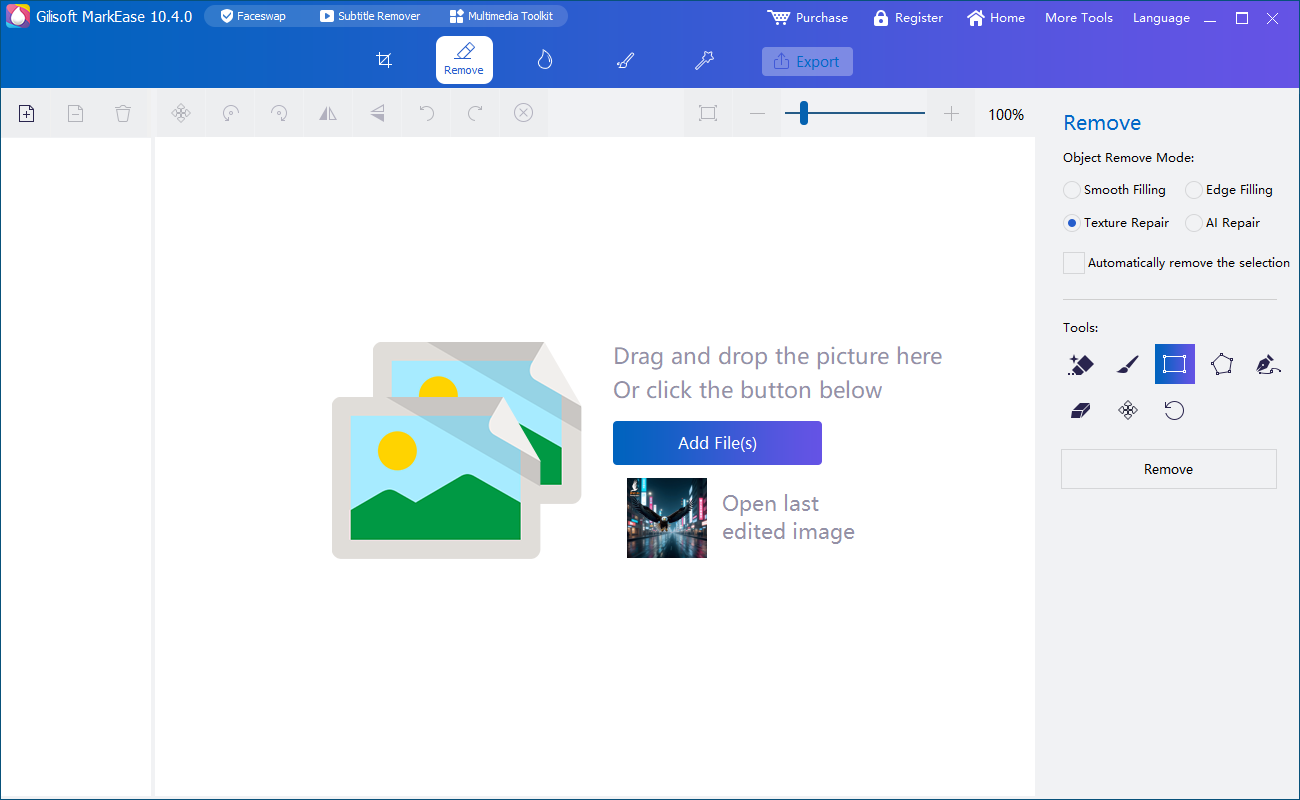
Open images in the MarkEase workspace and choose the cleanup or editing task that matches the photo job.
Use it to remove date stamps, logos, labels, and imported marks before publishing cleaner visuals for stores, catalogs, and marketplaces.
Batch tools help when multiple image sets need similar watermark removal, object cleanup, and export preparation in one process.
MarkEase is a better fit when image privacy matters and users prefer routine photo cleanup without relying on credit-based video processing.
Go beyond simple stamp removal with old photo repair, face repair, enhancement, sky changes, and image matting in the same product family.
MarkEase focuses on removing watermarks, logos, text, and unwanted marks from images instead of trying to be a video tool or a general media suite first.
It is the better fit when your job is mainly image cleanup and enhancement, and you want to avoid turning routine photo edits into a credit-managed process.
MarkEase processes image cleanup on your PC instead of relying on a server upload, which is useful when portraits, internal images, and client assets should stay under your control.
Process large image sets with repeated stamps, imported marks, or distracting objects more efficiently than manual one-by-one retouching.
Clean date marks, old brand overlays, and imported logos before reusing images in listings, campaigns, or archives.
Remove watermark from photo | Remove logo from photo | Remove date stamp from photo
Use image cleanup tools when text overlays, unwanted objects, or background distractions get in the way of reuse.
Remove text from photo | Remove object from photo | Remove background object from photo | Remove photobomber from photo
Batch processing is useful when a set of photos needs the same removal, export, or refresh treatment.
Batch watermark removal | Batch photo cleanup software | Remove watermark from screenshot | Remove logo from screenshot
Use local processing when private portraits, internal business visuals, and client assets should stay on your PC during cleanup.
Offline photo cleanup software | Private photo cleanup software | Photo cleanup without uploading | Local photo watermark remover | Secure photo cleanup tool | Photo cleanup for private images | Keep photo cleanup on your PC | Local image cleanup for confidential photos | Clean up client photos locally
After cleanup, prepare polished output by adding branding back, improving portraits, or repairing older images.
Add watermark to photo software | Add text watermark to photo | Add logo watermark to photo | Batch add watermark to photos | Image enhancement software | Old photo repair and colorization | Face repair software | Remove acne from photo | Remove blemishes from photo | Remove pimples from photo | Portrait cleanup software | Local portrait cleanup software | Beautify photo on Windows
Best for removing watermarks, logos, date stamps, and unwanted marks from photos.
Best for removing watermarks, logos, timestamps, and overlays from videos.
Best for removing subtitle bars, burned-in captions, and text-heavy overlays from videos.
Best for mixed image cleanup and general video watermark removal in one tool family.
MarkEase is best for photo cleanup, including removing watermarks, logos, date stamps, text, and small unwanted objects from images.
Yes. MarkEase focuses on local image cleanup, so routine photo edits do not need a server upload. That makes it a stronger fit for private portraits, internal assets, and client images that should stay on your PC.
Yes. MarkEase is a practical fit when you want local photo cleanup without uploading sensitive images. It works well for secure photo cleanup, private-image cleanup, a more local watermark-removal process, and broader cases like confidential photo cleanup or local client-photo cleanup.
Yes. Batch processing is available for repeated image cleanup jobs when many files need similar removal and export work.
No. MarkEase is the photo-first option for image cleanup and AI image tools without moving into a credit-based video-processing model. For video cleanup, ClipMark and Subtitle Remover are better fits, while Watermark Remover is the broader mixed image-and-video option.
Yes. Besides watermark and mark removal, MarkEase can also fit portrait-oriented cleanup such as portrait cleanup, local portrait cleanup, blemish correction, and light beautification on your PC.

 Editors highlighted effective watermark and stamp cleanup features for daily photo editing tasks.
Coverage noted practical batch tools that reduce repetitive retouching time across product photos and reused image archives.
Reviewers praised stable output quality across JPG, PNG, and mixed image sets.
Lab observations cited dependable performance during repeated batch cleanup operations and practical handling of text, logo, and date-stamp removal.

Independent write-ups described MarkEase as practical for creators and photo operations teams.
Commentary emphasized predictable outcomes and straightforward operation for removing unwanted objects such as date stamps, watermarks, text, and distracting background elements.


Enter your email address to get our latest newsletter
MarkEase
Watermark Remover
ClipMark
Photo Cleanup Software
Offline Photo Cleanup Software
Private Photo Cleanup Software
Photo Cleanup Without Uploading
Local Photo Watermark Remover
Secure Photo Cleanup Tool
Photo Cleanup for Private Images
Keep Photo Cleanup on Your PC
Local Image Cleanup for Confidential Photos
Clean Up Client Photos Locally
Add Text Watermark to Photo
Add Logo Watermark to Photo
Batch Add Watermark to Photos
Remove Watermark from Photo
Remove Logo from Photo
Remove Date Stamp from Photo
Batch Photo Cleanup Software
Remove Text from Photo
Remove Object from Photo
Remove Acne from Photo
Remove Blemishes from Photo
Remove Pimples from Photo
Portrait Cleanup Software
Local Portrait Cleanup Software
Beautify Photo on Windows
Remove Photobomber from Photo
Remove Background Object from Photo
Remove Logo from Screenshot