
How to Turn Audio into Subtitle Text
A speech transcript saves typing, but it is not yet a finished subtitle track. Use Audio to Text in GiliSoft Audio Toolbox to make a draft, then correct the words, divide them into readable lines, and add timing against the video.
Quick answer
Open AI Tools > Audio to Text, add the spoken recording, and generate a text draft. Listen back to fix recognition errors, shorten the text into subtitle-length phrases, then time each phrase in a video or subtitle editor. Audio to Text does not by itself produce a reviewed, timed subtitle file.
What the transcription step gives you
Separate the three stages before you start, especially if the destination needs an SRT file or burned-in captions:
| Stage | Result | Next task |
|---|---|---|
| Audio to Text | A draft of the spoken words | Correct names, numbers, and missed speech. |
| Subtitle text draft | Short phrases arranged for reading | Set start and end times against the video. |
| Finished subtitles | Timed captions or a captioned video | Watch the complete result and export the required format. |
From audio recording to subtitle-ready text
- Prepare a clear recording
Choose the cleanest source and keep an untouched copy. Trim unrelated sections or reduce distracting noise if it makes speech hard to recognize.
- Open Audio to Text
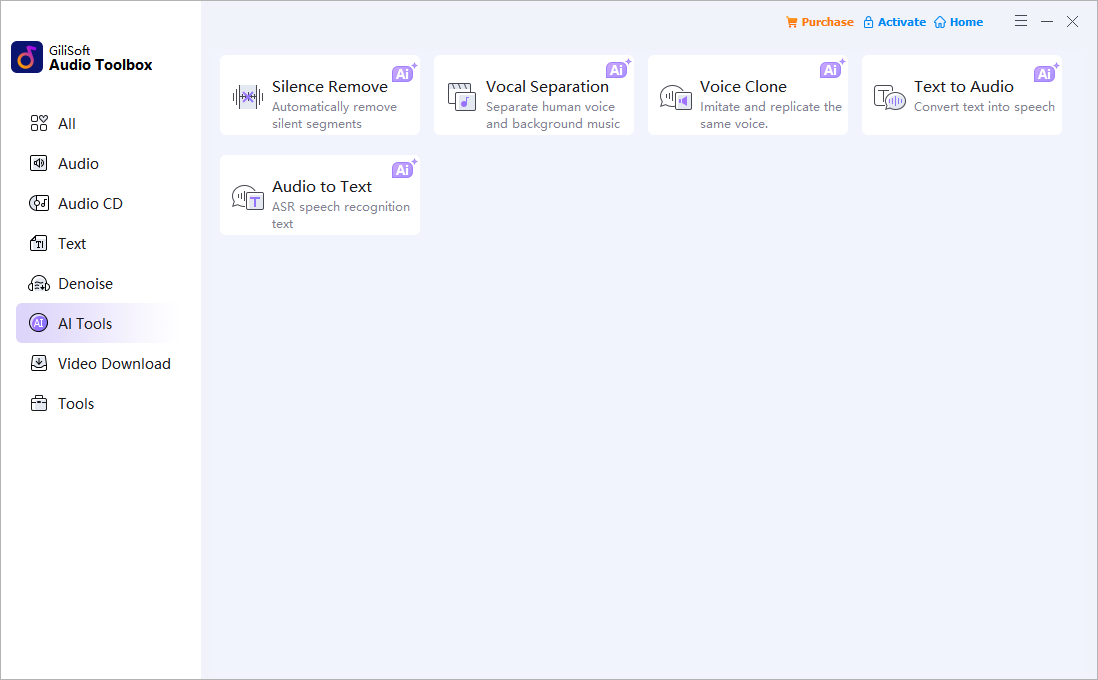
In GiliSoft Audio Toolbox, select AI Tools, then Audio to Text. Add the recording and use the available settings to generate a text draft.
- Correct the transcript
Listen alongside the draft. Check names, technical terms, numbers, punctuation, and speech hidden by overlapping voices.
- Break text into readable phrases
Turn long sentences into short, complete thoughts. Keep the original meaning while making each line readable on screen.
- Time and review in the video editor
Place the reviewed lines against the corresponding speech. Check starts, ends, speaker changes, and text placement before exporting.
Edit the draft for viewers, not just readers
A transcript can be long and conversational; subtitles must be read while the video keeps moving. Remove filler that is not needed for comprehension, break at natural pauses, and leave enough time for each phrase to be read. Recheck any line that contains a name, figure, or technical instruction.
For a tutorial or webinar, compare the text with the visible action. Do not place a line over a button, diagram, or other detail the viewer needs to see. Keep timing review in the video editing stage rather than assuming the transcript already contains usable timecodes.
FAQ
Does Audio to Text automatically create an SRT file?
This guide uses it to create an editable speech draft. A finished SRT needs accurately timed lines and a playback check in a subtitle-capable workflow; do not assume the text draft is an SRT.
Can I use the draft for video captions?
Yes. Correct the words, split them for on-screen reading, then time and preview the lines in a video editor before delivery.
What audio produces the most useful draft?
Clear, consistent speech with little overlap is easier to review. Noise reduction can help a distracting source, but always listen to the result for missing or changed words.


