

Free File Compressor for Windows: Choose the Right Tool
A free file compressor can package files in a ZIP archive or reduce the size of certain content. The right choice depends on whether you need an archive, smaller PDFs or images, video compression, or a broader file-maintenance workflow.
Quick answer
For occasional file sharing, Windows' built-in ZIP option can package files without installing another tool. Dedicated archive utilities offer additional archive formats. ZIP may not shrink files that are already compressed, such as JPG photos and MP4 videos; use a format-specific tool when you need to reduce image, PDF, or video size. GiliSoft Total Repair is a fit when file compression is one part of broader Windows cleanup and maintenance: it compresses files and folders to 7Z, ZIP, or TAR and batch-compresses images.
Choose a free compression method by file type
| What you need | Free option to consider | Important limitation |
|---|---|---|
| Package several files for sharing | Windows built-in ZIP compressed folder | Simple packaging; may not make already-compressed files smaller |
| Create or open more archive formats | A free archive utility | Check supported formats, encryption, and extraction compatibility |
| Reduce PDF size | A PDF compressor | Some settings reduce image quality or remove embedded detail |
| Reduce image size | An image compressor | Review dimensions, format, and quality before replacing originals |
| Reduce video size | A video compressor | Resolution, bitrate, codec, and quality affect output size |
| Compress files and folders as part of PC maintenance | GiliSoft Total Repair | Its archive compression targets 7Z, ZIP, and TAR; it is not a PDF or video encoder |
Why compression may not reduce file size
The file is already compressed
JPG, MP4, many PDFs, and existing archives already use compression. Adding them to ZIP can make them easier to send together, but the archive may be only slightly smaller.
The tool targets a different format
Archive compression is not the same as optimizing a PDF, resizing an image, or re-encoding a video. Choose a tool that exposes controls for the format you need to shrink.
Smaller output may mean quality loss
Lossy image, PDF, and video settings can reduce visual detail. Keep an untouched original and compare output quality before replacing or sharing it.
Packaging and protection are different
An archive can group files and may support password options, but do not assume every ZIP setting provides strong encryption or access control. Verify compatibility and protection requirements.
When GiliSoft Total Repair is a useful fit
Total Repair is relevant when you want file compression alongside Windows cleanup, repair, and optimization tools. Its Compression screen includes file compression, image compression, and file decompression. The file-compression interface lists 7Z, ZIP, and TAR output; the decompression tool supports common archive types shown in the product.
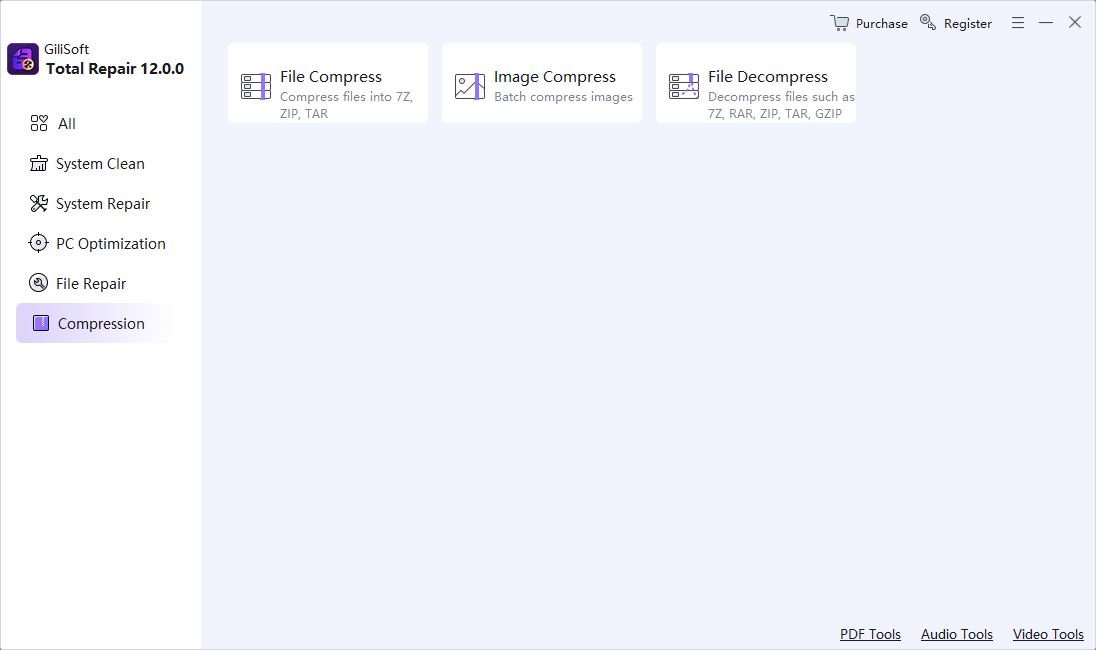
- Choose the right compression task.
Use File Compress for supported archive output, Image Compress for a batch of pictures, or File Decompress to open a supported archive.
- Select a small test set first.
Try representative files and review the resulting archive, image dimensions, or output size before processing more.
- Keep originals until you verify the result.
Check that files open correctly and that image quality and folder structure meet your needs.
Download the trial to confirm the supported formats and workflow on your Windows PC. For dedicated PDF or video compression, choose a format-specific tool instead.
Create a ZIP file with Windows
- Select the files or folder.
Use File Explorer to select the items you want to send or store together.
- Open the context menu.
Choose the Windows option to compress the selection into a ZIP file. Menu wording can vary by Windows version.
- Rename and check the archive.
Use a clear filename, then open the ZIP and confirm it contains the expected files.
- Compare the size.
If the source files are already compressed, use the ZIP for packaging rather than expecting a large size reduction.
Frequently asked questions
Does Windows have a free file compressor?
Windows includes a built-in option to create ZIP compressed folders. It is useful for packaging files, but it may not significantly reduce the size of already-compressed photos, videos, PDFs, or archives.
What is the difference between ZIP and file compression?
ZIP packages files into an archive and can reduce size for some content. PDF, image, and video compression use format-specific methods and quality controls, so choose a tool for the file type and desired result.
Which formats can GiliSoft Total Repair compress?
GiliSoft Total Repair includes file and folder compression to 7Z, ZIP, and TAR, plus batch image compression and decompression for supported archive formats. Check the current trial with your workflow before processing a large collection.
Why did my ZIP file barely get smaller?
Many formats, including JPG, MP4, and existing ZIP files, are already compressed. ZIP can package them together, but often cannot reduce their size much further.
Can I compress files without losing quality?
Creating a ZIP or 7Z archive is generally lossless for the original files. Some image, PDF, and video compression methods reduce quality to achieve smaller output, so keep an original copy and review settings.