

What to Look for in a Mac Internal Audio Recorder
Internal audio recording is more than a red button. The recorder must identify the source clearly and fit the duration, output, and privacy needs of the task.
| Capability | Why it matters | GiliSoft workflow |
|---|---|---|
| Clear source selection | Prevents microphone-only or silent recordings | Choose System Audio, Microphone, or System & Mic. |
| macOS permission guidance | System audio and microphone have separate privacy controls | Approve only the access required by the chosen source. |
| Short test and monitoring | Reveals silence, noise, clipping, or routing mistakes | Record a sample and review the saved file. |
| Long-session controls | Reduces oversized or incomplete files | Use automatic stop and automatic splitting. |
| Useful output formats | Matches sharing, editing, and archive needs | Save MP3, M4A, or WAV. |
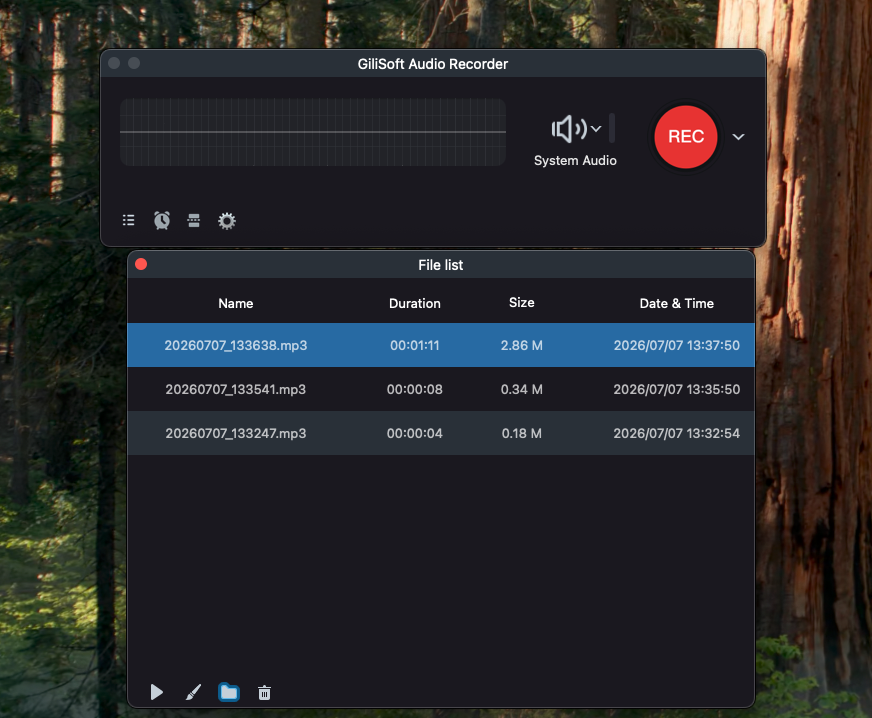
| Local file management | Makes completed recordings easier to verify | Review duration, size, date, and playback in the file list. |
Use GiliSoft as a Mac Internal Audio Recorder
Install and open the recorder
Download GiliSoft Audio Recorder for Mac and open its focused recording workspace.
Choose the required source
Select System Audio for internal sound, Microphone for voice, or System & Mic when both are needed.
Approve the minimum macOS access
Allow system-audio or microphone access only when the selected recording source requires it.
Set output and session controls
Choose MP3, M4A, or WAV and configure automatic stop or splitting for long recordings.
Record, review, and organize
Make a short test, complete the session, and verify duration, sound, and file location in the recording list.

Choose the Recorder for the Actual Task
Quick app recording
Prioritize direct System Audio selection and a fast saved-file review.
Narrated tutorial
Choose System & Mic, use headphones, and verify microphone permission.
Long lesson or stream
Use automatic stopping or splitting and leave enough storage.
Planned session
Use scheduling only after a complete near-term rehearsal succeeds.
Questions to Test Before Relying on a Recorder
- Can it record an ordinary application without routing sound through the room?
- Can system audio and microphone be enabled separately and together?
- Does it explain the macOS permissions required for each source?
- Can it stop or split a long recording automatically?
- Can you find, play, and identify the saved files without another tool?
Frequently Asked Questions
What is a Mac internal audio recorder?
It records sound produced by macOS and applications rather than capturing speaker playback through a microphone.
Does macOS control system-audio access?
Yes. Screen & System Audio Recording access is managed in Privacy & Security on supported macOS versions.
Can GiliSoft record microphone audio too?
Yes. Choose Microphone alone or System & Mic for a mixed recording.
What formats can I use?
GiliSoft Audio Recorder for Mac supports MP3, M4A, and WAV output.
Can it handle long recordings?
Automatic stop and splitting controls help manage duration and file size, provided the Mac remains awake and storage is available.
Is an internal audio recorder appropriate for protected content?
Only use it for audio you are authorized to capture. Protected services may restrict recording and should not be bypassed.
More Mac Audio Recording Guides
Continue with the source, scheduling, or troubleshooting guide that matches the next recording task.