

Quick Picks
| Software | Best for | Protection model | Main consideration |
|---|---|---|---|
| GiliSoft USB Encryption Best overall for ordinary USB drives | Keeping public and private files on one Windows USB drive | Separate public area and password-protected secure area | Windows-focused paid software |
| BitLocker To Go | Managed Windows environments | Encrypts the removable volume | Normal management requires supported Windows editions |
| VeraCrypt | Advanced and open-source users | Encrypted file container or device-hosted volume | More setup, mounting, and recovery decisions |
| Rohos Mini Drive | Portable encrypted partition access | Hidden encrypted USB partition/container | Free edition and published Windows support have limits |
| Cryptomator | Selected files in a local encrypted vault | File-based vault mounted as a virtual drive | Not whole-volume USB encryption |
| 7-Zip | Occasional encrypted file bundles | Password-protected 7z archive | Archive workflow, not transparent drive encryption |
How We Compared the Software
This is not a cryptographic strength contest based on marketing numbers. We reviewed current official documentation, product interfaces, Windows edition requirements, portable-access behavior, recovery options, and the amount of work required before protected files can be opened on another computer.
Protection scope
Does the tool protect a secure area, the whole removable volume, a mounted vault, or only an archive?
Destination computers
Can the drive be opened on the Windows editions and managed PCs where it will actually be used?
Public sharing
Can ordinary files remain available without opening the confidential storage area?
Recovery and administration
How are passwords, recovery keys, drivers, administrator rights, backups, and policy handled?
GiliSoft USB Encryption
Best for: an ordinary USB drive that needs both public sharing and private storage.
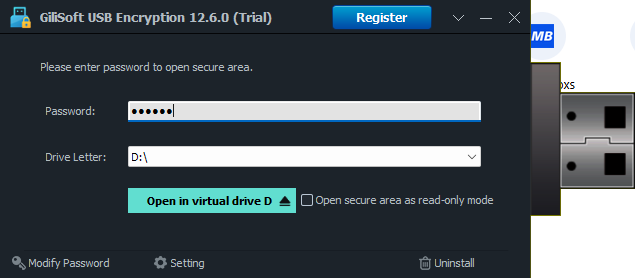
GiliSoft divides the selected USB drive into a normal public area and a password-protected secure area. The secure area opens as a virtual drive after the password is accepted, while public documents can remain available for routine exchange. This is particularly useful for consultants, trainers, sales teams, students, and office users who carry both shareable material and confidential files on the same device.
Clear separation without buying a special USB device
You can reuse a standard flash drive, choose how much space belongs to the secure area, and keep the remaining space public. The toolbox also exposes password change, backup, recovery, and secure-area removal functions in one interface.
Strengths
- Public and secure areas on the same USB drive
- Simple size allocation and password setup
- Secure area opens as a familiar virtual drive
- Backup and recovery tools are visible in the interface
Considerations
- Designed primarily for Windows workflows
- Files left in the public area are intentionally not protected
- Paid after the trial period

BitLocker To Go
Best for: organizations already managing Windows encryption, policy, and recovery keys.
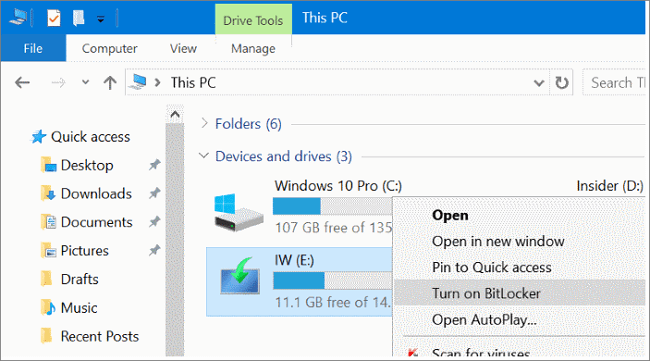
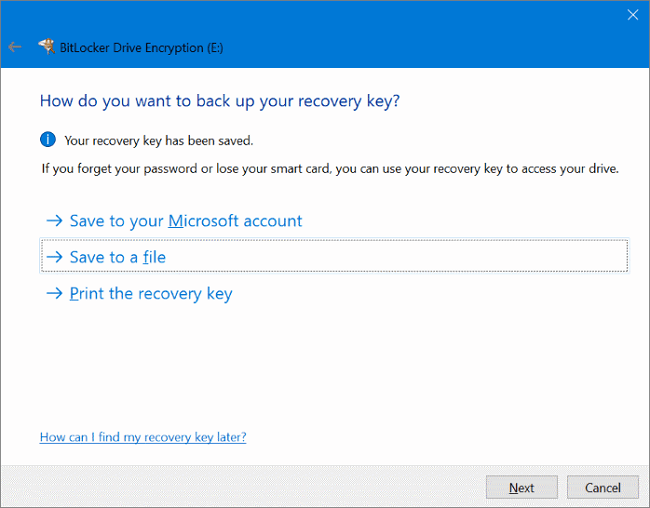
BitLocker To Go is Microsoft's removable-drive encryption feature. It protects removable storage such as USB flash drives, SD cards, and external drives, and it integrates with Windows recovery and Group Policy. Microsoft documents manual BitLocker Drive Encryption management for Pro, Enterprise, and Education editions rather than Windows Home.
Strengths
- Built into supported Windows editions
- Recovery-key and organization-policy integration
- Can enforce read-only access to unprotected removable drives
- Protects the removable volume rather than selected files
Considerations
- Windows edition and destination-PC compatibility matter
- The volume normally must be unlocked before its files are available
- Recovery keys need deliberate storage and administration
VeraCrypt
Best for: technically confident users who want open-source encrypted containers or volumes.
VeraCrypt supports file-hosted containers and device-hosted volumes. Its official tutorial specifically notes that a container can be created on a USB memory stick, and its volume documentation also covers entire USB memory sticks and USB hard disks. Once mounted, encrypted files behave like files on a normal drive and are encrypted and decrypted on the fly.
Strengths
- Free and open source
- Container, partition, and device-hosted options
- Works with normal file operations after the volume is mounted
- Useful for users who want more configuration control
Considerations
- Creation, mounting, passwords, keyfiles, and recovery require more learning
- Device-hosted volume creation can require administrator privileges
- Portable mode still has driver and host-computer considerations
Rohos Mini Drive
Best for: users who want an encrypted USB partition plus a portable browser.
Rohos Mini Drive creates a hidden encrypted partition or container on a USB drive. Rohos Disk Browser can open and work with that protected area without installation, and the official page describes access without administrator privileges through the browser workflow.
Strengths
- Encrypted USB partition/container workflow
- Portable Disk Browser for guest PCs
- Public USB space can remain available
- Free personal edition
Considerations
- Official free-edition page lists an 8 GB encrypted-area limit
- Published system requirements still list Windows 7, 8, and 10
- Users should verify current Windows 11 behavior before relying on it
Cryptomator
Best for: selected files in a local vault when file-based encryption is preferred.
Cryptomator stores protected data as encrypted vault files and exposes an unlocked vault through a virtual drive or supported volume type. A vault can be placed on local storage, including removable media, but this remains a file-vault model rather than transparent encryption of the complete USB volume.
Strengths
- Open-source file-based vault design
- Virtual-drive access after unlocking
- Good for selected folders and files
- Useful when vault portability matters more than full-volume protection
Considerations
- Does not encrypt files outside the vault
- Not a direct public-area/secure-area USB partition tool
- Destination-device support and vault mounting should be tested
7-Zip
Best for: sending or carrying an occasional password-protected archive.
7-Zip's 7z format supports AES-256 encryption and works well when several files should be bundled into one encrypted archive. It is not mounted USB encryption: files are added to an archive, extracted when needed, and may leave unencrypted working copies if the user does not manage them carefully.
Strengths
- Free and widely available
- Simple for a small set of files
- Convenient for encrypted archive delivery
Considerations
- No transparent secure-drive workflow
- Changes require updating or recreating the archive
- Extracted files are no longer protected by the archive
When Hardware-Encrypted USB Is the Better Purchase
Do not mix hardware products into a software ranking
Kingston IronKey, Apricorn Aegis Secure Key, and similar products are physical encrypted USB devices, not USB encryption applications. They can be a better fit when protection must travel with the device, host-software installation is undesirable, an organization needs centralized device management, or procurement requires a particular validation or approved model.
The tradeoffs are higher per-device cost, dependence on that hardware, and more specialized recovery or replacement procedures. For personal or small-office use with existing USB drives, software is usually more flexible and less expensive.
How to Choose the Right USB Encryption Method
Define what remains public. If the same USB must share ordinary files without opening private storage, start with GiliSoft or another secure-area design.
List every destination computer. Check Windows edition, administrator rights, allowed software, and whether a portable reader or driver is permitted.
Choose the protection scope. Use whole-volume encryption for everything, a mounted container or vault for selected files, or an encrypted archive for occasional delivery.
Plan recovery before encryption. Store recovery keys, passwords, backup copies, and documented ownership separately from the USB device.
Test a disposable USB first. Create, unlock, copy, close, reconnect, recover, and safely eject before trusting the method with important data.
USB Encryption Safety Checklist
Encryption protects confidentiality; it cannot repair failed flash memory or replace a lost drive.
Do not reuse the same password for email, Windows sign-in, and portable storage.
Never keep the only recovery key or instructions on the encrypted USB itself.
Save open work, close the mounted area or vault, and safely eject the device.
Anything deliberately stored outside the secure area remains available without its password.
To block or whitelist USB devices on company PCs, use USB Lock.
USB Encryption Software FAQ
What is the best USB encryption software for Windows 11?
GiliSoft is the practical recommendation when one ordinary USB drive needs public and private areas. BitLocker To Go is better when IT already manages BitLocker and recovery keys. VeraCrypt is better for advanced users who prefer open-source encrypted containers or volumes.
Can encryption protect a lost USB flash drive?
It is intended to stop ordinary unauthorized access to the protected data while the encrypted area is closed and credentials remain secret. It does not prevent physical loss, media failure, password theft, or access while the protected area is already unlocked.
Does Windows 11 Home include BitLocker To Go management?
Microsoft documents manual BitLocker Drive Encryption management for Pro, Enterprise, and Education. Windows Home does not provide the same Manage BitLocker setup environment.
Is free USB encryption software good enough?
It can be, if its workflow, destination-computer support, recovery process, and protection scope fit the job. Free does not automatically mean weak, and paid does not automatically mean appropriate. Test the complete open-and-recover process before storing the only copy of important data.
Is 7-Zip the same as encrypted USB software?
No. 7-Zip protects files inside an encrypted archive. Secure-area, full-volume, and mounted-vault products offer a different day-to-day workflow.
Should I buy a hardware-encrypted USB instead?
Consider one when protection must be device-based, host installation is restricted, centralized management is required, or procurement specifies a validated secure USB. Otherwise, software lets you reuse existing media and choose among more flexible storage layouts.
Research Sources
- Microsoft Support: BitLocker Drive Encryption
- Microsoft Learn: BitLocker and BitLocker To Go FAQ
- Microsoft Learn: Configure removable-drive policy
- VeraCrypt: Beginner's Tutorial
- VeraCrypt: File-hosted and device-hosted volumes
- Rohos: Rohos Mini Drive features and limits
- Cryptomator: Security architecture
- Cryptomator: Virtual volume types
- 7-Zip: 7z format and AES-256 encryption
- CISA: Protect data stored on devices and removable media
- Kingston: Hardware vs software encryption
- Kingston IronKey: Hardware-encrypted USB overview
Product capabilities and limitations were taken from vendor documentation available on August 3, 2026. Software changes over time; verify current operating-system support, licensing, and recovery behavior before deployment.