

- "This is the easiest way to hide my CD/DVD-rom drive. "
--------------Henry - "The hiding technology will never damage any file data. It is safe and reliable. "
-------------- Fred - "Hide it so that other will not even know that the drive exists "
-------------- Michae - "Hidden data can be displayed and unhidden only when the user enters the valid password."
-------------- William
How to deny delete a folder
How to deny delete folder in win 8.1,8,win7,vista,xp ?
From preventing your documents from being deleted by your siblings; to safeguarding your company's data and information from negative elements; or protecting your files against malware - all these are real life scenarios and the main cause of worry in an organization or a PC user in general.
This article provides a quick and easy ways to deny delete a file in Windows 11,8,7,vista,xp.


The following steps will tell us how to use GiliSoft File Lock to deny delete a folder and how to unprotect them when needed.
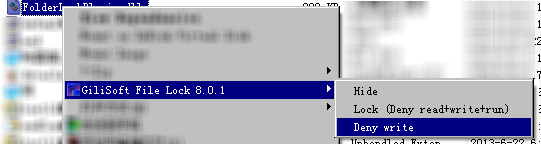
The easiest way to deny delete one folder is right-click the folder and click 'GiliSoft File Lock'-->'Deny write',
then the selected folder will can not be modified by others.
Just as this picture:
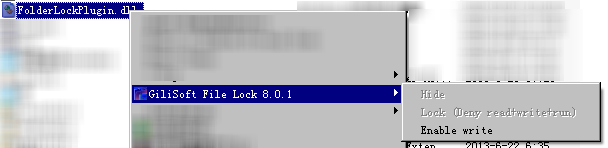
The easiest way to remove folder deny delete is right-click the protected folder and click 'Enable write'.
- How to deny delete a folder
- How to make my folder deny delete
