
Match the protection to the training use
| Training situation | Recommended method | Useful controls | Recipient receives |
|---|---|---|---|
| Paid course or certification material | GiliSoft Copy Protect | Password, copy/print rules, watermark, expiry, viewing limit, device binding | A protected GCP or EXE package |
| External partner or contractor training | Copy Protect with PC or USB binding | Named watermark, expiration date, blocked reuse paths | A controlled offline training package |
| Internal employee handbook | PDF open password and permissions | Opening password, printing level, editing and copying rules | The original password-protected PDF |
| Confidential material in transit | USB encryption plus document protection | Private USB area and document-level controls | An encrypted drive containing protected training files |
| Public handout or printable worksheet | Normal accessible PDF | Metadata cleanup and verified redaction | A reusable PDF by design |
Protect the complete training package with GiliSoft Copy Protect
Training rarely consists of one PDF. A course USB may include manuals, workbooks, policy documents, slides, videos, images, web pages, and reference folders. Copy Protect can package these materials together so learners open a controlled delivery rather than browse the original source files.
- Finalize the course release. Remove instructor notes, hidden attachments, answer keys, old revisions, and personal metadata that learners should not receive.
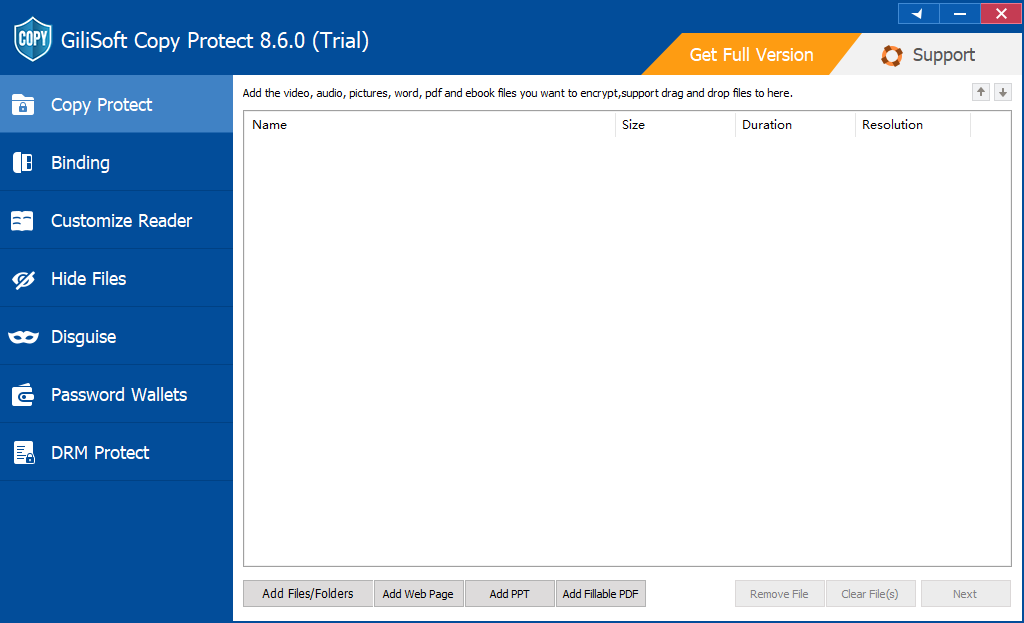
- Open Copy Protect and add the training PDFs, slides, videos, images, web pages, and supporting folders in the order learners should see them.
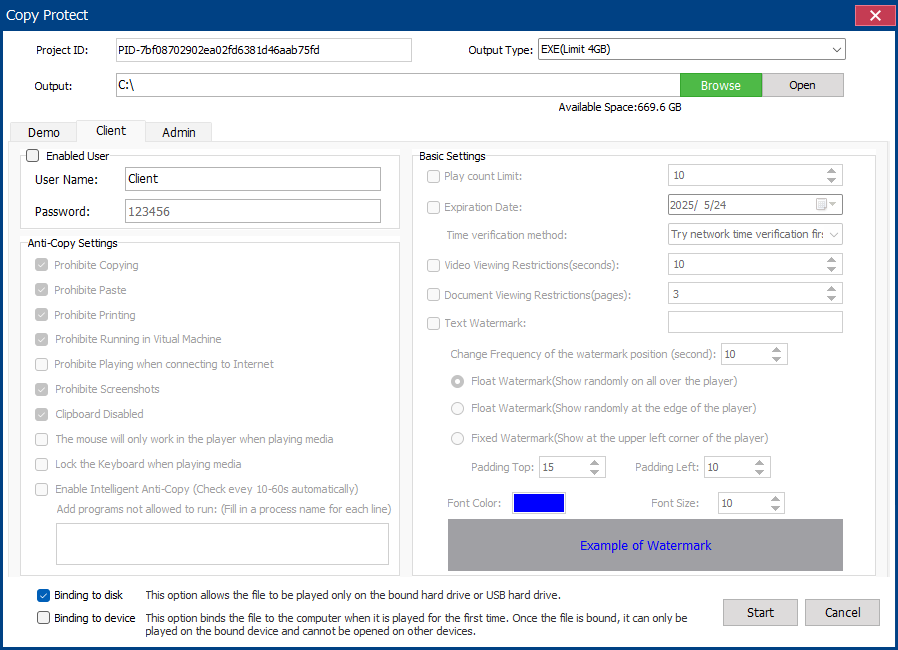
- Select GCP for a protected reader package or EXE for a self-running Windows delivery within the 4 GB output limit.
- Choose whether learners may print, copy text, use the clipboard, take screenshots, use Save As, or open the package in a virtual machine.
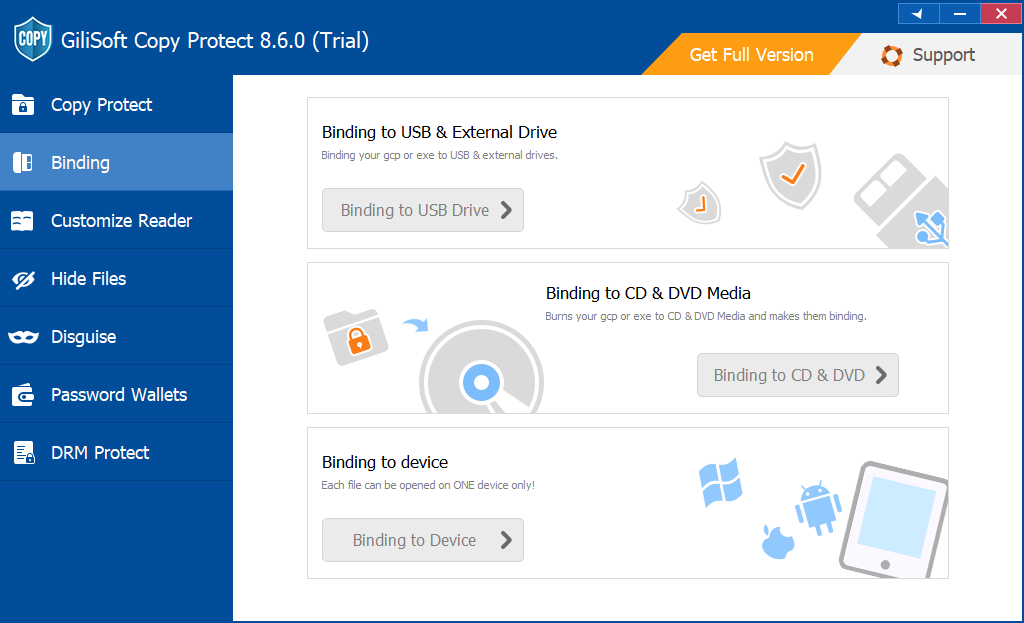
- Add the course name, learner or company name, expiration date, viewing limit, and an approved USB or PC binding where appropriate.
- Build the package and test the complete learner experience on another PC: opening password, navigation, links, fonts, search, printing, watermark, expiry, and relaunch behavior.
What the learner receives
The learner launches the GCP or EXE delivery from the USB drive instead of browsing editable source PDFs.
The package applies the password, approved USB or PC binding, expiry, and viewing rules configured for that release.
The learner reads the manuals and supporting files while printing, copying, screenshots, and Save As follow the permissions you selected.
Keep instructor and learner releases separate
Do not build the protected USB directly from the working course folder. Create a clean learner-release folder first. Exclude answer keys, facilitator notes, editable slide masters, source artwork, previous revisions, attendance records, and any document that should remain inside the training team.
Deliver the training experience, not the editable source set
Give learners, customers, partners, or field teams a GCP or EXE package while retaining the original PDFs and supporting files internally. The protected package remains usable offline and can carry the access rules chosen for that training release.
Use a normal PDF password for trusted learners
A document-open password encrypts the PDF and blocks viewing until the correct password is entered. This is suitable when an employee or trusted learner is expected to keep, search, annotate, and reuse the original PDF after training.
- Open the PDF in Adobe Acrobat and choose All tools > Protect a PDF.
- Select Protect with password, choose Viewing, and enter a strong password.
- Save the protected PDF, close it, and reopen it to verify the password prompt.
- Copy the PDF to the USB drive and send the password through a separate communication channel.
Set PDF permissions when the source file must remain a PDF
A permissions password controls what a compatible PDF reader allows after the document opens. Adobe Acrobat can disable printing, limit printing to low or high resolution, restrict document changes, and turn text, image, and other content copying on or off.
- Open the PDF in Acrobat and choose All tools > Protect a PDF > Protect with password.
- Choose Editing, enter a permissions password, and select the allowed printing and document-change settings.
- Disable copying when text and images should not be extracted, while keeping screen-reader access enabled when accessibility requires it.
- Save the file and test it in the PDF readers your recipients actually use.
Permission settings are useful for ordinary PDF delivery, but the recipient still receives the original PDF file. Choose Copy Protect when the objective is controlled viewing from a USB package rather than distribution of a reusable PDF.
Use an encrypted archive for one-time transfer
An encrypted archive is practical when several training PDFs must be transferred together to a trusted employee or partner. Use AES encryption where the archive tool supports it, choose a strong password, and test extraction before deleting or moving any source files.
The protection ends when the recipient extracts the archive. The extracted PDF is an ordinary file unless it also has its own password or permission settings.
Encrypt the USB when loss of the physical drive is the main risk
USB encryption protects every file while the drive is lost, stolen, or not yet unlocked. GiliSoft USB Encryption can create a password-protected private area and a normal public area on the same removable drive.
After the secure area is opened, its PDFs behave like normal files. Combine USB encryption with PDF passwords or Copy Protect when you also need document-level restrictions after access is granted.
What a training PDF password does not solve
Recommended setups for common training deliveries
Training release checklist
- Remove instructor-only notes, answer keys, hidden attachments, old revisions, personal metadata, and unused pages.
- Apply real redaction to confidential text and images instead of covering them with shapes.
- Verify fonts, links, bookmarks, forms, search, accessibility, and media references on another computer.
- Keep the original PDFs and editable source files in an internal archive, not beside the protected learner package.
- Use learner-, customer-, or department-specific passwords and watermarks instead of one permanent password for every recipient.
- Test copy, print, screenshot, expiration, watermark, viewing-limit, USB-binding, and relaunch behavior before duplication.
- Label each USB release, record the assigned recipient or group, and retain the configuration used to rebuild that release.
Related training and document protection guides
Training PDF protection FAQ
Can I stop learners from copying or printing course PDFs?
Copy Protect can restrict common copy, clipboard, print, screenshot, Save As, and virtual-machine paths inside a protected package. Select only the restrictions required for the course; for example, allow printing for worksheets while blocking it for paid manuals.
Can each learner receive a named watermark?
Yes. Visible watermarks can identify the learner, customer, department, or partner receiving a protected release, which makes redistributed screenshots or printouts easier to trace.
Should I choose GCP or EXE output?
Choose GCP for the standard protected-reader format and larger projects. Choose EXE for a self-running Windows package when the complete output is within the 4 GB EXE limit.
Can access end after the training period?
Set an expiration date or viewing limit for a protected release. Test the rule before duplicating the USB drives and keep the source project so a revised authorization can be issued when appropriate.
Should internal employee PDFs use Copy Protect?
Use Copy Protect when the material must remain inside a controlled viewer or when device, watermark, expiry, and viewing rules matter. A normal password-protected PDF is simpler when employees legitimately need the source file for ongoing work.
Official references
- Adobe: Password security overview for PDFs
- Adobe: Restrict printing, editing, and copying in PDFs
- Adobe: Create reusable PDF password policies
- NIST: Reducing cybersecurity risks from portable storage media
Deliver training PDFs without releasing the source set
Create one protected package for manuals, workbooks, slides, videos, and supporting files, then choose how each learner may open, print, capture, and reuse the material.
View GiliSoft Copy Protect