How to Use GiliSoft Copy Protect
Create protected GCP or EXE packages, set recipient permissions, bind access to hardware, or prepare the reader. Choose a task below for its controls and steps, with screenshots from GiliSoft Copy Protect for Windows.
Create a Protected GCP or EXE Package
Add the content, set Client permissions, create the package, and open the result as a recipient. Start with a small bundle containing each file type you plan to deliver; keep the source files in a separate working folder.
Add the content you want to protect
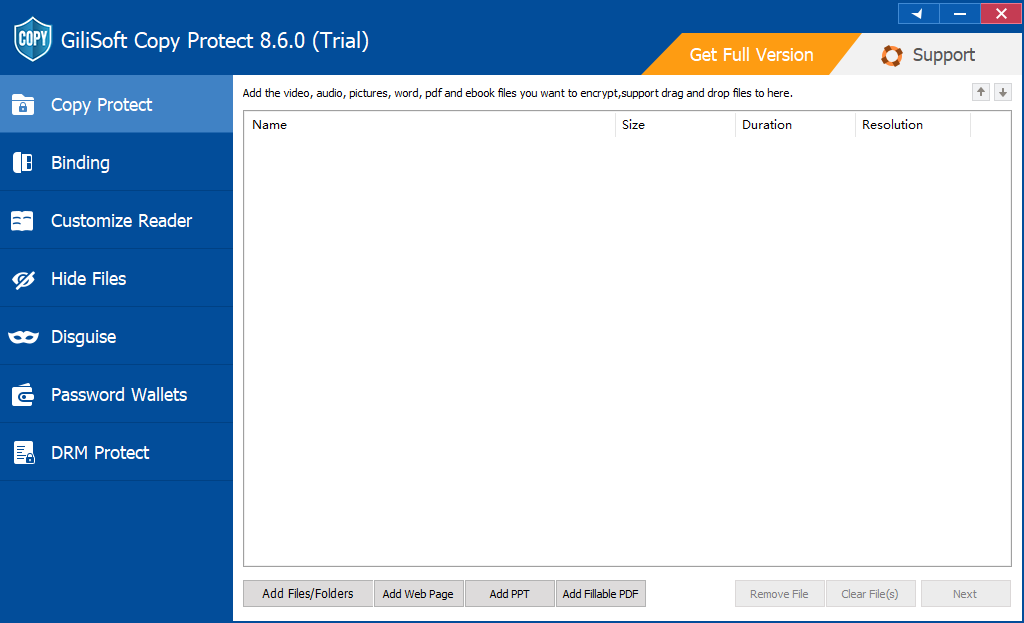
Open Copy Protect and use Add Files/Folders, Add Web Page, Add PPT, or Add Fillable PDF for the source content. Review the list, remove unwanted entries, and select Next to configure the protected package.
- Choose the matching import control
Use Add Files/Folders for local files and folders, or Add Web Page, Add PPT, or Add Fillable PDF for the corresponding source workflow.
- Review the delivery contents
Check the listed names, sizes, and durations. Use Remove File or Clear File(s) to remove an unwanted entry. Include the final versions of the files rather than working copies.
- Continue to the package settings
Select Next. Configure Client access and permissions, then choose the output format and destination before selecting Start.
Configure client access and content permissions
Open the Client tab and enable the recipient profile with Enabled User. Set the client user name and password, choose the Anti-Copy Settings, and configure only the viewing limits and watermark rules needed for this delivery.
The Client screenshot has Enabled User cleared, so its profile controls are greyed out. Enable the intended profile before changing its settings; the pictured password, date, and numbers are examples.
Set the Client User Name and Password
- Enable the recipient profile
After importing content and selecting Next, choose the Client tab and select Enabled User.
- Enter the Client login
Set User Name and Password for recipient access. Keep these separate from the Admin credentials.
- Create and test the delivery
Review the permissions below, then create the output. Open that finished package with the Client user name and password to confirm the login and restrictions.
Restrict Copying, Printing, and Screenshots
- Select the Client profile
In the package settings, open Client and enable it with Enabled User. Rules belong to the selected Demo, Client, or Admin profile.
- Choose the Anti-Copy Settings
Select the required controls, including Prohibit Copying, Prohibit Paste, Prohibit Printing, Prohibit Screenshots, and Clipboard Disabled. Review virtual-machine and Internet-related rules only when they match the recipient's playback environment.
- Create the package and test its content
Use Start to create the output, then sign in as Client and try the actions you restricted on the actual documents and media. These rules protect the content in the reader, not the .GCP file from duplication in File Explorer.
Set Viewing Limits and Expiration
- Open the Client Basic Settings
Select Client, enable its profile, and locate Basic Settings on the right of the package dialog.
- Enable the required limits and enter values
Use Play count Limit, Expiration Date, Video Viewing Restrictions (seconds), or Document Viewing Restrictions (pages) as needed. For expiration, also review Time verification method; do not copy the screenshot's sample date.
- Verify the limits in the finished output
Create a test package and open it with Client access. Check the enabled count, time, or page limits. Test network-related time verification under the same connected or disconnected conditions the recipient will use.
Add a Text Watermark
- Enable Text Watermark for Client
In the Client tab's Basic Settings, select Text Watermark and enter the wording for the delivery.
- Set the watermark appearance
Choose a floating or fixed position. Review Padding Top, Padding Left, Font Color, and Font Size. For floating text, review the change-frequency control and the watermark example.
- Check it on the packaged content
Create the output, sign in as Client, and view several documents or scenes. Check that the text is readable and positioned as intended over different backgrounds.
Choose the package format and create the output
Review Project ID, choose GCP Format or EXE in Output Type, and use Browse to set the output destination. Confirm the client and administrator settings, then select Start and wait for package creation to finish. Keep EXE output within the displayed 4GB limit.
- Match the output to the delivery
In Output Type, choose GCP Format for the GCP Reader workflow or EXE for a self-contained Windows executable. The dialog labels EXE with a 4GB limit.
- Set the destination and review access
Use Browse beside Output to choose the destination. Review the enabled Demo, Client, and Admin profiles, plus any binding settings. Keep ordinary source copies out of the recipient folder.
- Create the finished package
Select Start and wait for creation to finish. Identify the generated package, then test it as a recipient. For the separate Binding workspace, use this finished GCP or EXE as the input.
Which Output Type Should You Choose?
- GCP Format
- Creates a protected package for the GCP Reader workflow. Include the reader opening instructions with the Client login.
- EXE output
- Creates a self-contained Windows executable package. Keep the output within the displayed EXE 4GB limit.
Select Output Type in the package settings dialog, not on the initial Add Content screen. The Admin screenshot also shows Project ID, Output, Browse, and Start.
Test the finished package as a recipient
Open the completed package through its protected reader workflow with the client credentials. Check each content type, selected copy and print restrictions, viewing limits, and any hardware binding. Give recipients the tested package and client instructions, not the administrator credentials or source files.
- Open the delivery, not the source
Use the final package and its reader workflow. Confirm every expected file or lesson is present and usable with Client access.
- Try the actions you restricted
Check copy/paste, print, clipboard, and screenshot behavior for the relevant content. Verify enabled page, time, play-count, and watermark settings.
- Check the binding cases
For USB or disc, reconnect the intended medium and test without it. For first-play device binding, use the designated computer and a separate test output for internal rehearsal.
- Prepare the recipient handover
Keep the tested package, concise opening instructions, and Client access information. Keep Admin credentials, source files, and Project ID records with the publisher.
For an unbound or removable-media delivery, test on a recipient Windows PC as well as the authoring computer. For a device-bound package, test on its intended bound computer instead of expecting it to open on a second machine.
Set Up Demo and Admin Profiles
Use Client for ordinary recipients, Demo for an optional limited preview, and Admin for publisher access. Review each enabled profile separately so an extra login does not provide different access from the one you intended.
Create a Limited Demo Preview
- Enable Demo when a preview is needed
After adding content and selecting Next, open the Demo tab. Select its Enabled User control and set the profile's user name and password.
- Set the preview permissions and limits
Configure Demo's own Anti-Copy Settings and Basic Settings. For example, enable a video viewing-time limit or a document page limit for a course sample.
- Test Demo and Client separately
Create the output and test both logins. Confirm Demo receives the intended preview and Client receives the purchased access. Leave Demo disabled when no separate preview is required.
Set Up the Publisher's Admin Account
- Open the Admin profile
In the package dialog, choose Admin and review Enabled User. The account is marked confidential and not for clients.
- Set and keep the publisher credentials
Set the administrator user name and password in the licensed software. Keep them with the publisher's package records, not in the recipient folder. Do not adopt the trial password printed in the screenshot for a delivery.
- Review the package and test as Client
Before selecting Start, review all enabled profiles. Use Client credentials for the recipient test; an Admin opening does not verify Client restrictions. The matching Admin login is also used by Customize Reader.
Keep the Project ID and Publisher Records
Record Project ID, the source-file list, output filename, enabled profiles, permissions, and binding method. Keep administrator credentials separately from recipient instructions. Project ID identifies the protected project; it is not the Client password or a password-reset tool.
Bind Protected Access to the Intended Hardware
The Binding workspace offers separate USB/external-drive, CD/DVD, and device routes for finished GCP or EXE output. The package settings also show Binding to disk and Binding to device. Choose the route for the delivery medium.
Bind a Package to a USB or External Drive
- Create the package and connect the intended drive
Prepare the finished GCP or EXE and connect the USB or external drive that recipients will use. Keep the source files separately.
- Run the removable-drive binding workflow
Open Binding > Binding to USB Drive. Follow its package and destination selections with the intended medium. The package dialog describes Binding to disk as allowing playback only on the bound hard drive or USB hard drive.
- Verify access with and without the drive
Complete the binding process and open the result with Client access from the delivery medium. Also test without the required medium. Copying the .GCP file alone is not the same as extracting the protected content inside it.
Bind a Package to CD or DVD
- Prepare the package and recording medium
Create the protected GCP or EXE, connect a suitable disc recorder, and prepare appropriate blank CD or DVD media.
- Choose the optical-media binding route
Open Binding and select Binding to CD & DVD. Follow the package and media choices to burn and bind the protected output to the disc.
- Test the completed disc as Client
Open the finished disc delivery with Client access and check its documents or media. Verify that access behaves as intended without the required bound disc, and give recipients the disc and its opening instructions.
Bind Access to One Computer
- Plan which computer opens the delivery first
Identify the intended recipient computer before enabling device binding. Use a separate test output for internal rehearsal.
- Enable the intended device-binding workflow
The package dialog's Binding to device rule binds the file to the computer where it is played for the first time. The separate Binding > Binding to Device entry is also available for protected output; follow that route's prompts when using it.
- Perform the first opening on the recipient computer
Open and test the final delivery on the designated computer. Do not open that copy on the publisher's PC first, or assume copying or renaming it resets the binding. After binding, verify the configured access and restrictions there.
Open a Package as the Recipient
- Use the package's opening method
For GCP output, open the file through the appropriate GCP Reader workflow. For EXE output, open the generated Windows executable. Use the protected package rather than an ordinary source file.
- Sign in with the Client account
Use the Client user name and password supplied for the package. Keep the required bound USB or disc available; perform a device-bound delivery's first opening on its intended computer.
- Check the content and access rules
Open the expected documents or lessons, check playback and sound, and verify enabled limits and restrictions. Use the recipient test checklist before handing over the package and concise opening instructions.
Customize the Reader
- Select the EXE to customize
Open Customize Reader. Use Browse beside Select EXE to customize and select the intended protected EXE.
- Verify the publisher account
Enter the matching Admin Name and Password, then select Customize Reader. Continue with the options presented by the installed build. The screenshot shows this entry screen, not a finished customization.
- Test the customized result with Client access
Open the resulting delivery as Client and confirm the content and restrictions. Give recipients Client instructions; do not include Admin credentials.
Why a GCP file can still be copied
Copy Protect protects the content inside the GCP package. File Explorer can still duplicate the .GCP container. That operation copies the protected package; it does not produce ordinary editable documents or unprotected videos from inside it.
| Action | What to verify |
|---|---|
| Copy the .GCP file in File Explorer | The protected container can be duplicated. Its contents are still subject to the configured reader permissions and access requirements. |
| Open without the bound hardware | For a hardware-bound delivery, test that protected content cannot be opened without the required medium or on an unbound device. |
| Open a copy with the bound USB connected | Include this in the acceptance test. Check the actual binding setup rather than treating a different folder path as proof that access should fail. |
| Copy or export content inside the Reader | Test the selected Client restrictions on the documents, images, and media inside the package. This is separate from duplicating the container. |
The two controls work together: binding decides which hardware may open the protected content; Reader permissions decide what the recipient can do with it after opening.
Match content types to the rules you need
The import controls support files and folders plus specific workflows for web pages, PowerPoint, and fillable PDFs. A mixed course or client delivery can include documents, images, audio, and video under the selected package rules.
- Documents and presentations
- Check reading, printing, copy/paste, clipboard behavior, and any document page limit on the actual PDF or Office content.
- Videos and audio
- Check playback, sound, permitted viewing time, play-count limits, and the intended playback environment.
- Images and web content
- Check display, navigation, screenshot controls, and any allowed or restricted content-copy action inside the reader.
- Mixed folders
- Inspect every intended content type, not only the first entry. Verify that ordinary source copies were not included outside the protected package.
Make the acceptance test reflect the enabled Client rules. The permissions operate in the protected viewing workflow; they are not a system-wide block on Windows file operations.
Use the Local File and Password Tools
Hide Files, Disguise, and Password Wallets manage local items. Choose one below for its own procedure; these tools are separate from creating a recipient package.
Hide or Unhide Local Files
- Add the files or folder to Hide Files
Open Hide Files in the sidebar and select Hide Files/Folder. Choose the local items to manage.
- Check the listed items and status
Review the Files/Folder list and Status. Select the intended listed item and use Hide when available, then check its local visibility.
- Restore visibility with UnHide
Select the listed item and choose UnHide. Verify that it is visible and opens from its original location.
Disguise or Restore a Folder
- Choose the local folder
Open Disguise in the sidebar and select Disguise Folder. Choose the folder and complete the offered disguise options.
- Check the recorded disguise
Review the folder entry, Disguised Type, Disguised Time, and Status in the list. Check the folder's local presentation.
- Reverse it with Non-disguise
Select the listed folder and choose Non-disguise. Check that its normal presentation is restored and the original contents remain available.
Create or Open a Password Wallet
- Create a wallet or open an existing one
Open Password Wallets. Choose Create Wallet for a new wallet or Open Wallet for one you already have, then complete the dialog shown by the software.
- Select and manage the wallet
Review the Wallets, Last Modified, and Protection list. Use Edit Wallet or Copy/Move for the selected wallet when those controls are available.
- Reopen the intended wallet and verify access
Check that you can open the correct wallet before relying on the stored information. Keep publisher credentials separate from recipient materials; a wallet does not automatically set a package's Client password.
Troubleshoot package access and restrictions
| Problem | What to check next |
|---|---|
| Client login does not work | Check the correct package and Client profile, Enabled User, user name, password, expiration, and any opening limits. |
| Permissions differ from the intended rules | Confirm you opened the finished output as Client, not Admin or Demo. Review the enabled rules for that profile and recreate the output if the settings were wrong. |
| A copied GCP file still exists | This is a copy of the protected container. Test access to the content and the restrictions inside the Reader, not whether File Explorer can duplicate the package. |
| The package opens only on the authoring PC | Check whether Binding to device was enabled and the first opening occurred there. Use the intended first-open workflow for the recipient delivery. |
| USB or disc-bound output will not open | Use the intended bound medium and confirm the binding workflow completed. Check the same Client credentials and access limits used in the final package. |
| EXE creation fails for a large bundle | Check the displayed 4GB EXE limit, output destination, and free space. Review whether GCP output is the appropriate route for the delivery. |
| Offline access fails | Review expiration time verification and Internet-related restrictions, then test under the recipient's actual connected or disconnected conditions. |
| Customize Reader does not continue | Confirm you selected the intended EXE and entered the matching Admin Name and Password, rather than Client credentials. |
Copy Protect FAQ
If a GCP package is bound to a USB drive, why can the file still be copied?
Copy protection applies to the content inside the GCP package, not to duplicating the .GCP file in File Explorer. Copying the package does not extract or unlock that content. USB binding controls access through the bound hardware, while Reader permissions restrict actions such as copying, printing, or exporting the content after opening. Test the bound and unbound cases before delivery.
Should I choose GCP or EXE output?
Choose GCP for the protected GCP Reader workflow. Choose EXE when you want a self-contained Windows executable package and its size fits the displayed 4GB limit. Select the format in Output Type in the package settings dialog, not in the initial Add Content screen.
What is the difference between Demo, Client, and Admin?
Demo is an optional preview profile, Client is the ordinary recipient profile, and Admin is the publisher's administrator profile. Review Enabled User and the permissions for each profile you enable. Keep administrator credentials private and test the delivery with Client credentials so the test reflects the recipient's access.
Why are some password or permission settings greyed out?
First check the selected Demo, Client, or Admin tab and whether Enabled User is selected for that profile. Some controls also depend on enabling the relevant rule. If a control remains unavailable, review the installed edition and trial screen rather than assuming a greyed-out option has been applied to the package.
Can I restrict printing, screenshots, and clipboard use?
The Anti-Copy Settings include Prohibit Printing, Prohibit Screenshots, Clipboard Disabled, and related controls. Select the intended rules for the recipient profile and test the actual documents, images, and media in the protected reader. These are content-use controls, not a Windows file-copy block on the GCP container.
When does Binding to device attach a package to a computer?
The package dialog describes Binding to device as binding to the computer where the file is played for the first time. After binding, it is intended to open only on that device. Plan the first opening on the intended recipient computer so an internal test does not bind a delivery copy to the wrong machine.
What is the Project ID used for?
Project ID identifies the protected project. Keep it with the source-file list, output filename, profile settings, and publisher credentials so you can identify the correct package during support. It is not the client password and should not be treated as a password reset tool.
What does the Customize Reader screen require?
The shown Customize Reader screen asks you to select an EXE, then enter Admin Name and Password before choosing Customize Reader. Use the matching publisher credentials and complete the options presented by your installed build. Test the customized result as a Client before distributing it.
Is Copy Protect free, and which license do these buttons show?
A Windows trial download is available. The Buy Now buttons in this guide show the lifetime license for 1 PC at $99.95 and link to the official purchase page. Review the installed trial screen for current limitations and choose the intended license at checkout.