
Windows Privacy Cleaner for Local Activity Traces
A privacy cleaner should not promise to make a computer anonymous. Its practical job is narrower: help you review and remove selected local activity records, temporary traces, and sensitive files while preserving passwords, documents, settings, and evidence you still need.
Quick answer
Use built-in browser, Windows, and application controls for account-specific history and sync. Use GiliSoft Privacy Protector to review supported local browser, application, and Windows traces from one interface and to shred carefully selected files. Keep backups and treat whole-device resale or disposal as a separate sanitization task.
Match the Trace to the Right Control
| Situation | Recommended approach | Check carefully |
|---|---|---|
| Browser history, cache, or cookies | Start with the browser privacy settings | Profile sync and saved sign-ins |
| File Explorer and Windows activity traces | Use Windows settings and supported Privacy Protector categories | The original files remain |
| Application-specific recent items | Use the application controls first | Signed-in account history may be remote |
| Selected sensitive file | Use File Shredder only after exact verification | Backups, cloud copies, SSD behavior, and retention |
| Whole laptop leaving your control | Use reset or approved media sanitization | A privacy cleaner is not a whole-device guarantee |
Step-by-Step Workflow
- Define the privacy goal
Choose whether you are cleaning a shared session, preparing for temporary lending, troubleshooting a browser, deleting a selected file, or handing off the entire device.
- Back up and close active applications
Save required work, verify the backup, close browsers and applications, and pause synchronization when its behavior could delete needed cloud data.
- Scan or select supported categories
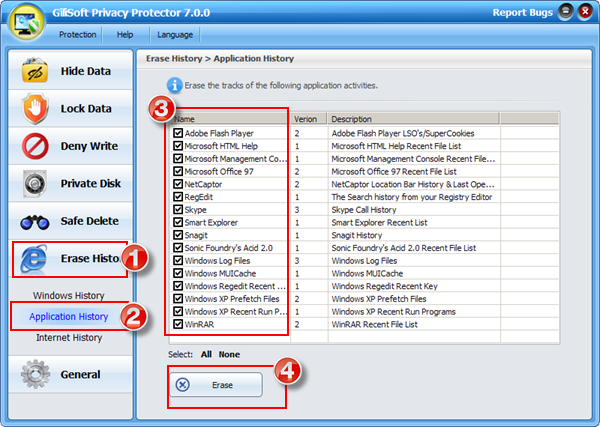
In GiliSoft Privacy Protector, review browser, Windows, and application-history categories rather than accepting every detected item automatically.
- Clean in small, verified groups
Start with the exact records you understand, check the result, and preserve saved passwords, autofill, cookies, or application state when they are still needed.
- Verify and change future settings
Reopen the affected browser or Windows surface, confirm the intended records are gone, and adjust history or sync settings if you do not want the same traces rebuilt.
For every product control and supported cleanup category, see the Privacy Protector user guide.
GiliSoft Privacy Protector Interface
These real product screenshots connect the guidance to the local Windows workflow.

Review Before You Finish
- Sign out of browsers, cloud services, and work accounts when the computer will change hands.
- Check synchronized devices and cloud dashboards separately; deleting a local record may not delete its cloud copy.
- Keep a verified backup of anything you may need before clearing history or shredding selected files.
- Test the result from a standard user account and restart the PC when the workflow calls for it.
Frequently Asked Questions
Is a privacy cleaner the same as a browser cleaner?
No. A Windows privacy cleaner may cover several supported local categories, while browser settings remain the best source for browser-specific and synced data.
Should I clean every detected item?
No. Review categories and preserve passwords, sessions, settings, and evidence you still need.
Can a privacy cleaner make me anonymous online?
No. It can remove selected local traces, but remote services, networks, accounts, and other systems may retain records.
Can it prepare a laptop for sale by itself?
No. A sale requires backup, sign-out, account deauthorization, reset or media sanitization, and verification.