
How to Add Subtitles to Video on Windows
Add subtitles to make dialogue understandable without relying on audio, publish translations, or keep instructions visible in noisy environments. This guide explains subtitle output choices, preparation, styling, synchronization, export checks, and common fixes.
Quick Answer
Finish trimming and speed changes first. Then open GiliSoft Video Converter, add the final source, open the Subtitle tool, load the subtitle file or create entries, check font and position, preview several cues, and export a short test before processing the complete video.
Choose Burned-In, Selectable, or Sidecar Subtitles
“Add subtitles” can mean three different delivery methods. Decide what the viewer should receive before choosing the output.
| Subtitle method | What viewers receive | Best use | Main limitation |
|---|---|---|---|
| Burned-in subtitles | Text becomes part of every video frame. | Social clips, displays, demos, and players with uncertain subtitle support. | Viewers cannot switch the text off or select another language. |
| Selectable subtitle track | A separate subtitle stream inside a compatible container. | Optional captions and multilingual playback. | The output container and player must support the track. |
| Sidecar subtitle file | Video and subtitle files remain separate. | Translation review, web workflows, and frequently updated captions. | The files must stay paired and the player must load the subtitle. |
Confirm the actual behavior of the selected GiliSoft output profile with a short sample. A successful export does not prove that another player can expose a selectable track.
Prepare the Video and Subtitle File
Use the final video cut
Trimming, rearranging, or changing speed after subtitles are timed can offset every later cue. Complete structural editing first.
Match the correct language and version
Pair the subtitle with the exact lesson, episode, customer revision, frame rate, and duration being exported.
Check timecodes
Inspect the first, middle, and final cues. Each entry needs a valid start time, end time, and readable text.
Use a compatible encoding
YouTube recommends plain UTF-8 for basic SRT files. UTF-8 is also a useful first test when non-English characters display incorrectly.
Common Subtitle File Choices
| Format | Typical strength | What to verify |
|---|---|---|
| SRT | Simple timecoded text with broad support. | Plain UTF-8, valid cue numbers and timestamps, and no unsupported styling assumptions. |
| ASS or SSA | More detailed style and positioning instructions. | Whether the chosen renderer preserves the intended font, position, and effects. |
| VTT | Timed text commonly used with web video. | Whether the target player and delivery workflow accept WebVTT. |
| Platform caption file | Upload separately to a service such as YouTube. | The platform's supported formats, language settings, and caption review tools. |
Method 1: Use the Dedicated Video Subtitle Workspace
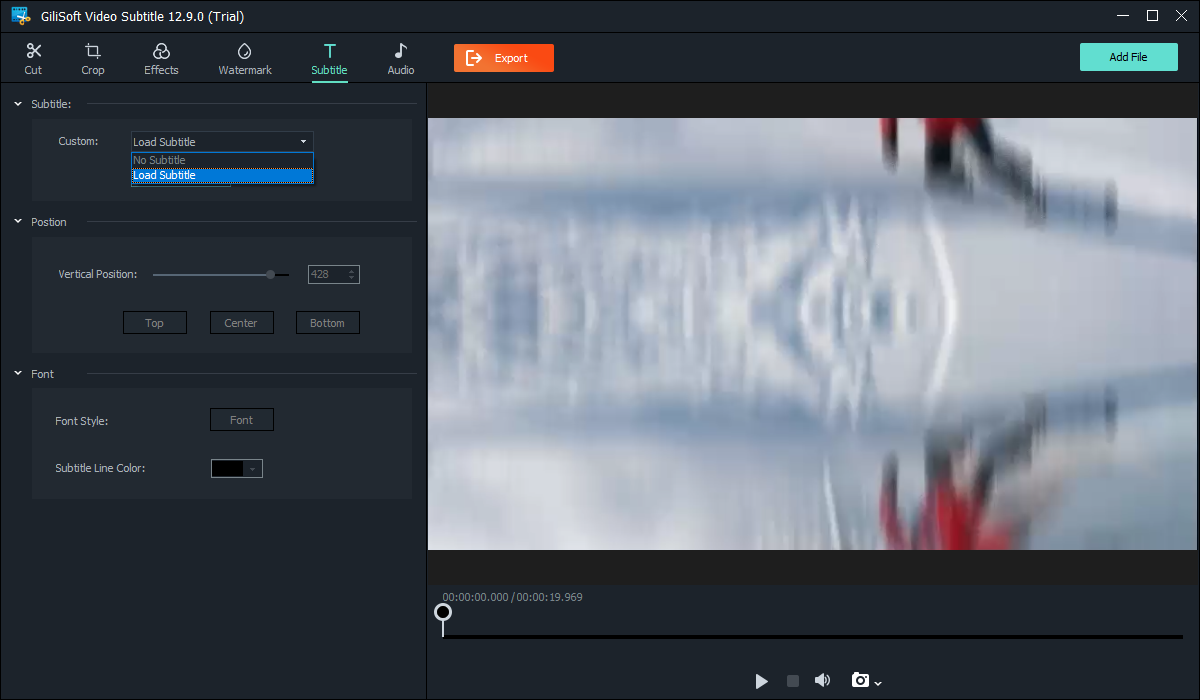 The focused workspace keeps subtitle controls beside a large video preview. Click to enlarge.
- Finish structural edits first
Use the final cut of the video. If duration or speed changes later, retime the subtitle against that new version.
- Add the source video
Open the Video Subtitle workspace and click Add File. Play the source and confirm that picture, sound, duration, and edit version are correct.
- Load or create subtitles
Open Subtitle, choose Load Subtitle for the prepared file, or create subtitle entries when the text must be entered manually.
- Set position and appearance
Choose top, center, bottom, or a suitable vertical position. Select a font and color that remain readable over bright and dark scenes.
- Preview timing and meaning
Check dialogue, speaker changes, two-line cues, silence, non-speech sounds, and places where text could cover important visual information.
- Export a short sample
Verify characters, timing, line wrapping, position, video quality, and audio. Then export the complete video and inspect the beginning, middle, and end again.
Method 2: Add Subtitles from the Conversion Queue
Use the main queue when subtitles are one part of format conversion, compression, batch processing, audio changes, or device preparation.
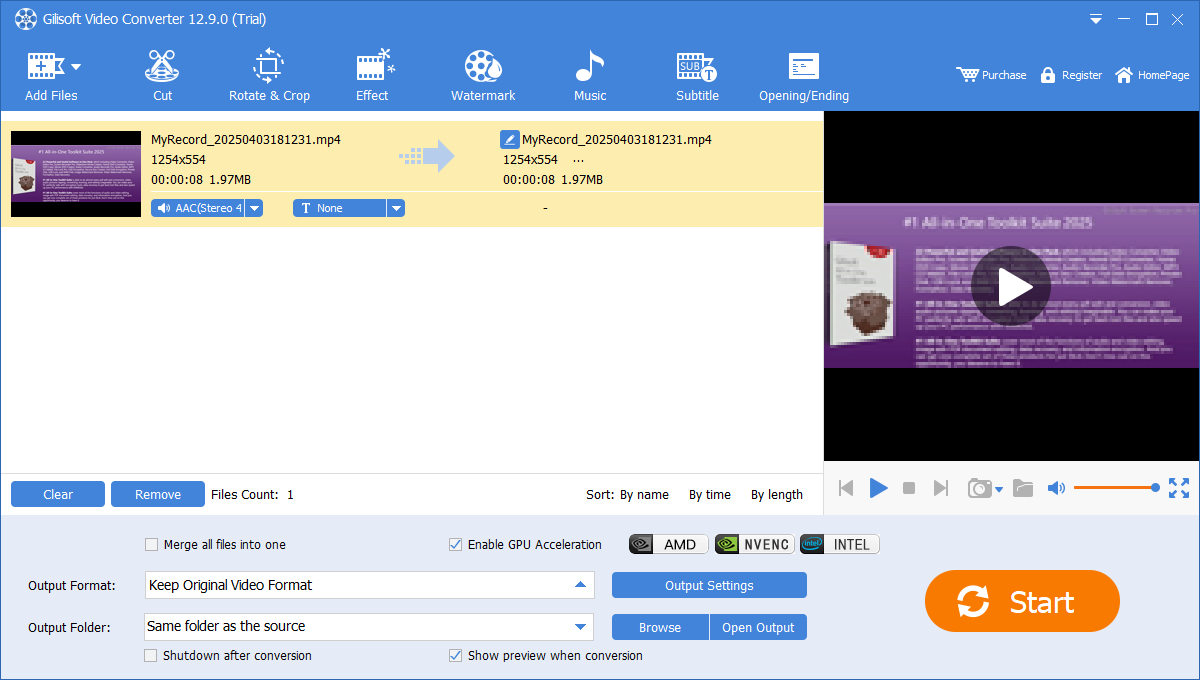 Add the video, select it, and open Subtitle from the toolbar. Click to enlarge.
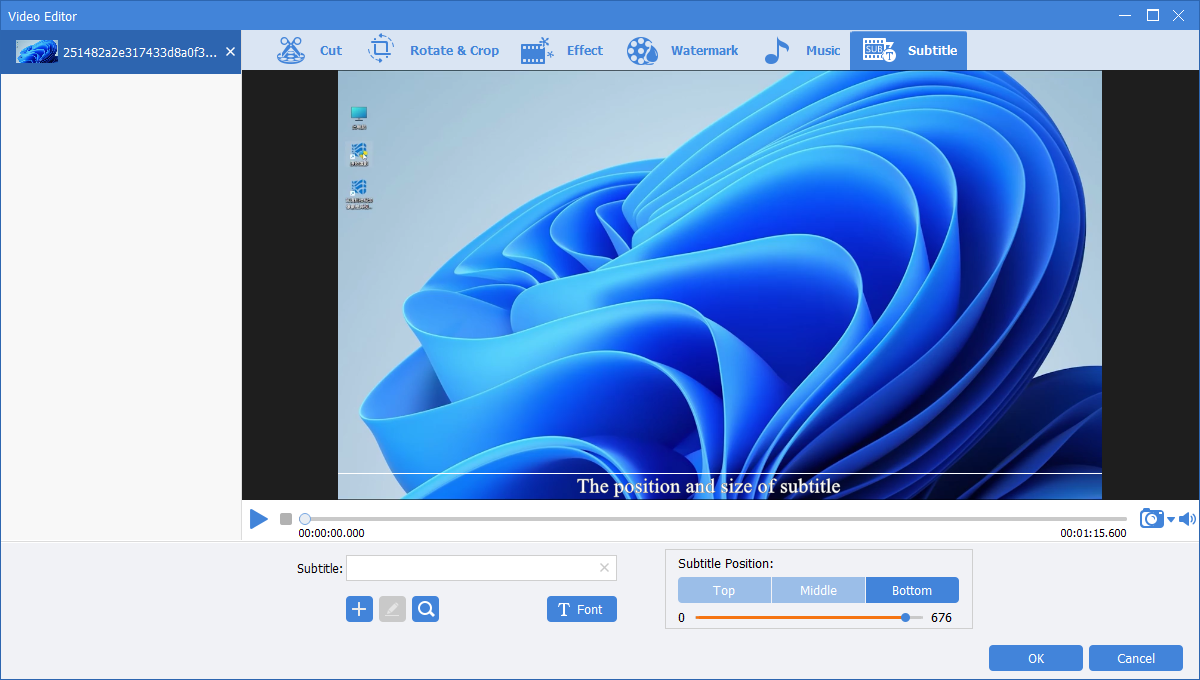 Load the subtitle, set font and position, and inspect it over the actual video. Click to enlarge.
Click OK after checking the subtitle. Back in the queue, choose the output format and folder, review acceleration and preview settings, and select Start. For more detail, read Add Subtitles During Video Conversion.
Make Subtitles Readable and Useful
| Check | What good output should do | What commonly fails |
|---|---|---|
| Timing | Appear with the relevant speech or sound and remain long enough to read. | Cues arrive early, remain after speech, or overlap the next speaker. |
| Line breaks | Keep phrases together and avoid covering too much of the picture. | Names, numbers, or short grammatical units split awkwardly. |
| Contrast | Remain legible over both bright and dark scenes. | A single text color disappears when the background changes. |
| Position | Avoid faces, demonstrations, interface controls, and existing on-screen text. | Default bottom placement hides the exact detail being explained. |
| Meaningful audio | Identify speakers and relevant sounds when the viewer cannot hear them. | Only dialogue is transcribed, so alarms, music changes, or off-screen events are lost. |
| Language | Use correct spelling, punctuation, names, technical terms, and installed font coverage. | Automatic text is published without checking product names or specialist vocabulary. |
Handle Multiple Videos or Languages
Pair files deliberately
Use clear video and subtitle names that include lesson, version, and language. Similar names are not enough for a production batch.
Separate different layouts
Do not force one position and font across horizontal lessons, vertical clips, screen recordings, and translated languages.
Test representative content
Include long lines, two speakers, numbers, special characters, bright scenes, and important content near the lower edge.
Review finished files
A completed queue only confirms processing. Play the actual outputs and verify the first, middle, and final cues for every language.
Fix Common Subtitle Problems
| Problem | Likely cause | What to do |
|---|---|---|
| Boxes, question marks, or missing characters | Text encoding or font coverage. | Keep the original, test a plain UTF-8 copy, and choose an installed font supporting the language. |
| Every cue is early or late by the same amount | A fixed timing offset. | Shift the subtitle timing and recheck the first, middle, and last cues. |
| Timing drifts progressively | Different edit, duration, speed, or frame-rate reference. | Retime against the final source rather than applying only one global offset. |
| Text is clipped or off-screen | Font size, long lines, position, or changed resolution. | Shorten lines, adjust font and vertical position, and preview at the final output dimensions. |
| Subtitle covers important content | Default placement conflicts with faces, slides, or software controls. | Move the text for that delivery and inspect changing scenes throughout the video. |
| Player does not show selectable subtitles | Container, track, or player support mismatch. | Test another compatible player or deliver burned-in text or a sidecar file according to the requirement. |
| Video quality falls after adding subtitles | Burn-in requires re-encoding with unsuitable output settings. | Start from the original, preserve suitable resolution and frame rate, and increase output quality before testing again. |
Choose the Right GiliSoft Workflow
Video Subtitle workspace
Best for one focused load, style, preview, and export job with a large subtitle-oriented workspace.
GiliSoft Video Converter
Best when subtitle handling accompanies conversion, compression, basic editing, audio work, or a managed batch. Download Video Converter.
GiliSoft Speech to Text
Use GiliSoft Speech to Text when spoken audio must first be transcribed, then proofread and timed for subtitle use.
GiliSoft Video Editor
Choose GiliSoft Video Editor when subtitles are part of a larger timeline project with detailed cutting, scene arrangement, music, titles, and effects.
Add Subtitles to Video FAQ
Can I add an SRT file to an MP4 video?
Yes. Add the final video, open Subtitle, load the matching SRT file, preview timing and position, and export a short sample. Confirm whether the selected output burns in the text or preserves a selectable track.
Can I create subtitles without an existing file?
Yes. The GiliSoft subtitle tools can create entries, although a prepared and proofread subtitle file is usually more efficient for a long video.
Can viewers turn the subtitles off?
Not when the text is burned into the picture. Selectable subtitles require compatible output, track, and player support.
Why are subtitles out of sync?
The subtitle may belong to another edit, or the video duration, speed, or frame rate may differ. Compare first, middle, and final cues to distinguish a fixed offset from gradual drift.
Why do Chinese, Arabic, or accented characters display incorrectly?
Test a plain UTF-8 subtitle copy and an installed font that contains the complete language character set.
Do captions need sound descriptions?
When captions provide access to audio content, include relevant speaker changes and meaningful non-speech sounds that affect understanding.