
How to Transport Private Data on CD or DVD Securely
Physical media can be lost, copied, or delivered to the wrong person. A safer disc workflow encrypts the private files, keeps only intended instructions in the public area, verifies password access before release, and treats the password and disc as separate delivery items.
Quick answer
List the intended recipient, retention period, public instructions, confidential files, and any data that must not be placed on removable media. Choose the narrowest control that matches the actual risk and verify it before relying on the finished media or workstation policy.
Choose the Right Offline Delivery Format
| Situation | Recommended approach | Check carefully |
|---|---|---|
| Final physical handoff | Create and burn a protected CD or DVD | Media capacity, burner support, and recipient hardware |
| Review or archive before burning | Create an encrypted ISO first | Storage location, integrity, and access permissions |
| Mixed public and private content | Use separate public and secure areas | Do not place confidential files in the public area |
| Recipient has no optical drive | Use another approved encrypted delivery method | Compatibility and organizational policy |
Step-by-Step Workflow
- Classify the files before authoring
List the intended recipient, retention period, public instructions, confidential files, and any data that must not be placed on removable media.
- Start a disc or encrypted ISO project
Insert supported blank media and select the burner, or choose Make ISO Image File when the project should be tested or archived first.
- Separate public and secure content
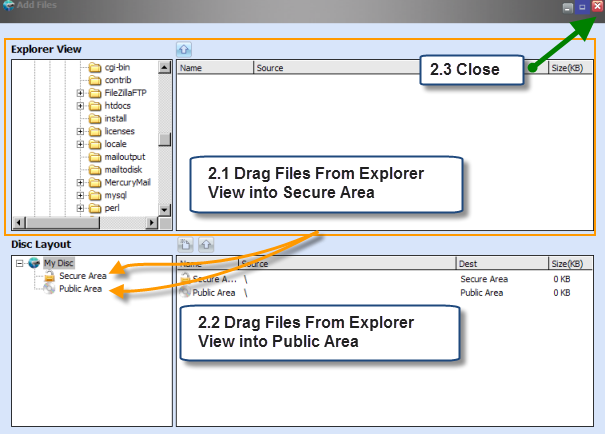
Add readme files and opening instructions to the Public Area, then place confidential documents, media, and archives in the Secure Area.
- Set the secure-area password and create the output
Use a strong unique password, confirm it carefully, then burn the disc or save the encrypted ISO without overwriting the only source copy.
- Verify on the recipient workflow
Test public files, run the included disc agent, enter the password, and open representative protected files on another suitable Windows PC.
- Transport the disc and password separately
Label the media without exposing sensitive details, maintain custody where required, and send the password through a separate approved channel.
For the complete product workflow, see the Secure Disc Creator user guide.
Product Interface
These real GiliSoft screenshots connect the workflow to the controls used on Windows.


Verify the Result Before Use
- Start with noncritical files or media and preserve a verified source copy.
- Test the exact recipient, application, drive, and Windows account involved in the real workflow.
- Document passwords, ownership, exceptions, and authorized recovery separately from the protected item.
- Review the setting when the delivery or workstation requirement changes.
Frequently Asked Questions
Can one disc contain public and private files?
Yes. Secure Disc Creator can place open instructions in a public area and password-protected files in a separate secure area.
Does the recipient need the full authoring application?
No. The protected disc includes an agent for opening the secure area with the correct password on a supported Windows PC.
Should the password travel with the disc?
No. Send it through a separate approved channel so loss of one item does not immediately expose both.
Can I test the project before burning?
Yes. Create an encrypted ISO, mount it in the virtual drive, and verify public and secure access before final production.