
Use EXE output when the audience uses Windows, needs one self-contained password-protected package, and the finished package stays within the 4 GB EXE limit. If the protected output will exceed 4 GB, choose GFX instead. Keep ordinary MP4 for browser, phone, Mac, or public streaming delivery. Do not attach EXE packages directly to Gmail because Gmail blocks executable attachments, including many executables placed inside archives.
What Does It Mean to Package a Video as an EXE?
Packaging a video as EXE does not turn a codec into a program. It places the protected video, playback logic, and access rules inside a Windows executable delivery package.
Microsoft defines EXE files as part of the Portable Executable format used by the Windows operating-system family. That is why an EXE package is a Windows delivery format, not a universal video format for macOS, iPhone, Android, smart TVs, or web browsers.
The recipient opens the EXE package without separately locating an MP4 and a player.
The package can require the configured password before the protected video opens.
Configured playback restrictions or authorized-USB binding remain part of the delivery workflow.
When EXE Video Packaging Is a Good Fit
Offline training delivery
Package course lessons, onboarding recordings, or internal demonstrations for Windows PCs that may not have reliable internet access.
Private customer previews
Let a client open a password-protected preview without handing over the ordinary source MP4 as a separate file.
USB-based distribution
Deliver the package on removable media and, when required, bind EXE playback to an authorized USB device.
Consistent recipient playback
Use one package when the intended Windows audience should not have to choose or install a separate media player.
When You Should Not Use an EXE Package
EXE is a Windows executable format. Use MP4, a compatible protected service, or another delivery method for cross-platform viewing.
Google states that Gmail blocks EXE attachments and can also block prohibited file types found inside compressed archives.
Ask the recipient's IT team whether downloaded executables are allowed before creating a large distribution batch.
Use a web video format and a hosting or access-control platform instead of asking public visitors to run an executable.
Deliver the original video through an approved encrypted transfer method when legitimate editing or reuse is required.
A package should be verified on a representative Windows PC before it becomes the only delivery copy.
EXE vs GFX vs MP4 vs Password-Protected Archive
| Format | Best use | What the recipient opens | Main tradeoff |
|---|---|---|---|
| Protected EXE Up to 4 GB | Offline Windows delivery, private previews, USB distribution | One self-contained executable package | The finished EXE must stay within 4 GB; Windows security checks may apply |
| Protected GFX For larger output | Protected videos whose finished package exceeds the EXE size limit | Encrypted GFX file in the compatible player | The recipient uses the GiliSoft protected-player workflow |
| Ordinary MP4 | Cross-platform viewing, web upload, mobile playback | A normal video file | No package-level password or continuing playback rules |
| AES archive containing MP4 | Secure transfer when extraction is allowed | An archive, then the extracted MP4 | After extraction, the MP4 is ordinary and copyable |
Before You Create the EXE Video Package
Confirm the recipient platform. Verify that the intended viewer uses a supported Windows environment and is allowed to run delivered applications.
Keep the original video. Store a verified backup of the source MP4 or other media outside the output folder.
Decide what playback should permit. Set requirements for screenshots, Save As, copying, offline use, and USB-device binding before export.
Choose a delivery channel. Use an approved HTTPS download portal, managed file-transfer service, or physical USB rather than assuming email will accept an EXE.
Prepare a test Windows PC. The clean test environment should resemble the recipient's permissions, endpoint security, and network conditions.
How to Package a Video as an EXE File
GiliSoft Any Video Encryptor provides both GFX and EXE output. Choose EXE only after confirming that the recipient and delivery channel are suitable for Windows executable files.
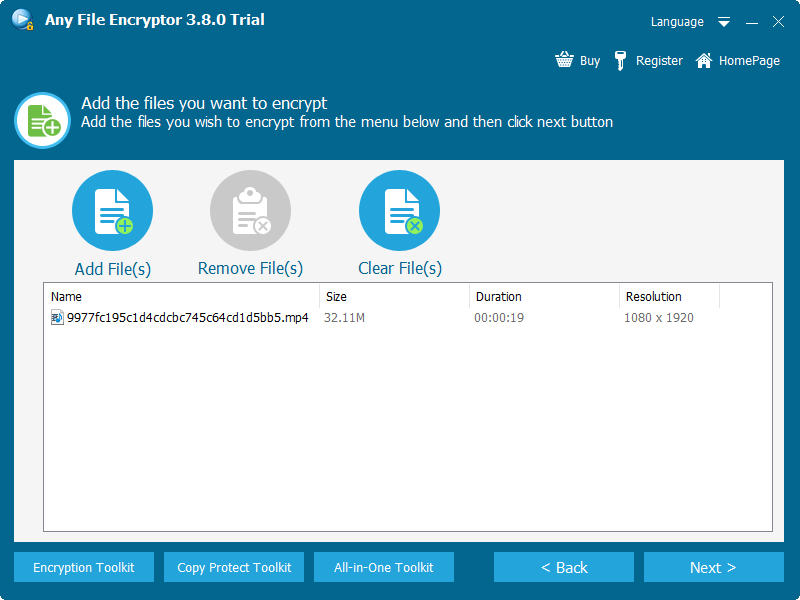
Open Any Video Encryptor and add the video or videos you are authorized to package.
Review each source filename, duration, resolution, and size before moving to the output settings.
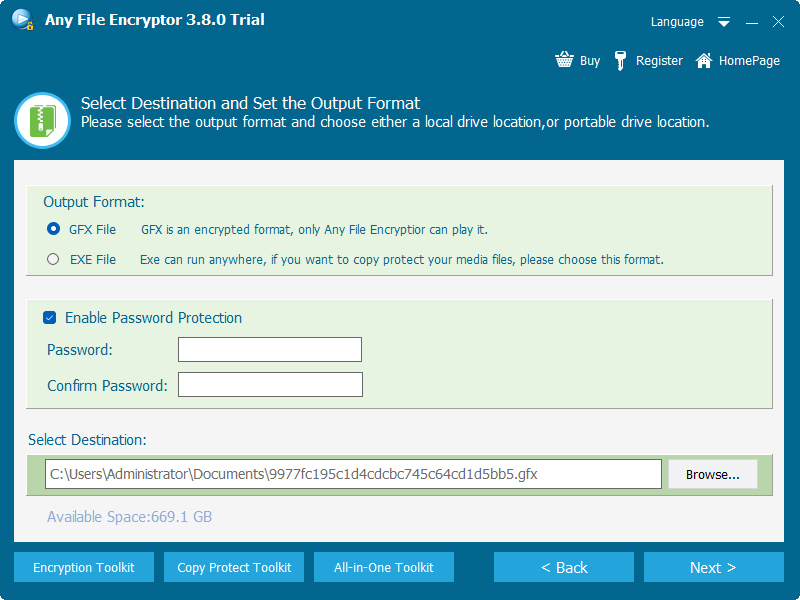
Select EXE File when the finished package will remain within 4 GB. If the estimated protected output is larger, select GFX File instead, then choose the destination.
Enable password protection and enter a long, unique passphrase. Record it in an approved password or project record.
Configure screenshot, Save As, or authorized-USB binding options according to the actual delivery requirement.
Create the EXE package, then test the exact exported file on another Windows PC before distribution.
How USB-Bound EXE Video Delivery Works
USB binding is useful when the executable should open only while an authorized removable device is present. It can make sense for offline training kits, event demonstrations, field-service media, or controlled customer handoff.
Insert the intended USB drive and confirm its identity before configuring the package.
Select EXE output and enable the option that binds playback to the authorized USB device.
Export the package to the planned delivery location and safely eject the USB drive.
Reconnect the authorized USB and test playback, then repeat the test without the USB to verify the intended restriction.
Document how a lost or failed USB device will be replaced. Keep the source video and project details in a separate verified backup.
Plan for Windows Download and Security Prompts
Microsoft Defender SmartScreen evaluates downloaded files using publisher reputation and file-hash reputation. A new or uncommon executable can therefore show a warning even when it was created for a legitimate project. The recipient should never be told to ignore security warnings blindly.
Host the package on the official company domain, an authenticated customer portal, or a managed transfer service.
Tell the recipient the expected filename, purpose, approximate size, and delivery channel before they download it.
Microsoft Authenticode can identify a software publisher and verify that signed software has not changed since publication.
For managed PCs, have the recipient's administrator review or allow the package instead of asking the user to bypass policy.
Deliver the EXE Package Without Creating Confusion
Gmail explicitly blocks EXE attachments, including many executable files hidden inside archives.
For sensitive material, do not place the protected file and its password in the same message.
State that the file is a Windows package, who sent it, why it is expected, and who to contact if policy blocks it.
A SHA-256 checksum gives technical recipients another way to verify that the delivered file matches the published copy.
Do not rename an EXE to resemble a document or video. Clear naming builds more trust and reduces unsafe behavior.
Keep the original media, package settings, password record, and replacement procedure until the project is complete.
EXE Video Pre-Delivery Test Checklist
The package launches on a representative Windows PC without relying on the authoring computer.
One incorrect entry is rejected and the correct passphrase opens the package as expected.
Video, audio, seeking, full screen, pausing, and closing all work correctly.
Screenshot, Save As, and USB-binding behavior match the configured policy.
If offline viewing is promised, the complete opening and playback process works with the network disconnected.
The intended download channel, endpoint security, and user permissions allow the package or have an approved IT exception.
Does EXE Packaging Reduce Video Quality?
Packaging does not inherently require changing the encoded video and audio streams. If the program wraps and encrypts the source without transcoding it, playback quality can remain the same. The EXE file may be larger than the source because it also contains playback and protection components.
EXE output has a 4 GB package-size limit. Judge this by the expected finished package rather than the source video alone because the protected player and package data add some overhead. When the finished output is likely to exceed 4 GB, use GFX output. You can also split a long course or training library into sensible modules when smaller packages will be easier to transfer, update, and replace.
Package Videos as EXE FAQ
Can an EXE video package play on a Mac or phone?
No. EXE is a Windows executable format. Use MP4 or a suitable cross-platform delivery method for macOS, iOS, Android, browsers, and smart TVs.
Does the recipient need the original MP4?
No. The purpose of self-contained EXE delivery is to package the protected media and playback workflow together instead of sending the source MP4 separately.
Can I send the EXE package through Gmail?
Gmail blocks EXE attachments and prohibited executable types found in many archives. Use an approved secure download link or physical media.
Does a SmartScreen warning mean the package is malware?
Not by itself. Microsoft says SmartScreen evaluates publisher and file reputation. Recipients should verify the source and follow organizational policy rather than bypassing warnings automatically.
Can I bind the EXE package to a USB drive?
Yes. Any Video Encryptor can create EXE delivery linked to an authorized USB device so playback depends on that device being present.
What if the protected video package is larger than 4 GB?
Choose GFX output. EXE packages are limited to 4 GB, while GFX is the appropriate protected format when the finished package exceeds that limit.
Can an EXE package prevent every possible capture method?
Configured screenshot and Save As restrictions can deter common reuse paths. Delivery should still be limited to trusted recipients and protected source material should be retained separately.
Will packaging change the video quality?
Protection alone does not require re-encoding. Verify the final output against the source because quality changes depend on the actual export settings and workflow.
Should I delete the source video after export?
No. Keep a verified source backup and the project settings until the recipient confirms successful playback and the retention requirement has ended.
Sources and Further Reading
- Microsoft Learn: PE format for Windows executable files
- Microsoft Learn: SmartScreen reputation for Windows apps
- Microsoft Learn: Authenticode digital signatures
- Google Gmail Help: File types blocked in Gmail
- NIST: How to create a good password