

How to Password Protect Video Files for Sharing and Playback
Video password protection can mean encrypting a file for transfer, protecting removable storage, or delivering a controlled playback package. Choose the method around the recipient and the required controls.
Quick answer
An ordinary MP4 file has no universal playback password. Use GiliSoft Any Video Encryptor to create a password-protected GFX or Windows EXE playback package when recipients should not receive the open source video. Use an encrypted archive for simple file transfer, USB encryption for removable storage, or a DRM platform when licenses, expiry, device binding, and revocation are required.
Compare video password-protection methods
| Method | Best for | Limit |
|---|---|---|
| Protected playback package | Windows delivery with a playback password | Recipient platform and package format must be confirmed |
| Encrypted archive | Small files that may be extracted after approval | Protection ends after extraction |
| USB Encryption or BitLocker | Protecting videos at rest on removable media | Files may be copied after the storage is unlocked |
| DRM protection | Licenses, expiry, device binding, and revocation | Requires a managed publishing and playback workflow |
Create a password-protected video package
- Confirm the recipient platform.
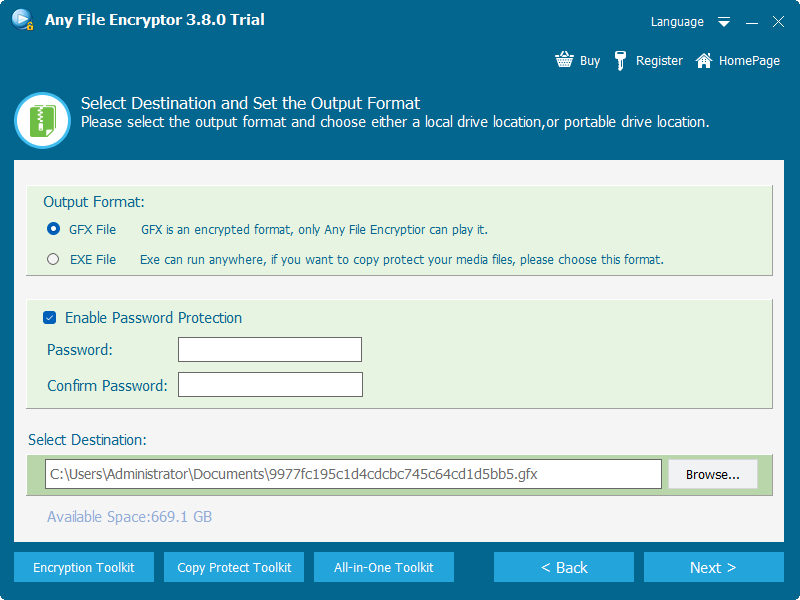
Choose GFX or Windows EXE output only after confirming how the viewer will open it.
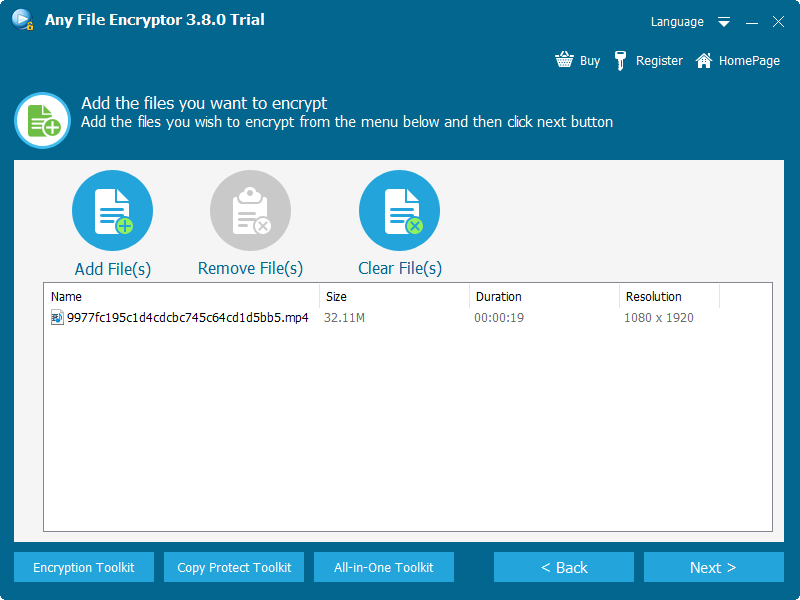
- Add the source videos.
Use authorized local files and arrange multiple videos in the intended order.
- Choose playback and output settings.
Set the package title, player appearance, and supported restrictions required by the project.
- Set the password or password-creation workflow.
Do not send the password through the same channel as the package.
- Create and test the package.
Open it on a clean intended Windows PC and verify video, audio, seeking, and password behavior.
- Deliver the protected package.
Keep the source video and recovery information under separate control.
Plan the recipient experience first
- Confirm Windows, macOS, mobile, or offline playback requirements.
- Decide whether files may be extracted or only played through a protected package.
- Send passwords through a separate approved channel.
- Test subtitles, multiple audio tracks, seeking, and long-video playback.
- Use DRM instead of a simple password when access must expire or be revoked.
Frequently asked questions
Can I put a password directly on an MP4 file?
MP4 does not define a universal playback-password field. Use a protected playback package, encrypted archive, encrypted storage, or DRM workflow instead.
What is the best method for emailing a video?
For a small file, an encrypted archive may work if the recipient has compatible software. For controlled playback, deliver a protected package through an approved transfer channel.
Can I password protect several videos together?
Yes. Add multiple videos to one protected package or encrypted archive, then test navigation and playback before delivery.
Can the viewer play a protected package on a phone?
Windows EXE packages are intended for Windows. Confirm platform requirements before choosing the output format.
Is a password enough to stop redistribution?
No. A password controls access, but authorized viewers may still record or redistribute content. Use DRM policies when stronger playback controls and revocation are required.