
When PDF to Image Is the Right Output
Image output is useful when a system cannot display PDF, when each page must become a standalone visual, or when page appearance matters more than editable text. The tradeoff is that text becomes pixels rather than searchable document content.
Choose the format and resolution for the destination. JPG is compact for photographic pages; PNG is better for sharp text, diagrams, and lossless screenshots. Very low resolution makes small text difficult to read.
Convert PDF Pages to Images with Formathor
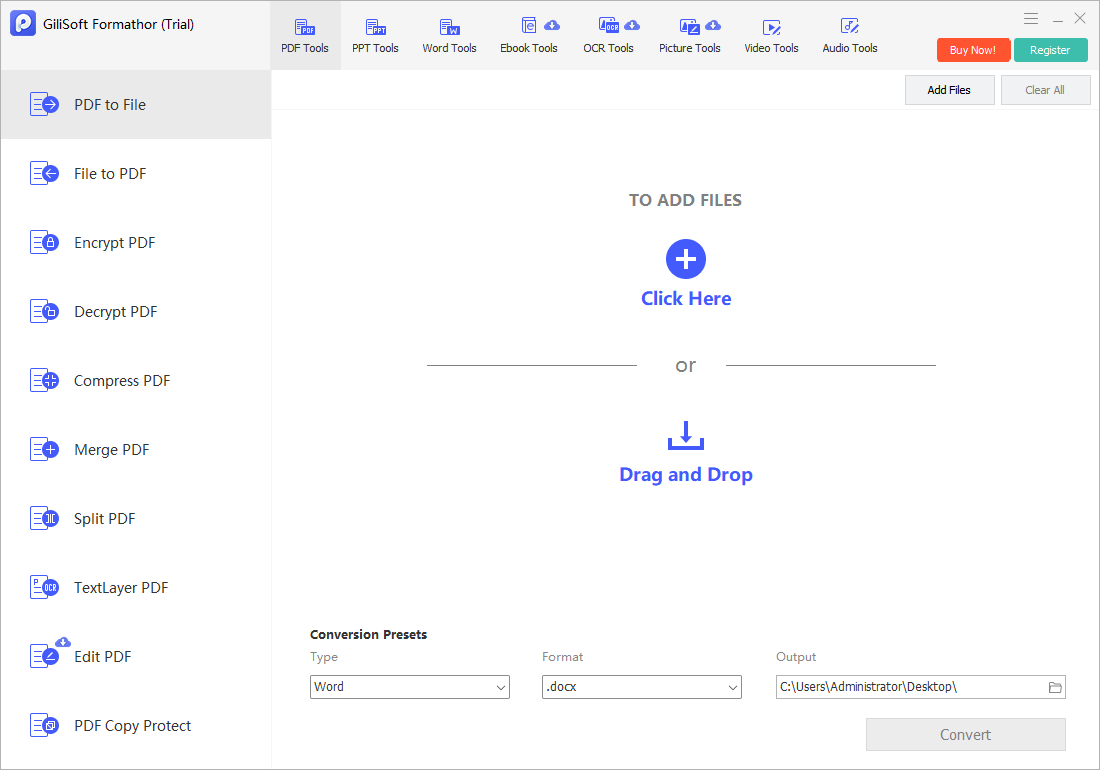
In GiliSoft Formathor, open PDF to File, add the PDF, choose an image output supported by the conversion preset, and save the results locally.
- Choose the page range.
Exclude blank, confidential, or irrelevant pages before export. - Open PDF to File.
Add the source PDF and choose the intended image format. - Set the destination.
Use a dedicated folder because a multi-page PDF can create many image files. - Convert the pages.
Keep predictable filenames so the exported sequence remains clear. - Inspect representative images.
Check the first, middle, and last pages at 100% zoom for text sharpness, color, and cropping.
Choose an Image Format and Resolution
| Output choice | Best fit | Check before delivery |
|---|---|---|
| PNG | Text, diagrams, UI captures, and lossless page images | File size and transparency requirements |
| JPG | Photographic or mixed-content pages | Compression artifacts around text and lines |
| Higher resolution | Printing, zooming, or detailed diagrams | Storage and processing cost |
| Lower resolution | Thumbnails and quick previews | Whether small text remains readable |
| One folder per PDF | Batch and multi-page jobs | Filename sequence and collision handling |
Common PDF to Image Converter Workflows
Website previews
Create page thumbnails while retaining the original PDF for download.
Presentation assets
Insert selected PDF pages as visual references in a deck.
Review systems
Supply one image per page to workflows that do not accept PDF.
Image editing
Use an exported page as a visual base when document structure is not required.
GiliSoft Formathor keeps PDF, Office, image, OCR, and related document conversion tools in one Windows application. Test a representative copy before processing important originals or a large batch.
Fix Common Conversion Problems
| Problem | Likely cause | Practical check |
|---|---|---|
| Small text looks blurry | Resolution or JPG quality is too low | Export at a higher resolution or use PNG |
| Pages appear out of order | Filenames do not sort numerically | Use zero-padded sequential names |
| Colors look different | Color profiles or viewer handling differ | Compare in the target application and device |
| Images are unexpectedly large | Lossless output and high resolution increase size | Choose a suitable format and dimensions for the destination |
| Links and selectable text disappear | Images contain pixels, not PDF structure | Keep or provide the original PDF when those features matter |
PDF to Image Converter FAQ
Can I convert every PDF page to JPG or PNG?
You can convert supported PDF pages to an available image format. Use a dedicated output folder and verify the filename sequence for multi-page documents.
Which is better for PDF pages, JPG or PNG?
PNG is usually better for text and line art; JPG can be smaller for photographic pages. Test the chosen format at the final display size.
Does PDF to image preserve searchable text?
No. The visible text becomes part of the image. Keep the original PDF or provide OCR text when search and accessibility matter.
What resolution should I use?
Use the lowest resolution that remains clear for the destination. Screen thumbnails need less than print or detailed zooming, but exact needs depend on page size and content.
Can password-protected PDFs be converted?
Only when you have permission and legitimate access. A converter does not bypass encryption or document restrictions.
Related File Conversion Guides
- Image to PDF converter
- PDF to Word converter
- PDF to PPT converter
- Offline PDF converter
- File to PPT converter
- Formathor User Guide
Export PDF Pages as Clear Image Files
Choose the right page range, format, resolution, and output folder, then inspect the images at their final size.