

Can Windows Block Phone File Transfer but Keep Charging?
USB ports carry power and several different device functions. Storage access, phone data, input devices, printers, security keys, and network adapters should not automatically receive the same policy. Define the risky channel first, then protect the policy and test every required exception.
Step-by-Step USB Access Workflow
Define the allowed phone use
Decide whether charging is allowed and whether file transfer, photo import, device trust, or USB tethering must be blocked.
Set the USB Lock administrator password
Protect policy changes and configure recovery information before applying phone controls.
Enable the phone data restriction
Use the Android and iPhone control to close the local data-transfer path.
Block tethering separately if required
Mobile USB tethering creates a network path and should be tested independently from file transfer.
Test representative hardware
Try Android File transfer, iPhone trust access, charging, tethering, and the cables and ports used in daily work.
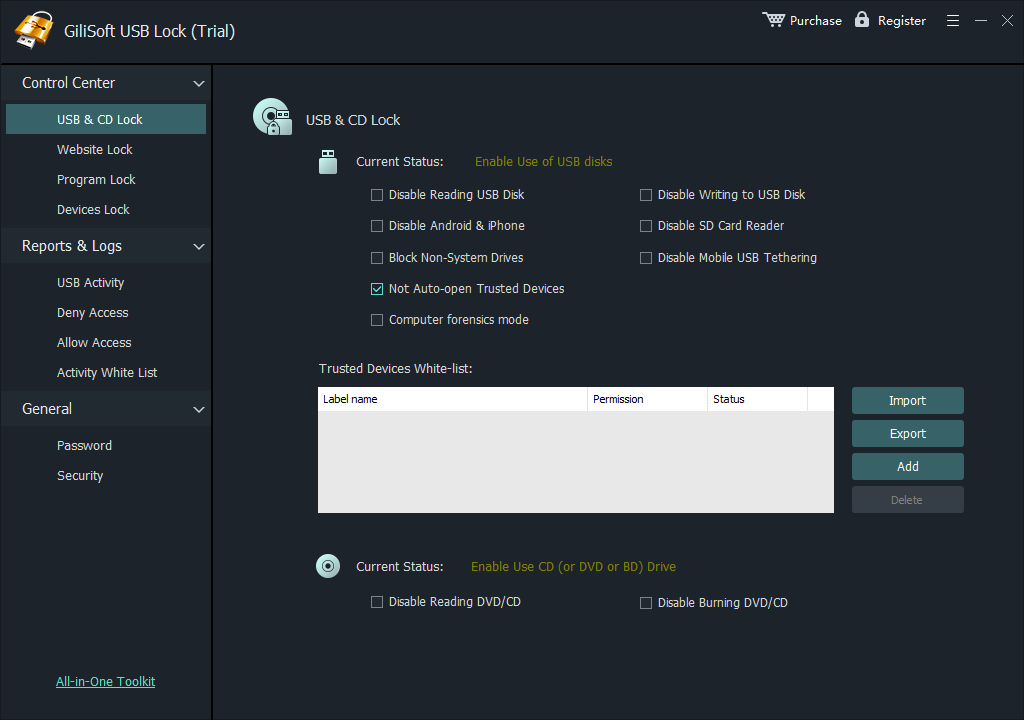 Configure the relevant USB Lock control, protect administration, and verify both approved and blocked behavior.
Build a Policy People Can Maintain
Phone data
Blocks the Windows access path used to browse or copy phone content.
USB tethering
Closes an unmanaged phone-based network connection when company policy prohibits it.
Charging test
Confirms whether each approved phone and cable still receives power under the selected controls.
Use GiliSoft USB Lock for Selective Device Control
GiliSoft USB Lock controls removable storage, phone transfer, SD cards, optical media, USB tethering, and selected USB network adapters from a Windows application protected by administrator credentials. Trusted-device rules keep reviewed company hardware available while unknown devices follow the restricted policy.
Deployment Checks
- Keep an administrator recovery route that ordinary users cannot change.
- Test every required keyboard, mouse, printer, security key, docking station, phone, and approved drive.
- Verify blocked behavior with unknown media instead of assuming the policy is active.
- Document approved devices, owners, permissions, exceptions, and replacement dates.
- Repeat testing after major Windows, driver, phone, or hardware changes.
Frequently Asked Questions
Will every phone continue charging?
Not guaranteed. Charging behavior varies by phone, cable, controller, port, and applied policy, so test the real hardware.
Is phone file transfer the same as USB storage?
No. Phones may appear as portable devices and should have their own data-access control.
Does blocking phone data also block tethering?
Treat tethering separately because it creates a network connection rather than an ordinary file-transfer path.
Can USB drives be controlled at the same time?
Yes. USB storage, SD cards, phones, and tethering can be covered by a coordinated policy.