
Document Converter for Windows: PDF, Word, Excel, PPT and More
Document conversion is rarely just changing an extension. A dependable workflow chooses the output for its destination application, preserves the source, tests representative files, and checks layout, data, images, links, and accessibility after conversion.
Quick answer
Choose the target format according to the next task. Use PDF for fixed delivery, Word for narrative editing, Excel for tabular reuse, PowerPoint for slide work, images for visual output, and OCR when the source contains only photographed or scanned text. GiliSoft Formathor brings these conversion families together locally on Windows.
Choose the Output for the Next Application
| Need | Output direction | Verify |
|---|---|---|
| Fixed review or delivery | Office, image, text, or eBook to PDF | Pages, fonts, images, links, and margins |
| Edit narrative text | PDF or other source to Word | Paragraphs, headings, lists, and page breaks |
| Reuse table data | PDF to Excel | Rows, columns, decimals, totals, and dates |
| Reuse presentation content | PDF or file to PowerPoint | Slide order, text boxes, images, and aspect ratio |
| Visual pages | PDF or document to image | Resolution, color, page order, and names |
| Scanned text | OCR before reusable output | Recognition accuracy and reading order |
Prepare Source Documents
- Keep the originals.
Write converted files to a separate destination and use clear version names.
- Open every source.
Check for damage, passwords, missing fonts, external links, tracked changes, hidden sheets, notes, or unsupported content.
- Group compatible jobs.
Separate source families and destination requirements before batching.
- Identify scanned pages.
Image-only text may require OCR rather than ordinary conversion.
- Select representative files.
Test common and difficult layouts before processing the entire set.
Convert Documents with GiliSoft Formathor
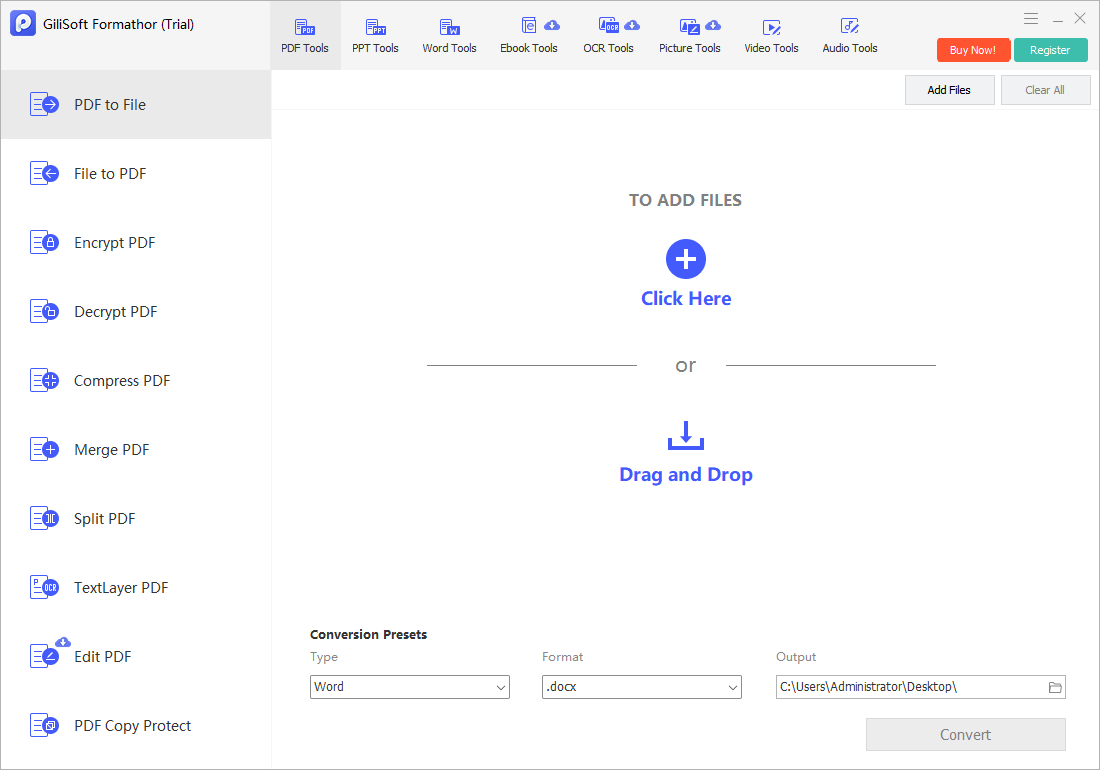
Open the task family that matches the source and destination, add files, choose the output format and folder, then run a representative conversion.

- Choose the conversion direction.
Do not send a PDF into a file-to-PDF task or mix unrelated source families.
- Add one or more supported files.
Review queue order, source names, and accidental duplicates.
- Set the output format and folder.
Avoid overwriting originals and confirm where completed files will appear.
- Convert a test file.
Let processing finish and note any failed or skipped source.
- Open the result externally.
Use the actual destination application to inspect the output.
Scale from One File to a Controlled Batch
After a representative output passes review, process a small group. Confirm naming, collision handling, page or slide order, output count, and failed-file reporting. Separate exceptions such as password-protected, scanned, corrupt, multilingual, macro-enabled, or unusually large documents.
Verify Content, Layout, and Data
- Compare beginning, middle, and end.
Check complete documents, not only the first page or slide.
- Inspect text and fonts.
Look for substitutions, missing characters, line-wrap changes, and clipped content.
- Check tables and numeric data.
Verify rows, columns, decimals, dates, formulas, and totals against the source.
- Review images and navigation.
Confirm resolution, crop, captions, hyperlinks, bookmarks, and reading order.
- Proofread OCR output.
Check names, numbers, punctuation, and low-quality pages manually.
Document Converter for Windows FAQ
What documents can Formathor convert?
It covers PDF, Office, image, eBook, text, OCR-oriented, and related conversion tasks shown in the installed application. Confirm the exact source and destination formats required.
Can it convert PDF to Word, Excel, and PowerPoint?
Yes, those are core PDF-to-file directions. Complex layout, tables, images, fonts, and scanned text still require output review.
Can it create PDF from Office and image files?
Yes, use the appropriate file-to-PDF task, arrange the sources, and verify page size, orientation, order, links, and image quality.
Does document conversion preserve formatting perfectly?
Not always. Different formats represent pages, text flow, tables, effects, fonts, and metadata differently. Test representative files and expect some correction.
Can I convert confidential files without uploading them?
Formathor provides a local Windows workflow. You must still protect source and output folders, device access, backups, passwords, and final delivery.
How should I run a large batch conversion?
Test difficult files first, process a small batch, verify output count and quality, then continue while separating protected, scanned, damaged, or unsupported exceptions.