
What Excel to PDF Conversion Changes
Excel stores formulas, values, sheets, hidden ranges, and interactive links. PDF freezes the selected print output into pages. That makes sharing easier, but it also means worksheet layout decisions become part of the final document.
Before conversion, decide which sheets and ranges belong in the PDF. A workbook that looks correct in Normal view can still create clipped columns, tiny text, blank pages, or awkward page breaks.
Convert Excel to PDF with GiliSoft Formathor
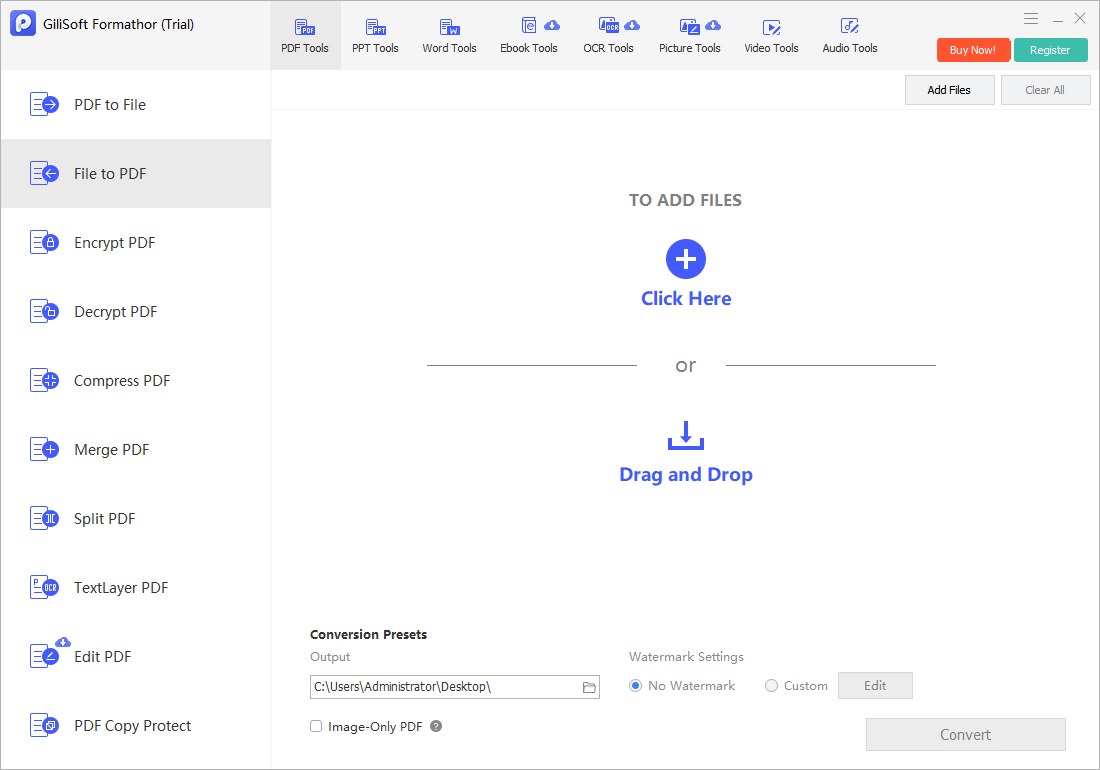
Open File to PDF in GiliSoft Formathor when spreadsheet files need consistent PDF output alongside other document conversions.
- Prepare the workbook.
Remove accidental print areas, expose required rows and columns, and save a working copy. - Open File to PDF.
Add the Excel workbook from local storage and confirm the intended file. - Choose the output folder.
Use a clear destination and avoid overwriting an approved PDF without review. - Convert the workbook.
Keep the original spreadsheet available because formulas and interactive behavior do not become editable PDF calculations. - Review every PDF page.
Check sheet order, headers, page breaks, charts, totals, links, and text size.
Check the Workbook Before Conversion
| Workbook element | What can go wrong | What to verify |
|---|---|---|
| Wide tables | Columns shrink or move to another page | Use landscape orientation or a sensible pages-wide setting |
| Multiple worksheets | Unwanted sheets may be included or omitted | Confirm the intended sheet selection and order |
| Hidden rows or columns | Sensitive or supporting data may be handled unexpectedly | Review hidden content before publishing |
| Charts and images | Objects may clip at print boundaries | Inspect each object in print preview |
| Internal links | Spreadsheet-internal links may not survive PDF conversion | Test important links in the exported PDF |
Common Excel to PDF Converter Workflows
Financial reports
Create fixed review copies of approved budgets, statements, and reconciliations.
Operations dashboards
Share a readable snapshot without exposing formulas or requiring Excel.
Price and inventory lists
Publish controlled tables while retaining the source workbook separately.
Client deliverables
Combine spreadsheet results with other documents in a stable PDF package.
GiliSoft Formathor keeps PDF, Office, image, OCR, and related document conversion tools in one Windows application. Test a representative copy before processing important originals or a large batch.
Fix Common Conversion Problems
| Problem | Likely cause | Practical check |
|---|---|---|
| Text is too small | The sheet was forced onto too few pages | Use landscape, a larger paper size, or allow additional pages |
| Blank PDF pages | Old print areas or distant formatted cells extend the used range | Reset the print area and inspect page-break preview |
| Columns are cut off | Paper width, margins, or scaling does not fit the table | Adjust page setup and preview again |
| Headers disappear | Title rows were not configured to repeat | Set repeating rows for multi-page tables |
| Numbers differ from the workbook | Formulas were not recalculated before export | Recalculate, save, and compare key totals |
Excel to PDF Converter FAQ
Can I convert XLS and XLSX files to PDF?
Yes. Add a supported Excel workbook to File to PDF, convert it, and review the output. Complex workbooks should be checked sheet by sheet.
Why is my Excel PDF text so small?
A wide sheet may have been scaled to fit one page. Change orientation, paper size, print area, or the number of pages wide so text remains readable.
Will formulas remain active in the PDF?
No. PDF preserves displayed output rather than Excel's live calculation model. Keep the source workbook for formulas, filters, and updates.
Can hidden worksheets appear in the PDF?
Output depends on the selected print content and converter behavior. Review hidden sheets, rows, columns, and named print areas before publishing.
Should I use Excel or PDF for the final file?
Use Excel when recipients need formulas, filtering, or data updates. Use PDF for a stable review, print, approval, or archive copy.
Related File Conversion Guides
- PDF to Excel converter
- Word to PDF converter
- Image to PDF converter
- Batch Office file converter
- Office file converter
- Formathor User Guide
Convert Excel Reports to PDF on Windows
Prepare spreadsheet pages carefully, convert locally, and verify the final report before sharing.