

How Long Does It Take to Encrypt a Laptop?
There is no reliable universal time estimate. Drive capacity, used space, storage speed, system load, encryption mode, and the amount of existing data all matter. Plan for uninterrupted power and enough time to verify the result instead of promising a fixed number of minutes.
Quick answer
A lightly used SSD may finish much sooner than a nearly full, slower drive. Back up first, keep the laptop on AC power, close heavy applications, start the encryption, and let the product progress indicator provide the only meaningful estimate for that specific machine.
What Changes the Encryption Time
| Factor | Why it matters | Practical check |
|---|---|---|
| Used data | More occupied storage requires more existing data to be processed | Check used space, not only advertised capacity |
| Storage type and health | Fast healthy SSDs usually process data faster than slower or unhealthy drives | Review drive health before starting |
| Encryption scope | Used-space-only and full-volume workflows process different amounts of storage | Choose the mode required by policy |
| System load and power | Heavy I/O, sleep, shutdowns, and low power can extend the job | Use AC power and schedule a maintenance window |
Step-by-Step Workflow
- Back up important data
Create and verify a current backup before changing protection on a system volume.
- Prepare recovery information
Create the required recovery media or credentials and store them separately from the laptop.
- Check storage health and free space
Resolve disk errors or signs of failure before starting; encryption is not a repair operation.
- Start the correct volume
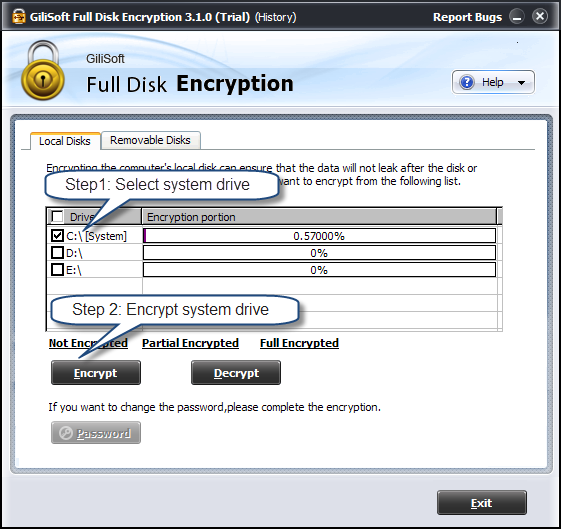
Select the intended system or data volume, review the status, and begin only when the machine can remain powered.
- Monitor without interrupting normal recovery controls
Avoid forced shutdowns and heavy disk work. If Windows pauses a supported encryption process, resume according to the product guide.
- Verify before returning the laptop to service
Confirm the volume reports protected, restart normally, and test recovery access according to your documented procedure.
For complete product controls, see the Full Disk Encryption guide.
Product Interface
Important Limits and Checks
Frequently Asked Questions
Can I use the laptop while encryption runs?
Light work may be possible, but heavy disk activity can slow the process. Follow the product guidance and avoid forced shutdowns.
What if the drive shows signs of failure?
Stop and back up or replace the drive. Encryption does not repair failing hardware and may add stress during a long write-intensive operation.
Does a larger SSD always take longer?
Not necessarily. Used space, storage performance, controller behavior, system load, and encryption scope all affect the result.
Should I encrypt before or after copying a large data set?
Follow your deployment policy. Encrypting an empty or lightly used volume may finish sooner, but the final configuration and recovery process still need verification.