

Which document protection method should you use?
| Method | What it controls | Best use | Important limitation |
|---|---|---|---|
| GiliSoft Copy Protect | Opening, copy, clipboard, print, screenshot, device, watermark, and expiry rules | External offline delivery of PDF, Office, and mixed files | Recipients use a protected GCP or EXE package instead of the original documents |
| Adobe PDF permissions | PDF opening, editing, printing, copying, comments, and page extraction | PDF-only distribution to compatible readers | Does not protect Word, Excel, PowerPoint, or mixed folders in one policy |
| Office password | Opening or modifying a Word, Excel, or PowerPoint file | Trusted recipients who still need the original Office file | Authorized viewers may still reuse visible content after opening |
| Microsoft 365 IRM | Per-user read, edit, print, copy, and expiration permissions | Managed Microsoft 365 organizations | Depends on supported accounts, licensing, and rights-management services |
| Read-only or Mark as Final | Discourages accidental editing | Internal review and completed drafts | Not a strong control for external confidential delivery |
Method 1. Protect delivered documents with GiliSoft Copy Protect
Use this method when customers, students, partners, contractors, or field teams should view documents without receiving ordinary reusable PDF, DOCX, XLSX, or PPTX files. Copy Protect can package Office files, PDFs, WPS documents, images, web pages, supporting media, and mixed folders together.
- Open Copy Protect and add the PDF, Word, Excel, PowerPoint, WPS, image, web, or supporting media files required for delivery.
- Choose the output format: GCP for flexible protected delivery or EXE when the package is within the 4 GB limit.
- Set the opening password and configure client permissions for copying, printing, clipboard use, screenshots, and related viewing behavior.
- Add PC, USB, CD, or DVD binding when the package should open only on approved hardware, then build and test it on a separate Windows PC before distribution.
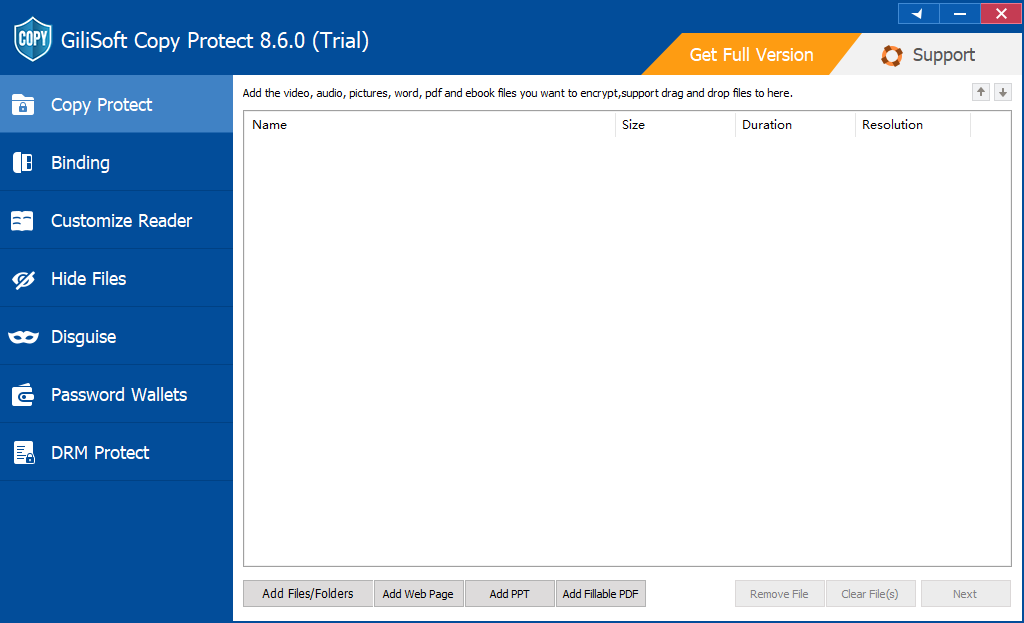
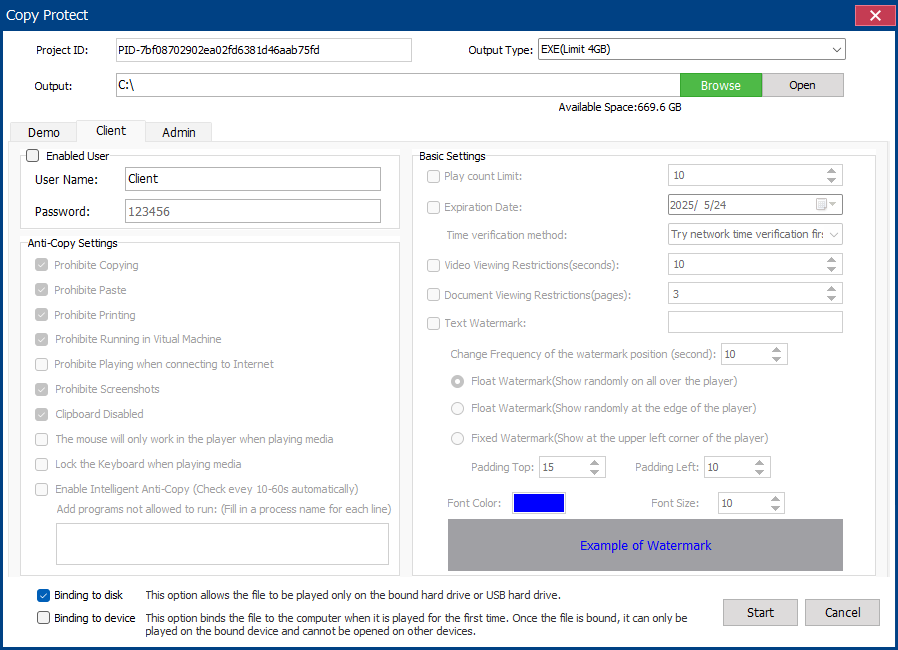
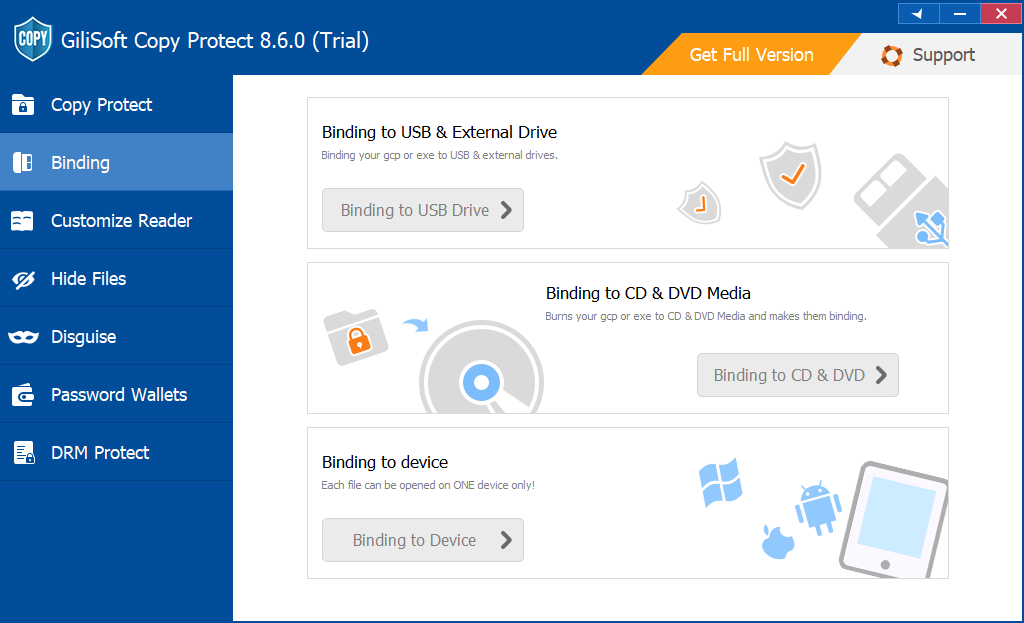
Use Copy Protect when documents leave your control
This is the primary GiliSoft recommendation for training manuals, paid reports, sales proposals, price lists, internal procedures, design documents, and client deliverables that should be viewed without distributing editable source files.
Method 2. Restrict PDF printing, editing, and copying in Adobe Acrobat
For a PDF-only delivery, Acrobat can use a document-open password and a separate permissions password. Adobe's permissions settings can control printing quality, editing, page extraction, comments, and whether text or images may be copied.
- Open the PDF in Acrobat and select All tools > Protect a PDF.
- Select Encrypt with Password, then enable Restrict editing and printing of the document.
- Choose the allowed printing level and document changes, and decide whether text and image copying remains enabled.
- Set a strong permissions password, save a new copy, and verify the restrictions in a separate reader session.
Method 3. Password protect Word, Excel, or PowerPoint files
Office file passwords are appropriate when trusted recipients still need the original editable file. In Word, Excel, and PowerPoint, the desktop application can encrypt the file so it cannot be opened without the password. Some formats also support a separate password to modify the document.
- Open the Office file and go to File > Info.
- Select Protect Document, Protect Workbook, or Protect Presentation, then choose Encrypt with Password.
- Enter and confirm a strong password, save the file, and reopen it to verify access.
Method 4. Restrict named users with Microsoft 365 IRM
Information Rights Management is relevant when files stay inside a managed Microsoft 365 environment. Supported Office applications can assign Read, Change, or Full Control permissions to named users or groups. Microsoft documents that Read permission can prevent editing, printing, and copying unless the author explicitly allows those actions.
- Save the Office file, then open File > Info.
- Select the relevant Protect command, then Restrict Permission by People > Restricted Access.
- Add approved users, choose their permission level, and configure expiration or print and copy options where available.
- Test the file with an actual recipient account before external distribution.
Method 5. Use read-only controls only for accidental changes
Read-only mode, worksheet protection, Restrict Editing, and Mark as Final can be useful for internal review. They are not substitutes for document encryption or controlled delivery. Microsoft specifically notes that worksheet protection is not a security feature, and a Word editing restriction without a password can be stopped by the recipient.
Add visible identity before external document delivery
A watermark does not stop copying, but it can make ownership, recipient identity, order information, or confidentiality visible on every page. Use document-native watermarks for ordinary files, or configure visible marks in the protected delivery when recipient-level traceability matters.
Recommended setup for common document scenarios
Related document copy protection guides
Document copy protection FAQ
Can document copy protection stop every possible copy?
No software can prevent a viewer from photographing visible content or manually recreating it. The practical goal is to stop ordinary file redistribution and restrict common reuse paths such as copy, paste, print, screenshots, Save As, and opening on unapproved devices.
Can GiliSoft protect PDF and Office files together?
Yes. A protected project can include PDF, Word, Excel, PowerPoint, WPS, images, web pages, media, and supporting folders. This is useful when a delivery contains more than one document format.
Should I use File Lock Pro or Copy Protect?
Use File Lock Pro to protect source documents stored on your own Windows PC, external disk, or shared folder. Use Copy Protect when documents must be delivered to another person under controlled viewing rules.
Should I choose GCP or EXE output?
Use GCP for the standard protected reader experience and larger projects. Use EXE for a self-running Windows package when the delivery is within the 4 GB EXE output limit.
Official references
- Adobe: Restrict PDF printing, editing, and copying
- Microsoft: Restrict Word document access with IRM
- Microsoft: Protect a Word document with a password
- Microsoft: Protection and security in Excel
- Microsoft: Make a Word document read-only
Deliver protected documents instead of reusable source files
Create a GCP or EXE package for PDF, Office, WPS, images, and supporting files, then configure how recipients can open, copy, print, capture, and reuse the content.
View GiliSoft Copy Protect