
Foxit PDF Editor Alternative for Document Conversion
Foxit PDF Editor is a PDF-centered product with editing, OCR, forms, signatures, organization, protection, and business document features. Formathor should be compared as a conversion-centered alternative for users whose files regularly move beyond PDF.
Quick answer
Consider Formathor when mixed-format conversion and offline document preparation are the main jobs. Foxit may fit better when advanced PDF editing, form design, signatures, redaction, accessibility, enterprise protection, or PDF collaboration are central. Test current editions rather than assuming that similarly named features are equivalent.
Compare the Primary Work, Not the Marketing Category
| Requirement | Formathor focus | Foxit-centered workflow |
|---|---|---|
| Convert across PDF, Office, image, eBook, and text | Central multi-format purpose | PDF creation and export are part of a PDF editor |
| OCR and searchable scanned documents | OCR and text-layer conversion workflows | Integrated PDF OCR with edition-specific capabilities |
| Merge, split, compress, encrypt, and decrypt | Practical PDF preparation | Broader PDF organization and protection tools |
| Advanced forms, signatures, redaction, accessibility | Not the main reason to choose Formathor | Strong reason to use a dedicated PDF editor |
| Collaboration and enterprise PDF controls | Local conversion is the focus | May be important in business PDF deployments |
When Formathor Fits Better
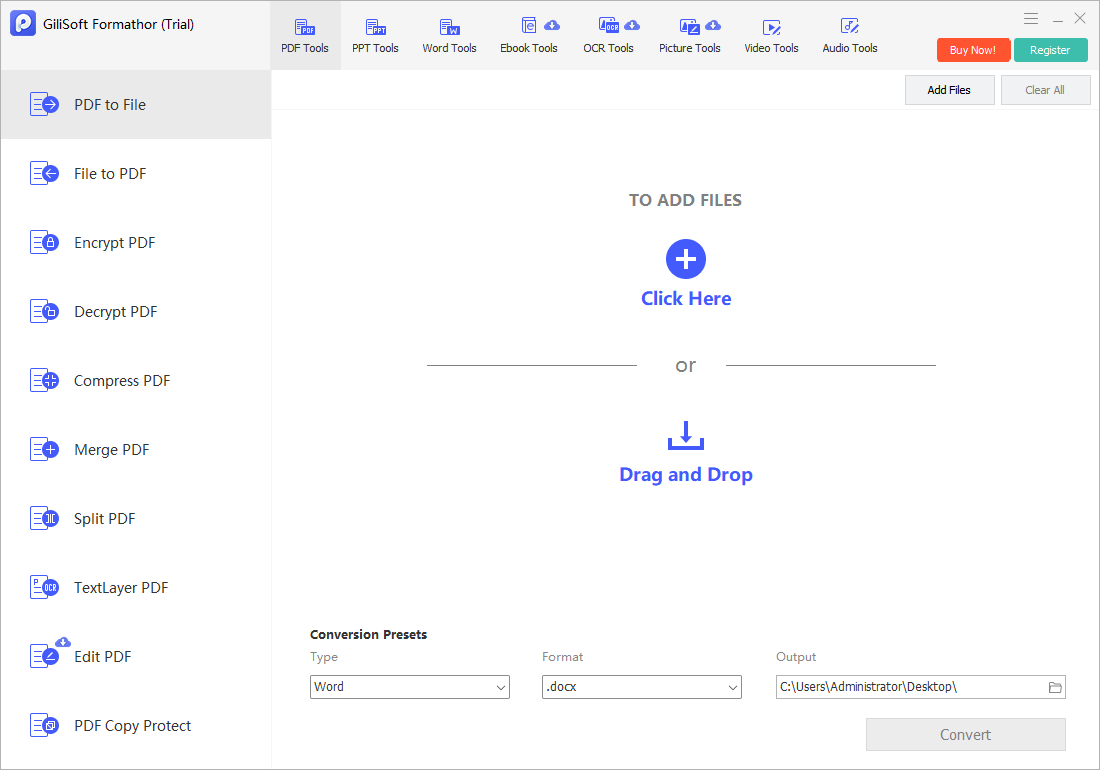
- The same workflow includes PDF, Word, Excel, PowerPoint, image, eBook, and OCR tasks.
- Users spend more time converting files than editing individual PDF objects.
- Local Windows processing is preferred for routine files.
- PDF merge, split, compression, and password preparation usually follow conversion.

When Foxit May Still Fit Better
A Foxit-centered workflow may be more suitable for detailed PDF editing, complex forms, e-signatures, redaction, accessibility work, certificate or enterprise protection, advanced page organization, and teams already using its collaboration or administration features. Check current plan and platform details.
Test the Conversion Work That Matters
- Collect representative sources.
Use real PDFs, Office files, images, eBooks, and scans with typical complexity.
- Choose the exact destination.
Match Word, Excel, PowerPoint, image, text, eBook, or PDF output to the next application.
- Convert one difficult file.
Preserve the original and use a separate output folder.
- Review outside Formathor.
Check text, tables, images, fonts, page order, links, and OCR accuracy.
- Test batch handling.
Confirm naming, overwrite behavior, failures, and output consistency before migration.
Use a Migration Checklist
Confirm required formats, OCR languages, batch volume, forms, signatures, redaction, accessibility, security, collaboration, integrations, licensing, support, and update policy. Keep the existing application until every mandatory workflow has passed a real-file test.
Foxit PDF Editor Alternative FAQ
Is Formathor a full Foxit PDF Editor replacement?
Not for every workflow. It is a conversion-centered alternative for PDF, Office, image, eBook, OCR, and practical PDF preparation, not a claim of parity with every editing or enterprise feature.
Who should consider Formathor?
Users who spend more time converting mixed files than editing PDFs, designing forms, collecting signatures, performing redaction, or managing collaborative PDF review.
Can Formathor convert Office files to PDF?
Yes, it includes file-to-PDF workflows alongside PDF-to-file, image, eBook, OCR, and related document tasks. Verify each representative output.
Does Formathor provide OCR?
It includes OCR-oriented and text-layer workflows for scanned or image-based content. Proofread recognition results and reconstructed layout.
Can I compare prices directly?
Use current official pricing and licensing because plans, promotions, included services, and business terms can change. Compare total workflow requirements, not only a headline price.
Should I keep Foxit for forms or signatures?
If advanced forms, signature workflows, redaction, accessibility, or enterprise PDF controls are required, keep the specialist tool until a tested replacement covers those exact needs.