
How to Recover Deleted Photos from a Memory Card
Deleted camera photos or found a memory card unexpectedly empty? Stop taking pictures immediately. Existing imports are the safest recovery route; otherwise a scan may find image data that has not been overwritten or erased.
Quick answer
Stop using the camera or card. Check PC imports, phone galleries, cloud backups, and any second recording card. Connect the memory card through a compatible reader, choose USB/Memory Card Recovery in GiliSoft Data Recovery, and save recovered photos to another physical drive. Inspect full-resolution files, not only thumbnails.
Check for Imported or Synced Photos First
- Review the camera-import folders on every PC used with the card.
- Check phone galleries, cloud photo services, shared albums, and editing catalogs.
- Inspect a second card when the camera recorded duplicate files.
- Look for exported JPEGs even if the original camera RAW file is missing.
An editing catalog may contain a preview or reference rather than the original image. Confirm the candidate's resolution and file size.
Protect the Memory Card
- Stop taking photos or videos.
New capture can overwrite deleted data. Power down the device before removing the card according to its instructions.
- Do not format the card.
Cancel camera and Windows format prompts. Do not take a test shot to see whether the card works.
- Use a compatible reader.
Connect the SD or microSD card to Windows through a reader that supports its type and capacity.
- Prepare another destination.
Install recovery software and reserve output space on healthy storage, never the source card.
Recover Photos with GiliSoft Data Recovery
Open USB/Memory Card Recovery for a stable, readable card. If photos disappeared after formatting, also review the formatted-drive limits.
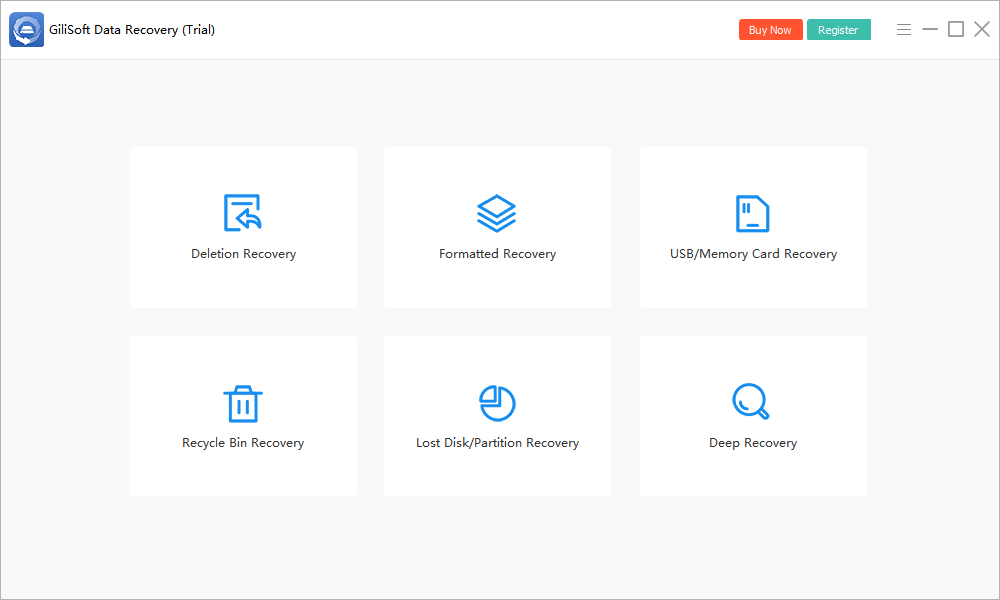
- Identify the memory card.
Match its label and capacity, not only a drive letter. Use Refresh if a newly connected healthy card is not listed.
- Select it and click Scan.
Keep the reader stable and avoid importing or saving anything to the card.
- Review image candidates.
Use file type, dimensions, dates, names, and supported previews where available. Include camera RAW formats used by your device.
- Recover to another drive.
Save priority images to healthy storage. Do not recover into a new folder on the memory card.
- Inspect and back up the output.
Open full-resolution files, check important regions, and create another copy before reusing the card.
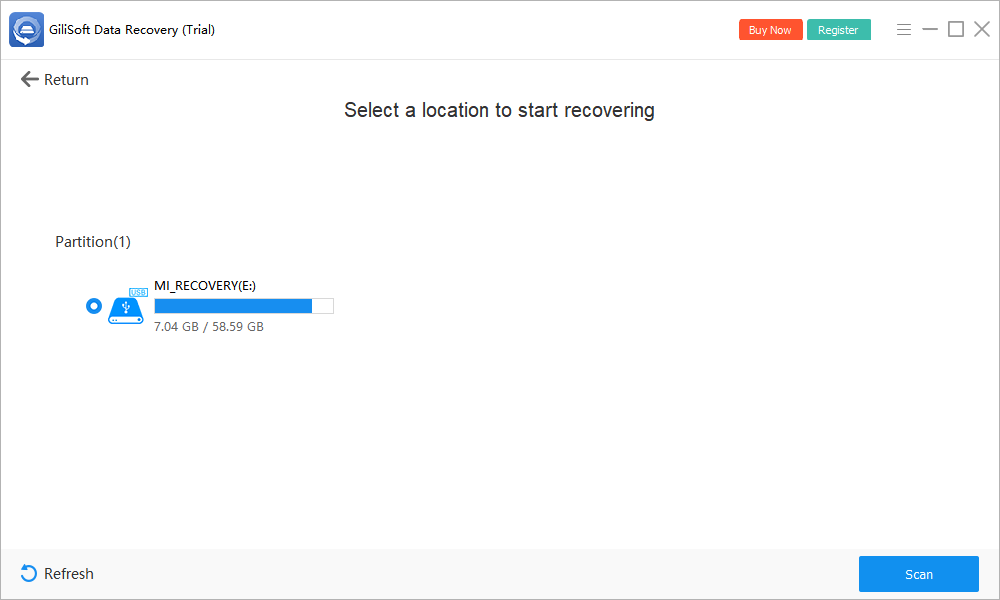
Deep Recovery may find additional candidates on healthy storage, but names and folder structure may be missing. It cannot reconstruct overwritten pixels. Check the trial's current limits and the full user guide.
Verify the Original Photo, Not Just a Thumbnail
| Check | Why it matters |
|---|---|
| Pixel dimensions | Distinguishes a full image from a small preview |
| Actual-size view | Reveals missing blocks, bands, or partial decoding |
| Beginning and end of a burst | Checks whether all expected frames were found |
| Camera RAW and JPEG pairs | Confirms whether both originals and previews survived |
| Independent application | Verifies the export outside the recovery preview |
Preserve the raw recovered files before editing or converting. Work on copies, especially when an image application proposes repair.
Why Some Photos Cannot Be Recovered
New capture, loop recording, formatting, and reuse can overwrite image data. An SD overwrite format explicitly overwrites the user data area. Flash controllers may also manage storage in ways that make old data inaccessible.
Stop repeated attempts if the card reports zero capacity, disconnects, overheats, or has physical damage. Valuable one-of-a-kind photos may warrant professional recovery rather than repeated scans.
Memory Card Photo Recovery FAQ
Can deleted photos be recovered from a memory card?
Sometimes, if the card remains readable and the photo data has not been overwritten or erased. Stop taking new photos, check existing imports, and recover candidates to another drive.
Can I recover camera RAW photos?
A scanner may find supported camera RAW file types if their content remains. Camera RAW image formats such as CR2 or NEF are unrelated to a drive whose file system is reported as RAW.
Why is there a thumbnail but the photo will not open?
A small embedded preview can survive when the full-resolution image is incomplete. Export the candidate and inspect it at actual size in a compatible application.
Should I format the card when the camera asks?
No, not while you need the photos. Formatting changes the source. Cancel the prompt, remove the card safely, and evaluate recovery first.
Can photos be recovered after overwrite format?
An overwrite format is designed to overwrite the user data area. Software cannot reconstruct photo bytes that were overwritten. Look for imported, cloud, or backup copies.
Does the SD lock tab protect recovery data?
Not reliably by itself. It signals write protection to compatible readers, but is not a guaranteed write blocker. Avoid operations that write to the card regardless of the tab.