
How to Recover Files from an SD Card on Windows
Deleted photos from a camera card, lost a drone recording, or found a microSD card unreadable? Stop recording first. A recovery scan may find remaining content, but continued use can overwrite the very files you need.
Quick answer
Stop using the card in the camera, phone, or recorder. Connect it to Windows through a compatible reader and cancel any format prompt. If the card is stable and readable, choose USB/Memory Card Recovery in GiliSoft Data Recovery, scan it, and save selected files to another physical drive. Check existing imports or backups before scanning.
Protect the Card Before Recovery
- Stop capture and remove the card safely. Stop recording and power down the device before removing the card. Do not take test photos or let loop recording continue.
- Check copies elsewhere. Review camera imports, editing projects, cloud backups, or a second card used for simultaneous recording.
- Choose a compatible reader. Use a reader that supports the card type and capacity. A camera connected by USB may expose files rather than the storage needed for a recovery scan.
- Keep downloads and output off the card. Install on healthy PC storage and prepare enough space for recovered media.
Match the Recovery Method to the Card Condition
| Situation | First action | Main limitation |
|---|---|---|
| Files deleted, card still opens | Scan through a card reader | New recording may overwrite old files |
| Accidental camera or PC format | Stop use and evaluate formatted recovery | Formatting behavior varies; an overwrite erase prevents recovery of erased content |
| Card appears RAW or needs formatting | Cancel the prompt and check scanner access | Unreadable file-system records may mean lost names or folders |
| No Media, 0 B, or repeated disconnections | Try a compatible reader; stop if persistent | Software needs readable storage |
| Phone card used as encrypted internal storage | Check access through the original phone | A PC scan does not bypass device encryption |
Recover SD Card Files with GiliSoft Data Recovery
For a stable, readable card, open USB/Memory Card Recovery. If the loss followed formatting, also review the formatted-drive workflow.
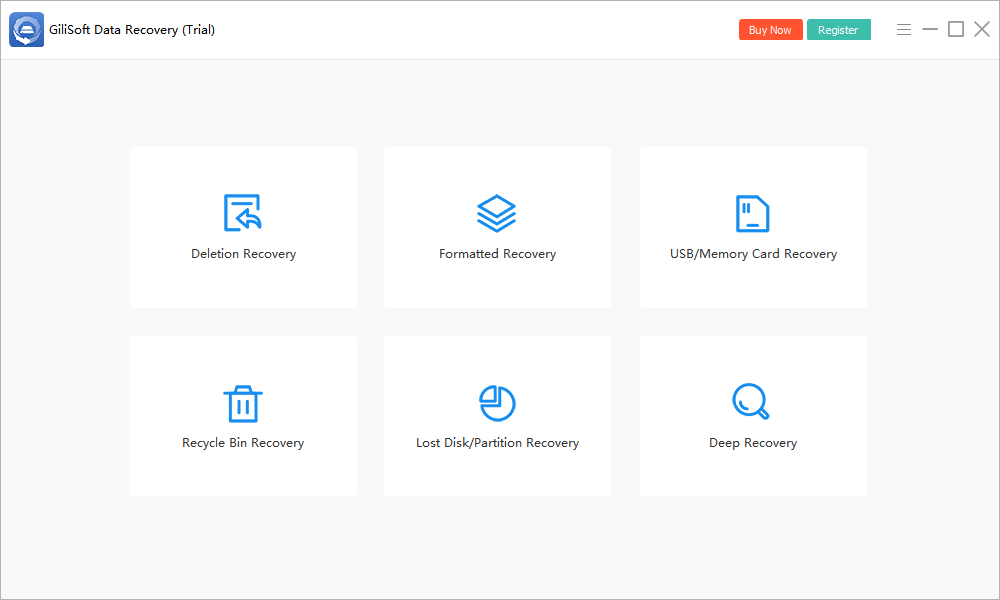
- Connect and identify the card.
Match its label and capacity, not only the drive letter. Use Refresh if a newly connected card is not yet listed.
- Select the card and click Scan.
Keep the reader connected. Do not import new files onto the card or format it while scanning.
- Review media and document results.
Look for expected file types, names, and folders when available. Preview supported images and prioritize irreplaceable recordings.
- Recover to a separate drive.
Select useful candidates and choose a destination on healthy PC storage or another external device, never the source card.
- Verify the exported files.
Check full-resolution photos and play videos beyond their first frame before deciding recovery is complete.
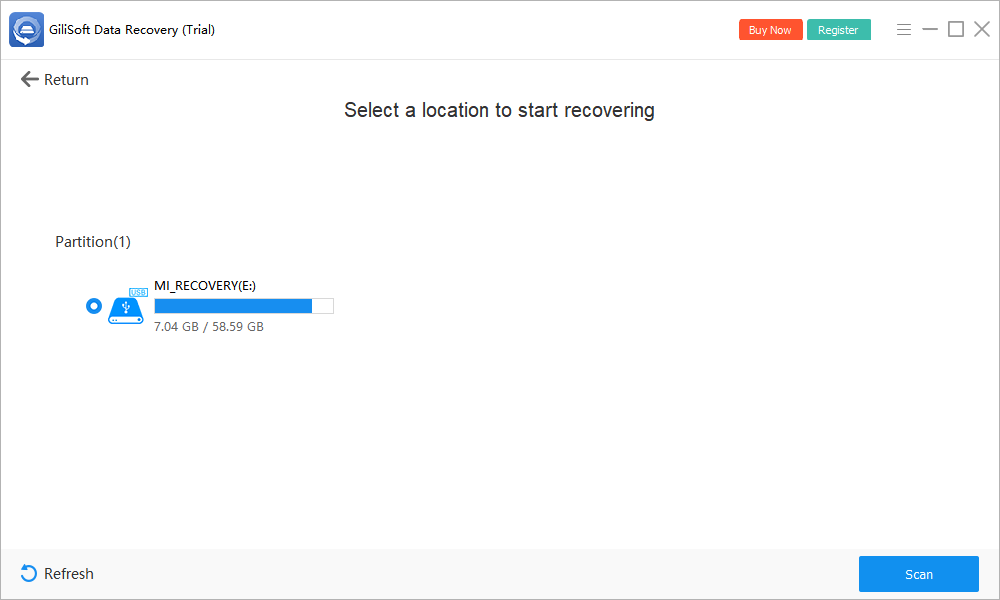
Check current trial limits in the installed application. If a basic scan finds little on healthy storage, Deep Recovery may locate additional candidates, but it cannot reconstruct overwritten bytes.
Check Recovered Photos and Videos Carefully
A thumbnail is not the full photo
Open exported images at their actual size. Check for missing regions and unexpected resolution. A small embedded preview can survive even if the full image is damaged. Camera RAW image files are also different from a drive reported as a RAW file system.
A listed video may still be incomplete
Play the beginning, middle, and end, seek across the clip, and check sound and duration. Fragmented recordings can be harder to reconstruct than individual images. Do not assume a general file scan includes camera-specific video reconstruction.
Preserve a verified copy
Back up recovered output before formatting or reusing any card. Retire a card that repeatedly loses files; a successful recovery does not prove the storage is reliable.
If the Card Is Not Detected or Cannot Be Read
Check a compatible reader and a known working USB port. Inspect Disk Management without formatting or creating volumes. A card visible there may not be accessible in File Explorer; a card reporting no usable capacity may not be scannable at all.
Do not repeatedly reconnect a cracked, overheating, or unstable card. For valuable data, stop and consult a recovery specialist. If it remains readable but shows RAW, follow the RAW-drive precautions before attempting repair.
SD and microSD Card Recovery FAQ
Can I recover deleted photos from an SD card?
Possibly, if the card remains readable and the photo data has not been overwritten or erased. Stop recording new images, check previous imports, and recover selected results to another drive.
Does this also apply to microSD cards?
Yes, for accessible removable storage. Use a reader or adapter compatible with the card. A phone card configured as encrypted internal storage may require the original device and cannot be treated as an ordinary portable card.
Should I format a card that Windows cannot open?
No. Cancel the format prompt while you still need the data. Formatting is not a prerequisite for recovery and can change or erase recoverable content.
Does the SD card lock switch guarantee no writes?
No. The switch signals a write-protection preference to compatible readers; it is not a guaranteed forensic write blocker. MicroSD cards themselves do not have that switch.
Why does a recovered video not play completely?
Video data may be fragmented, overwritten, or incomplete. A filename or thumbnail does not establish that every frame is intact. Check the exported clip in a compatible player and seek specialist help for valuable footage if needed.