
Can You Remove a Date Stamp from a Photo?
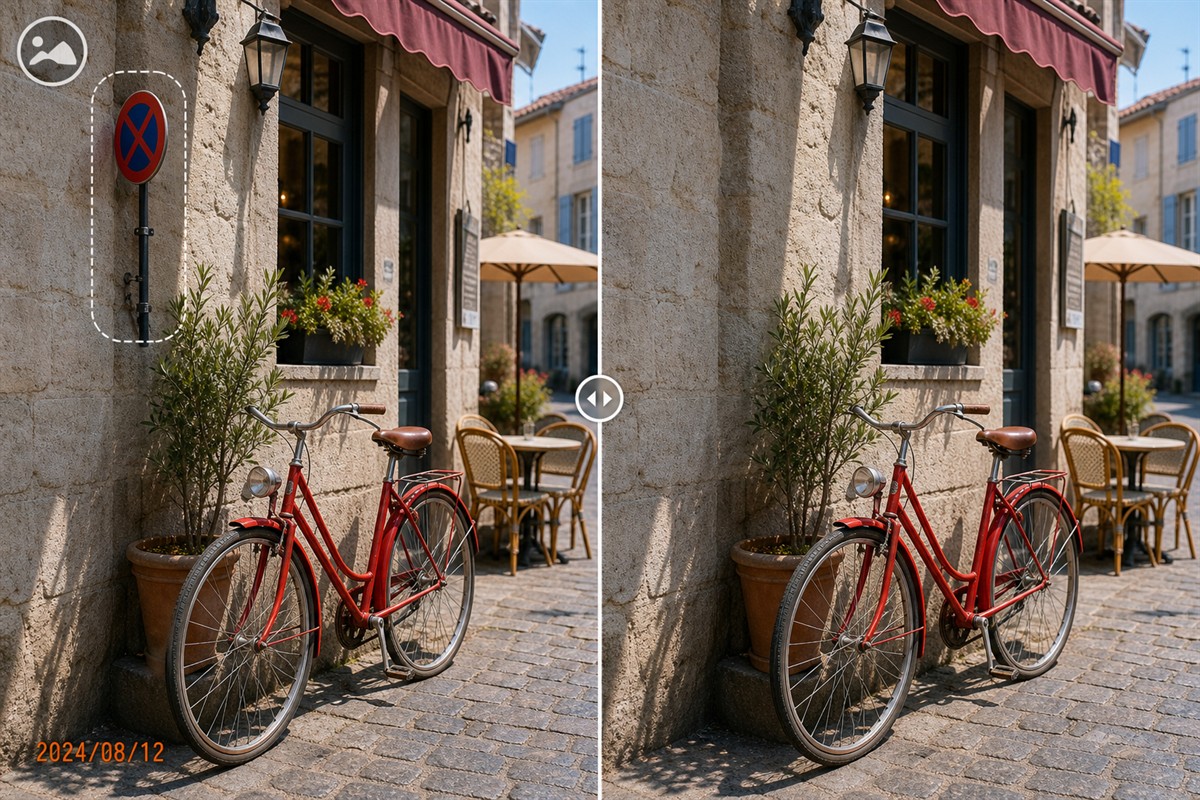
Yes. A visible camera date or timestamp is part of the image pixels, so it can be selected and replaced with an approximation of the surrounding background.
A date in an open corner over sky, a wall, pavement, grass, or soft blur is usually manageable. A timestamp crossing a face, detailed clothing, another line of text, furniture, or unique architecture is harder because the exact covered pixels do not exist elsewhere in the flattened image.
Visible Date Stamp vs Photo Date Metadata
These are separate forms of information and require different tools. Removing one does not automatically remove the other.
Visible date stamp
Digits such as 2024/08/12 appear inside the picture. They were burned into the pixels by a camera, scanner, app, or export process.
EXIF capture date
Date Taken and related camera information may be stored as metadata. It can remain after the visible text is cleaned and may be read by file managers or photo apps.
File-system dates
Created and Modified dates describe the file on a storage system. Copying, downloading, or exporting can change them without changing the photo pixels.
Printed date on a scan
A date printed on photographic paper becomes visible image content when scanned. Treat it like any other text region, while preserving the original scan.
Confirm what the user actually needs
If the goal is visual cleanup for an album or presentation, remove the visible stamp. If the goal is privacy before sharing, review metadata separately. If the goal is chronological organization, keep or correct reliable metadata instead of relying only on a decorative printed date.
Which Date Stamps Are Easier or Harder to Remove?
Color alone does not determine difficulty. The background beneath the digits, the width of the stamp, and the presence of glow or shadow matter more.
Easier: plain corner background
A compact date over sky, walls, sand, grass, asphalt, or soft blur has nearby color and texture available for reconstruction.
Harder: dates over people
Digits crossing faces, hair, hands, patterned clothes, products, signs, or readable text hide unique information that cannot be recovered exactly.
Easier: clear solid digits
A sharply defined orange, red, yellow, or white timestamp is easier to outline than semi-transparent text with a wide glow.
Harder: multiple surfaces
A long date spanning pavement, a shoe, vegetation, and a shadow needs several smaller repairs instead of one rectangular selection.
Select more than the obvious digit centers
Digital timestamp fonts often have anti-aliased edges, a dark outline, drop shadow, glow, or compression halo. If these pixels remain, a faint ghost of the date will still be visible after processing.
How to Remove a Date Stamp with GiliSoft MarkEase
Test the workflow on one representative photo before cleaning a larger archive. Photos may share the same date position but have completely different backgrounds.
- Open the highest-quality authorized photoUse the original camera image or best scan available. Save an untouched copy before making any visual changes.
- Zoom in and inspect the complete timestampIdentify every number, separator, AM/PM marker, outline, glow, shadow, and compression halo.
- Select close to the date boundaryInclude all stamp pixels without covering more authentic image detail than necessary.
- Split the selection where the background changesRepair digits over sky, clothing, paving, vegetation, and geometric lines as separate regions when needed.
- Inspect the repaired corner at 100%Look for ghost digits, repeated texture, bent edges, smeared detail, inconsistent grain, or a patch that is too sharp or too soft.
- Export a separate cleaned versionOpen the output outside MarkEase, compare it with the original, and retain the source date information for archive or recovery purposes.

Test timestamp cleanup with MarkEase
Use the Windows trial on one easy corner stamp and one difficult textured photo. Judge the reconstructed background at full size before processing the rest of the set.
Download MarkEase TrialDate Stamp Removal vs Cropping and Other Methods
| Method | Best use | Advantage | Trade-off |
|---|---|---|---|
| GiliSoft MarkEase cleanup | A visible date sits inside useful framing and nearby texture can support repair | Preserves the original composition in a focused Windows workflow | Reconstructs hidden pixels rather than recovering them exactly |
| Crop the corner | The stamp lies completely on an expendable edge | Fast and uses only authentic remaining pixels | Changes dimensions, composition, and possibly aspect ratio |
| Re-export without date display | The original camera or app source exists without a burned-in overlay | Provides the cleanest genuine pixels | Unavailable for scans or files where the date is permanently embedded |
| Manual clone and heal | The date crosses faces, patterned textures, architecture, or other unique detail | Offers precise control over sampling and edge repair | Requires more time and image-editing experience |
| Edit metadata only | The concern is hidden capture information rather than visible text | Addresses metadata privacy or organization directly | Does not erase the date visible inside the image |
Why the background is reconstructed
Adobe describes Content-Aware Fill as replacing a selected region using surrounding pixels and lets editors constrain the sampling area. Microsoft Photos provides local brush and mask controls for Generative Erase but notes that a result may not match expectations. GIMP's Heal tool uses a chosen source and warns that repeated healing can create smudging.
Editing principles consulted: Adobe Content-Aware Fill, Adobe fill controls, Microsoft Generative Erase, and GIMP Heal documentation.
Clean Date Stamps Without Losing Archive Value
When not to remove the date
Keep the visible date in legal records, incident photos, inspections, insurance documentation, research material, historical archives, and family collections when the printed timestamp is part of the record. For presentations or decorative prints, work from a copy and preserve the dated master.
Remove Date Stamp from Photo FAQ
Is a visible date stamp the same as EXIF date metadata?
No. A visible stamp is made of image pixels. EXIF information is stored as metadata and can remain after the visible text is removed.
What date stamps are easiest to remove?
Small corner dates over sky, walls, pavement, grass, sand, or soft blur are easier than stamps covering faces, text, patterned clothing, or unique objects.
Why does a faint date outline remain?
The digits may include anti-aliased edges, glow, outline, shadow, and JPEG halos. Expand the selection carefully to include those related pixels.
Can I use the same selection on many photos?
The position may repeat, but the background under the date changes. Test representative images and inspect every output rather than assuming one repair fits the entire set.
Should I crop instead?
Crop when the stamp is confined to an expendable corner and the new framing remains useful. Use cleanup when cropping would remove an important subject or composition.
Should the original dated photo be kept?
Yes. The visible date may have archival value, and the untouched source preserves both context and recovery options.


