
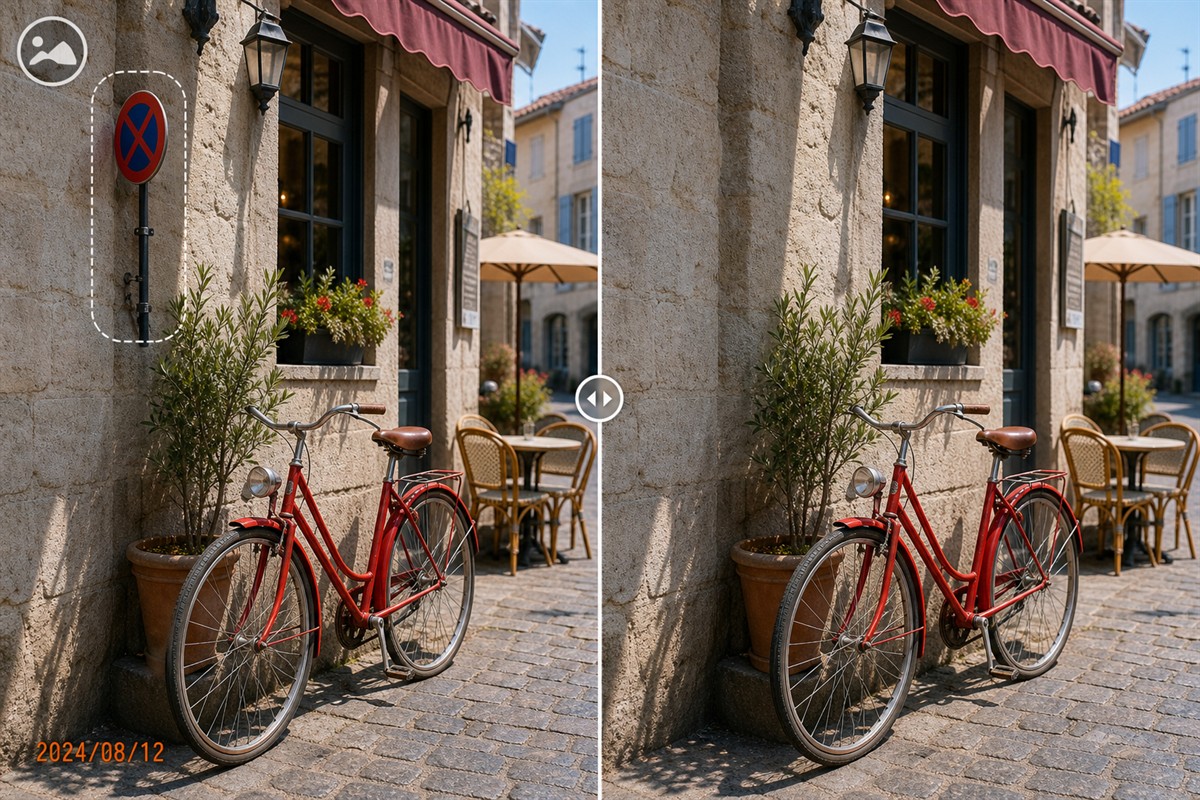
Can You Remove Text from a Photo?
Yes, when you own the image or have permission to edit it. In a flattened JPG, PNG, or scanned photo, visible words are pixels rather than editable characters, so removal means selecting the text and reconstructing the background that it covered.
Short text over a wall, sky, soft blur, pavement, or other repeatable texture is usually easier to clean. A long caption across a face, hair, product label, sign, patterned fabric, or architectural edge is harder because unique hidden detail cannot be recovered exactly from one flattened image.
Identify What Kind of Text You Have
The best method depends on how the words entered the image. OCR, metadata editing, and pixel cleanup solve different problems.
Editable text layer
If a PSD, presentation, publishing file, or design project still contains a live text layer, hide or delete that layer and re-export. This preserves the genuine background.
Baked-in visible text
Captions, prices, usernames, dates, and labels inside a JPG or PNG are part of the pixels. MarkEase can rebuild the selected area from nearby image information.
OCR-recognized words
OCR detects characters for copying, indexing, or translation. Recognition does not erase the visible pixels or restore the background behind them.
Metadata or comments
Titles, descriptions, EXIF fields, and file properties may not appear in the picture at all. Review them separately when privacy or archive accuracy matters.
Choose the cleanest source first
Before repairing pixels, check for an original photo without the caption, an editable source project, another frame of the same scene, or a higher-resolution export. A clean source is more accurate than any reconstructed result.
What Makes Photo Text Easy or Difficult to Remove?
The lettering color is less important than the background it covers and the extra pixels around each character.
Easier: compact text on open texture
Small labels over sky, walls, grass, sand, pavement, or soft depth-of-field blur have nearby pixels that can support a convincing fill.
Harder: text over unique detail
Words crossing eyes, fingers, hair, products, readable signs, artwork, repeated geometry, or fine fabric hide information that may need manual reconstruction.
Easier: crisp opaque letters
Well-defined solid text is easier to outline than translucent letters blended into a gradient or low-quality JPEG.
Harder: styled typography
Drop shadows, glow, strokes, underlines, semi-transparent boxes, and compression halos extend beyond the obvious letter shapes and can leave ghosts.
Long text should not be treated as one rectangle
If a sentence crosses a wall, a person's clothing, and the edge of a table, repair each surface separately. A broad selection can borrow pixels from the wrong area, bend straight lines, repeat texture, or create a soft patch that attracts more attention than the original words.
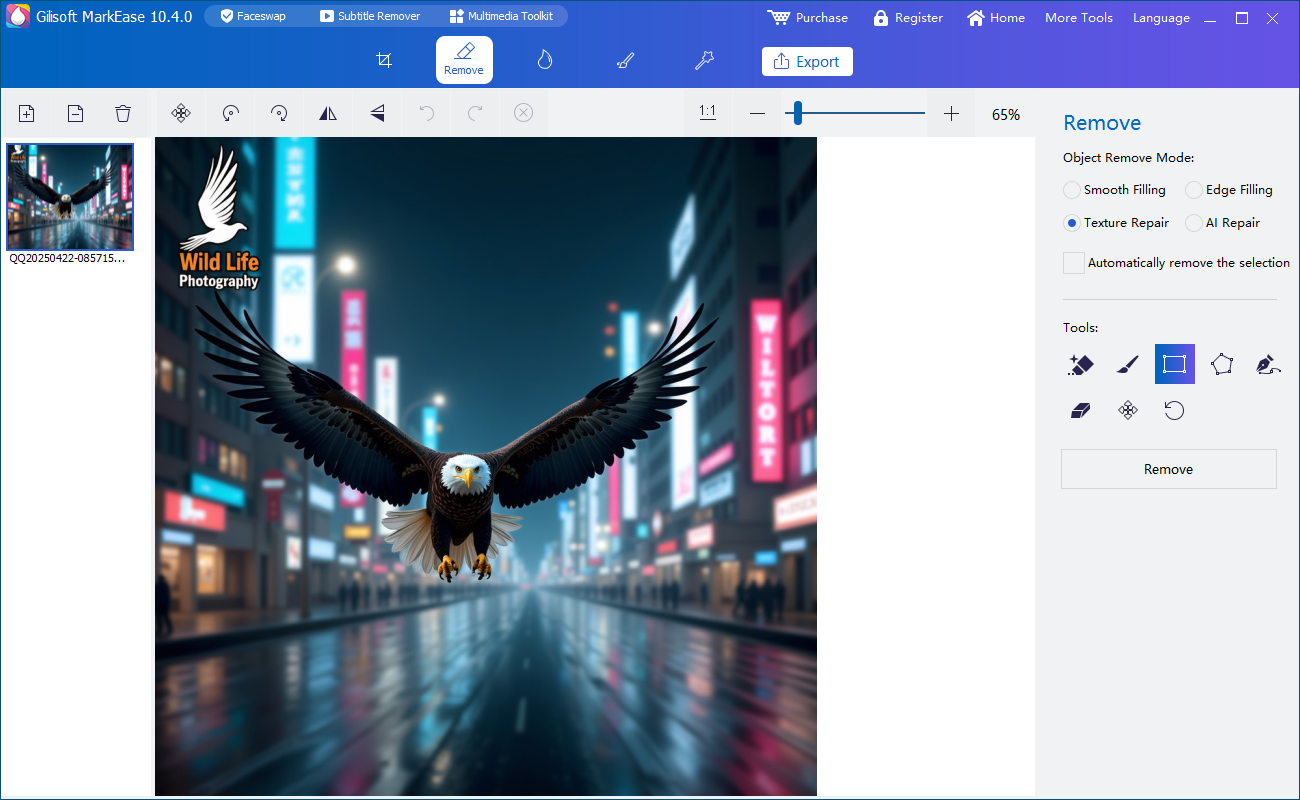
How to Remove Text with GiliSoft MarkEase
Start with one representative photo and judge the output at full resolution before applying the same workflow to more images.
- Open the best authorized sourceUse the largest, least-compressed photo available. Duplicate it so the untouched original remains available for reference or recovery.
- Zoom in and map the full text boundaryInclude letters, punctuation, accents, outline pixels, shadows, glow, background panels, and visible JPEG halos.
- Select close to the letteringCover every unwanted pixel while avoiding unnecessary portions of faces, object edges, or valuable texture.
- Split words by background surfaceProcess text over sky, clothing, walls, foliage, and straight edges as smaller regions when their repair sources differ.
- Run the cleanup and inspect at 100%Check for repeated patterns, smeared grain, bent edges, ghost letters, color shifts, and patches that are sharper or softer than the surrounding image.
- Export a separate resultOpen the saved image outside MarkEase, compare it with the original, and retain both files. Avoid repeated JPEG saves that add more artifacts.
Try text cleanup on one difficult sample
Test one easy label and one caption over a textured area. The Windows trial lets you judge edge handling, background continuity, and export quality before cleaning the rest of a collection.
Download MarkEase TrialChoose the Right Way to Remove Text from an Image
| Method | Best use | Why choose it | Limit |
|---|---|---|---|
| Delete the original text layer | The layered source or design project is available | Restores the genuine background and offers the cleanest result | Impossible when only a flattened photo remains |
| Crop the image | Text sits entirely on an expendable edge | Fast and keeps only authentic remaining pixels | Changes framing, dimensions, and sometimes aspect ratio |
| GiliSoft MarkEase | Text is baked into a photo and cropping would remove useful content | Focused local Windows workflow for selecting words and rebuilding nearby background | Reconstructs covered pixels rather than recovering them exactly |
| Clone or heal manually | Text crosses patterns, straight lines, faces, or other difficult detail | Gives precise control over the sampled source and edge repair | Takes more time and editing skill |
| OCR | You need to recognize, copy, search, or translate the words | Converts visible characters into usable text data | Does not visually erase the letters |
Why text cleanup needs surrounding pixels
Adobe explains that Content-Aware Fill replaces a selected object using surrounding pixels and lets the editor control the sampling region. Its guidance also recommends a selection that extends slightly into the area being replicated. Microsoft Photos offers local Generative Erase with adjustable brush and mask controls, while warning that AI infill may not always match expectations. GIMP's Heal tool similarly samples a chosen source and cautions that repeated correction can create smudging.
Research consulted: Adobe Content-Aware Fill, Adobe fill and sampling controls, Microsoft Photos Generative Erase, and GIMP Heal documentation.
Review Text Removal Quality and Protect Sensitive Data
Text removal is not secure redaction
Do not use a reconstruction brush to conceal passwords, API keys, addresses, account numbers, private messages, or personal identifiers. For confidential material, return to the clean source when possible or use an opaque redaction workflow, flatten and export the result, inspect it in another viewer, and remove sensitive metadata. If a credential has already been exposed, rotate it instead of relying on an edited screenshot.
Remove Text from Photo FAQ
Can text be removed from every photo?
Many text overlays can be cleaned, but quality depends on what they cover. Nearby repeatable texture supports reconstruction; text over faces, products, signs, or unique artwork may require detailed manual repair or a clean source.
Why does a faint word remain after removal?
The selection probably missed anti-aliased edges, a stroke, shadow, glow, translucent background box, or JPEG halo. Zoom in and include those related pixels without selecting unnecessary image detail.
Does OCR remove text from a picture?
No. OCR recognizes characters for copying or search. It does not erase the pixels or restore the hidden background.
Should I crop the text instead?
Crop when the words are confined to an expendable edge and the new framing still works. Use MarkEase when cropping would remove an important subject or change the composition too much.
Can I remove a username or social-media caption?
Yes, if you own the image or have permission. Preserve the original and consider whether the label provides attribution or context that should remain.
Can MarkEase process text without uploading the photo?
MarkEase is a Windows desktop application, so the photo cleanup workflow runs on the PC. This is useful for client, archive, and internal images that should not be sent to a browser-based editor.


