Built-In Voice Recorder or Dedicated PC Recorder?
| Need | Practical starting point | Why |
|---|---|---|
| Quick personal voice memo | Windows Sound Recorder | Simple microphone capture for short notes |
| Long lecture, interview, or meeting | Audio Recorder Pro | More control over source, files, and recording workflow |
| Voice-activated capture | Audio Recorder Pro | Starts or manages capture around detected sound and silence |
| Scheduled recording | Audio Recorder Pro | Supports a planned start and stop workflow |
| Computer audio plus voice | Audio Recorder Pro | Combines microphone input with Windows playback |
Record Voice on Windows 11: Step by Step
Connect and select the microphone
Open Settings > System > Sound > Input and choose the intended built-in, USB, headset, or interface microphone.
Test Windows input
Speak at the real recording distance and use the Windows microphone test to confirm the device and input volume.
Allow microphone access
Under Privacy & security > Microphone, enable the access required by the voice recorder.
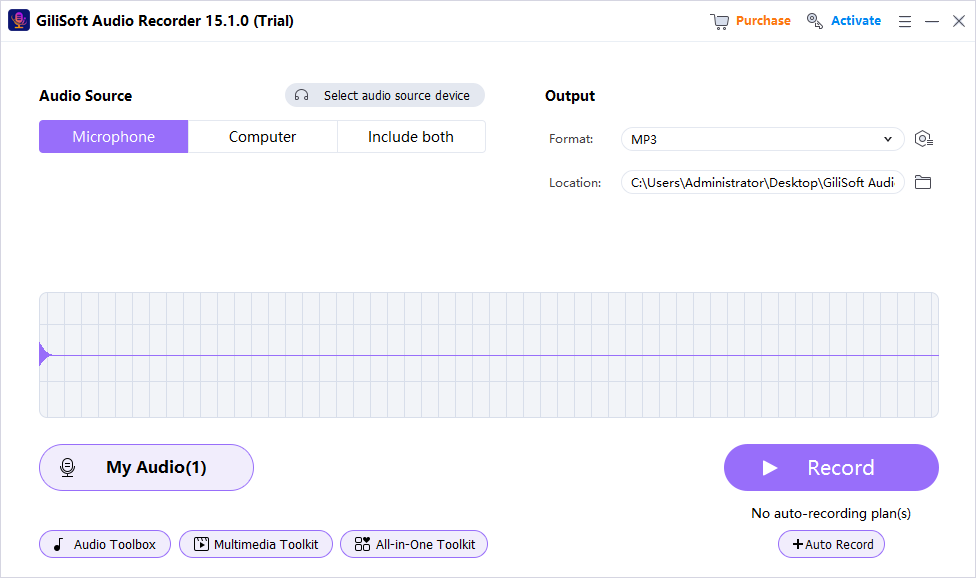
Choose Microphone in Audio Recorder Pro
Set the output folder and format and leave Computer Sound off for voice-only recording.
Record a short room test
Listen for fan noise, keyboard sound, echo, clipping, and an incorrect input.
Record and review
Maintain a consistent distance, stop when finished, and verify the saved file before leaving the session.
Make Windows 11 Voice Recordings Clearer
Keep a consistent distance
Changing position creates large volume and tone differences that are harder to repair later.
Reduce room reflections
Soft furnishings and closer microphone placement can reduce hollow room echo.
Move away from noise
Fans, keyboards, desks, and cable contact can dominate a quiet voice recording.
Leave headroom
Do not push input volume so high that louder words distort or clip.
Use Voice Activation and Scheduling Deliberately
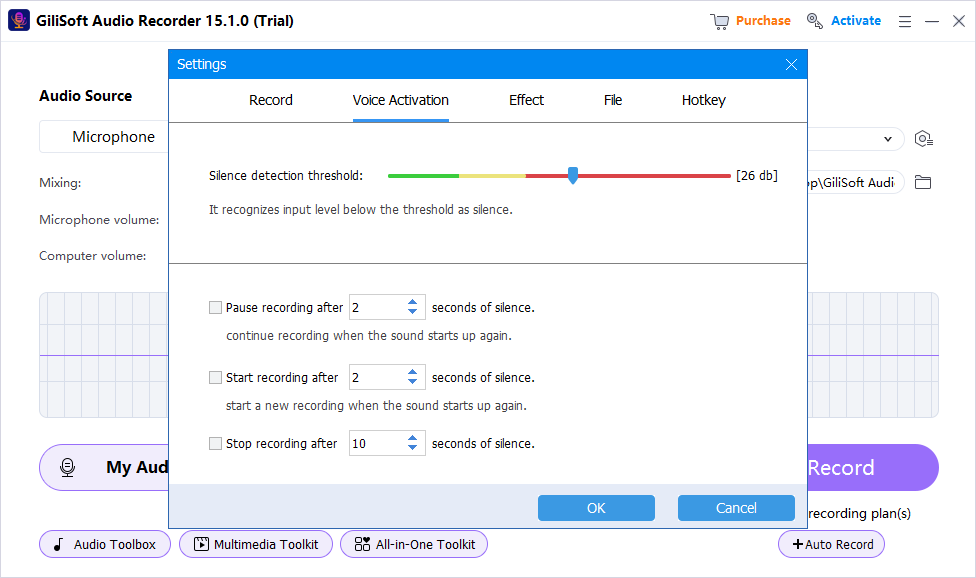
- Test the voice-activation threshold against real background noise and quiet speech.
- Confirm how silence is handled so words are not cut off at the beginning or end.
- For schedules, check the Windows clock, source device, power, sleep state, and storage.
- Use hotkeys only after verifying they do not conflict with the application being recorded.
Fix a Missing, Quiet, or Noisy Microphone
- Select the correct microphone under Windows 11 Sound > Input.
- Run the Windows input test and adjust input volume.
- Enable microphone and desktop-app access under Privacy & security.
- Reconnect a USB or Bluetooth device and select it again.
- Move closer to the microphone before relying on heavy noise reduction.
- Test in another app to separate Windows or hardware problems from recorder settings.
Frequently Asked Questions
Does Windows 11 include a voice recorder?
Yes. Windows Sound Recorder is suitable for basic microphone recordings and short voice memos.
When do I need dedicated voice recording software?
Use it for mixed sources, scheduling, voice activation, hotkeys, denoise tools, or more structured file management.
Why is my microphone not recording?
The wrong input may be selected or Windows microphone access may be disabled. Check Sound > Input and Privacy & security > Microphone.
Why is my voice too quiet?
Select the correct microphone, move closer, and adjust Windows input volume while leaving room for louder words.
What does voice activation do?
It uses detected sound and silence to control or reduce empty recording sections. Test the threshold before relying on it.
Can I record interviews or meetings?
Yes, when you follow applicable consent, workplace, and privacy requirements and all required participants agree.
More Windows Audio Recording Guides
Continue with the source, device, or workflow guide that matches the next recording task.