
How to Recover Files from a Corrupted USB Drive
A USB drive may ask to be formatted, appear RAW, disconnect repeatedly, or show no usable capacity. These symptoms do not have one universal fix. Recover important files before attempting repairs that alter the source.
Quick answer
Cancel any format prompt and stop writing to the USB drive. If it remains stable and appears with a plausible capacity, scan it with USB/Memory Card Recovery or Deep Recovery in GiliSoft Data Recovery and save files to another device. If it shows No Media, 0 B, physical damage, or repeated disconnections, stop repeated software attempts and consider specialist help.
Check Whether the Problem Is Logical or Physical
| Symptom | Recovery approach |
|---|---|
| Drive opens but files are missing | Stop writes and scan the original USB storage |
| Windows asks to format or reports RAW | Cancel; check whether the scanner can access the device |
| Drive absent in File Explorer but visible with normal capacity | Inspect Disk Management without initializing or creating a volume |
| No Media, 0 B, or wrong persistent capacity | Software access may be unavailable; consider specialist help |
| Loose connector, overheating, or repeated disconnects | Stop repeated attempts and avoid stressing the device |
Protect the USB Drive Before Scanning
- Do not format, initialize, create a new volume, or copy test files onto it.
- Use a known working port and appropriate cable for a cable-connected drive.
- Record the model, capacity, drive letter, and Disk Management status without changing them.
- Install recovery software and reserve output space on healthy storage.
Recover Corrupted USB Files with GiliSoft Data Recovery
For an accessible USB drive, start with USB/Memory Card Recovery. When ordinary results are incomplete or the file system is unreadable, evaluate Deep Recovery on a stable source.
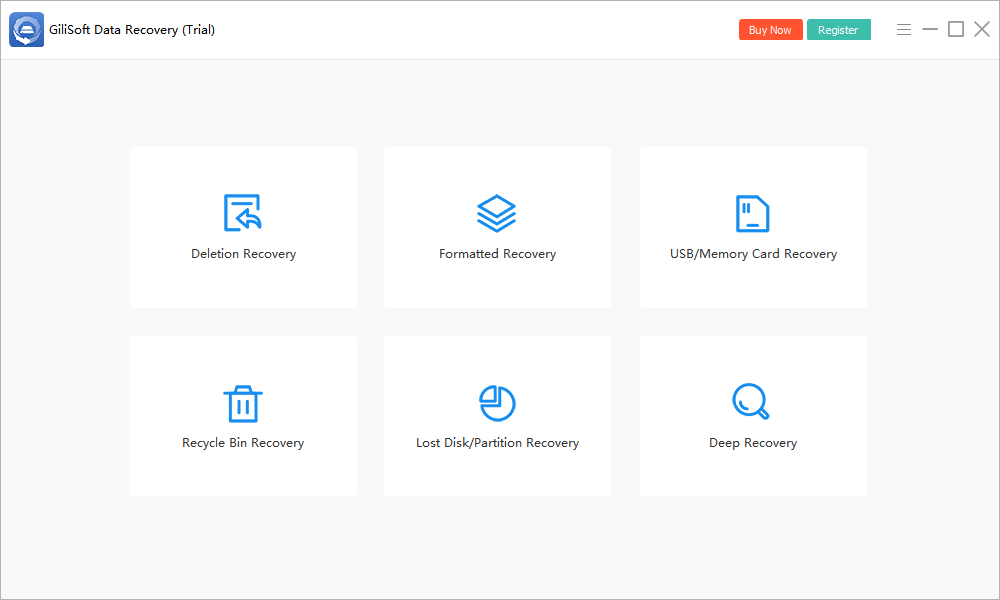
- Open the matching recovery mode.
Launch from healthy storage. Do not install the application on the corrupted USB source.
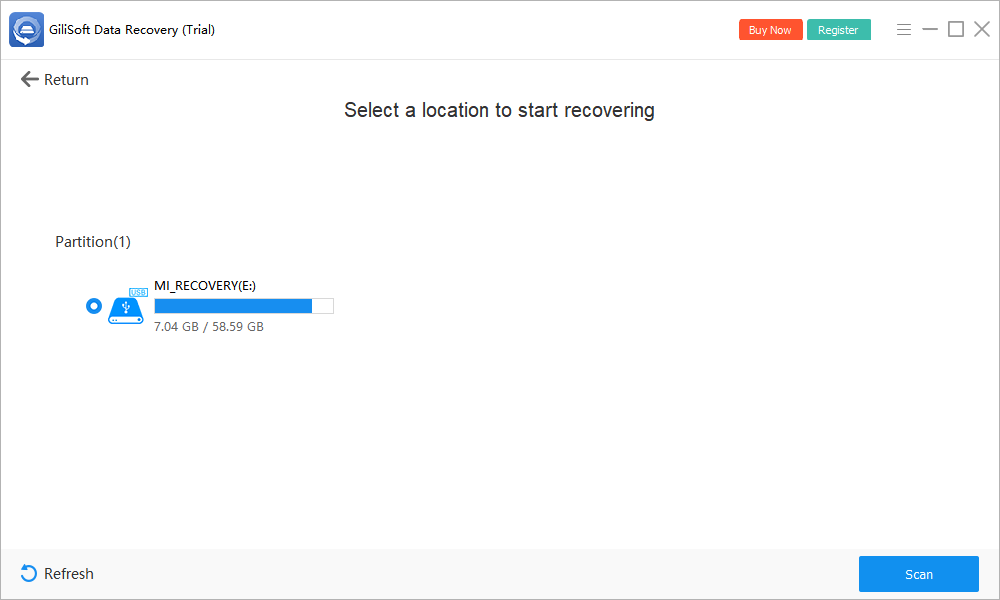
- Identify the correct device.
Match its capacity and label where available. If it is absent or reports no usable capacity, do not modify it to force detection.
- Scan while the connection is stable.
Start the search and stop if the device repeatedly disconnects or produces signs of hardware failure.
- Preview priority files.
Review supported documents, photos, and media. Original names or folders may be missing when file-system metadata is damaged.
- Recover to healthy storage.
Save selected files to another physical device, verify them, and create a second copy of irreplaceable output.
Check current trial limits. If the device cannot be read, a deeper scan cannot manufacture access. Contact support or a qualified specialist with the exact status rather than formatting it first.
Recover First, Repair or Reformat Later
File recovery and drive repair have different goals. Recovery copies accessible content elsewhere; repair changes structures on the source. Verify and back up priority output before considering CHKDSK, formatting, or repartitioning.
A successful scan does not certify the USB drive. Replace a device that repeatedly corrupts files, disconnects, or reports inconsistent capacity.
When to Stop DIY Recovery
Stop if the USB connector is broken, storage overheats, access is intermittent, capacity is zero or implausible, or the files are uniquely valuable. Repeated power cycles and long scans can be the wrong response to hardware failure.
Encryption also requires legitimate access. Recovery software does not bypass a password or recovery key, and resetting an encrypted device may erase it.
Corrupted USB Drive Recovery FAQ
Should I format a corrupted USB drive before recovery?
No. Cancel the format prompt while files matter. Formatting changes the source and is not required for scanning a device that recovery software can already read.
Can CHKDSK recover files from a corrupted USB drive?
CHKDSK repairs file-system structures; it is not a deleted-file recovery command. Repair can change the source. Recover important files first or seek specialist advice for valuable data.
Can software recover a USB drive showing No Media or 0 B?
Persistent No Media or zero capacity can mean the controller is detected without accessible storage. Ordinary recovery software needs readable media. Try a known working connection once, then stop if the condition persists.
What if the USB drive keeps disconnecting?
Stop repeated scans. Check one suitable port and cable if applicable. Intermittent access or physical damage can worsen, so valuable files may require professional recovery.
Does recovery repair the USB drive?
No. This workflow saves file copies to another device. It does not establish that the original USB drive is healthy or suitable for reuse.