
How to Recover Files from a USB Drive on Windows
Missing files on a USB flash drive do not always mean the same thing. You may have deleted them, formatted the device, or connected a drive Windows cannot read. Check the device's condition before choosing a recovery method.
Quick answer
Stop writing to the USB drive and cancel any format prompt. Check backups or original copies first. If the USB storage is detected and readable, open USB/Memory Card Recovery in GiliSoft Data Recovery, select the device, and click Scan. Preview supported results and save selected files to another physical drive. Software recovery is not guaranteed and cannot substitute for hardware repair.
Before You Scan the USB Drive
- Keep the source unchanged. Do not copy files onto it, download an installer to it, format it, or run a repair operation first.
- Check for an existing copy. Look on the PC that supplied the files, an external backup, or an authorized shared folder. USB drives often hold transfer copies rather than the only originals.
- Use a stable connection. Connect directly to a known working USB port. For an external drive with a removable cable, check the cable and required power supply.
- Prepare a separate destination. Install recovery software on healthy storage and save recovered files there, not back to the USB source.
Choose a Recovery Route for Your USB Problem
| What you see | What to do first | Avoid |
|---|---|---|
| The drive opens, but files were deleted | Scan the USB drive for lost files | Adding replacement files to the source |
| You accidentally formatted the drive | Follow formatted-drive recovery | Formatting again or copying new data |
| Windows asks you to format, or shows RAW | Cancel the prompt; check whether storage is accessible to the scanner | Formatting to make it appear in File Explorer |
| No drive appears in File Explorer | Check Disk Management without modifying the disk | Creating a new volume or initializing it |
| No Media, 0 B, or repeated disconnections | Check the connection once; consider specialist help if persistent | Assuming a deep scan can fix inaccessible hardware |
A USB connection describes how a device connects, not its underlying storage technology. A flash drive, external HDD, and external SSD can behave differently after deletion. For SSD-specific cases, see external SSD recovery.
How to Recover USB Files with GiliSoft Data Recovery
These steps suit a USB device that remains readable and stable. They do not require writing new files to the source.
Open USB/Memory Card Recovery
Launch GiliSoft Data Recovery from a healthy drive and select USB/Memory Card Recovery on the main screen.
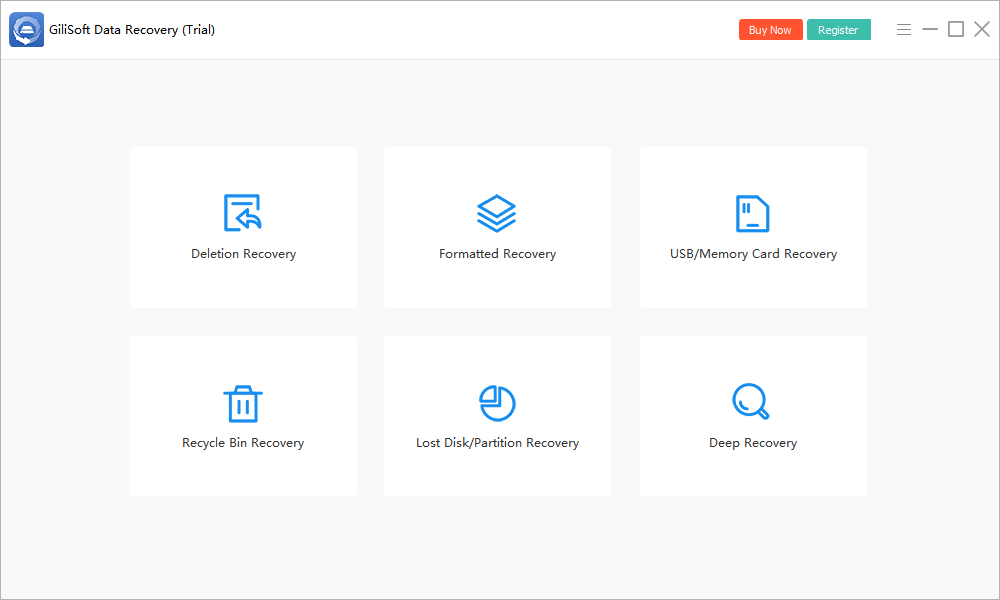
- Identify the correct USB device.
Match the volume label, capacity, and drive letter to your USB drive. Do not rely on a letter remembered from another PC. Use Refresh if a newly connected healthy device is not yet listed.
- Select the USB drive and start scanning.
Choose the device and click Scan. Keep the connection stable and avoid using the drive while the search runs.
- Review the files found.
Look for relevant names, paths, and file types where those details remain available. Preview supported files and prioritize irreplaceable documents, photos, and projects.
- Recover to another physical device.
Select the files you need and use the recovery action. Choose a healthy internal drive or another external device with sufficient space.
- Verify the recovered output.
Open documents, inspect photos, play videos, and test important archives. Keep a separate backup before deciding what to do with the original USB drive.
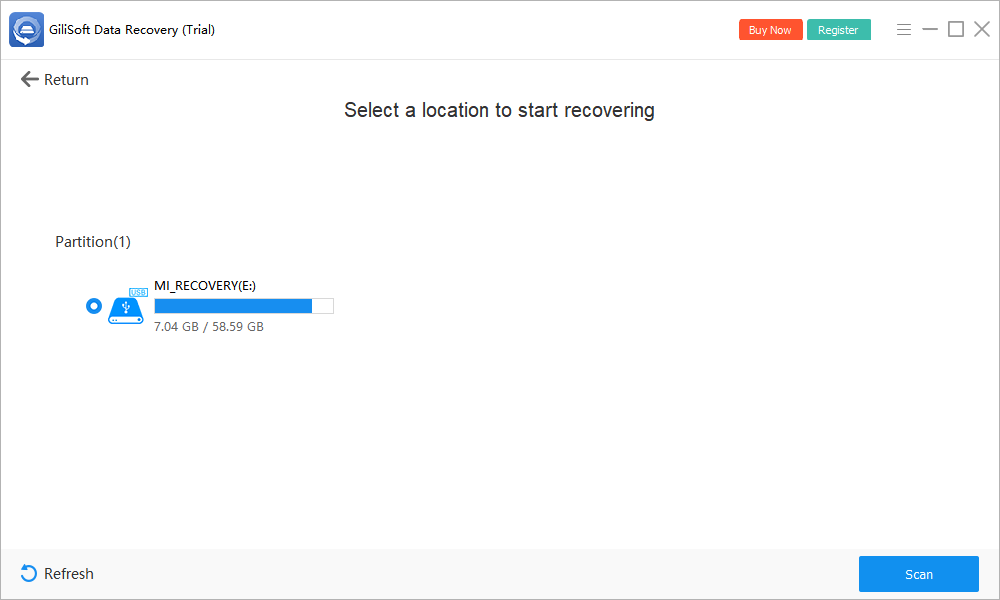
Example: if your missing files were on USB drive E:, scan E: and save output to a healthy internal drive or a second external device. Creating E:\Recovered does not protect the remaining source data.
If an initial search finds too little on healthy storage, consider the available Deep Recovery mode. It may take longer and may not preserve names or folders. It cannot recreate overwritten content. See the Data Recovery User Guide for the other modes and check the installed trial's current recovery limits.
What If the USB Drive Is Not Detected?
Missing in File Explorer, visible in Disk Management
Right-click Start and open Disk Management. Inspect the device's capacity and status without formatting, initializing, or creating a volume. A missing drive letter is different from a device that exposes no readable storage.
If GiliSoft lists the correct device, evaluate a scan before trying repairs. If it does not, record the status and consult support or a recovery specialist rather than modifying the disk to force detection.
Windows asks to format the drive
Cancel the prompt. An unrecognized file system does not prove the drive is empty. If the device is accessible to the recovery tool, recover important files before considering reuse. Read RAW drive recovery for that situation.
No Media, 0 B, or absent on another working port
Try a known working connection if the device has no obvious physical damage. For a cable-connected drive, use a suitable cable and power source. If the condition persists, the controller may be detected without usable access to the storage. Ordinary scanning software needs readable media; stop repeated attempts for valuable files.
The USB drive is encrypted
Use the legitimate password or recovery key to unlock it through its normal process. Recovery software does not bypass encryption. Do not reset an encrypted device if doing so erases its contents.
Check the Result Before Reusing the USB Drive
- Validate contents, not just names. A filename and size can survive even when part of a file is missing.
- Check alternate candidates. Scans may find several versions or unnamed files. Compare supported previews and exported contents.
- Expect incomplete structure. Damaged directory records can mean lost folder names even when individual files are found.
- Keep recovery and repair separate. Do not format or run source-modifying repair tools until important output has been verified and backed up.
- Replace unreliable storage. A successful recovery does not establish that the original drive is trustworthy.
Recovery chances depend on overwriting, formatting behavior, and device condition. Some external SSDs also make deleted data unavailable through TRIM and storage cleanup. There is no universal success rate or time limit.
USB Drive Recovery FAQ
Can I recover deleted files from a USB drive?
Possibly, if the original content has not been overwritten and the device remains readable. Stop using the USB drive, check other copies, then scan it and save recovered files to a different physical device.
Should I format the USB drive before recovery?
No. Cancel a Windows format prompt when you still need the data. Formatting changes the source and is not a prerequisite for recovering files from a readable device.
Why are deleted USB files not in the Recycle Bin?
Deletion from many removable USB drives bypasses the Windows Recycle Bin. Check backups or the original computer used to copy the files, then consider scanning the USB device.
Can software recover a USB drive that shows No Media or 0 B?
A listed USB controller is not the same as accessible storage. Persistent No Media or zero capacity can prevent software from reading the device. After a basic connection check, seek specialist help if the files are valuable.
Can I recover files from an encrypted USB drive?
You generally need the legitimate password or recovery key and access to the unlocked storage. Recovery software does not bypass encryption. Do not reset an encrypted device if the reset erases its data.
Where should I save recovered USB files?
Use a healthy internal drive or another external device with enough free space. Never use the affected USB drive as the first destination, even if a different folder on it is available.