

How to Recover Deleted Word Documents on Windows
A Word document can be missing because it was deleted, moved, overwritten, or never saved. Begin with Word's retained copies and your backups. Use a storage scan only for a document file that actually existed and was deleted locally.
Quick answer
Check the Recycle Bin, Word's Document Recovery, OneDrive or SharePoint Version History, and existing File History backups. If a saved local .docx or .doc file was permanently deleted, stop using the source drive, scan its original location with GiliSoft Data Recovery, and save recovered candidates to another physical drive.
Deleted, Unsaved, or Overwritten?
| What happened | Best first check |
|---|---|
| Word or Windows closed unexpectedly | Document Recovery when Word reopens |
| New document was never saved | Word's Recover Unsaved Documents option |
| A cloud document was overwritten | OneDrive or SharePoint Version History |
| A saved file was deleted | Recycle bins, existing backup, then a disk scan |
| The file exists but will not open | Preserve it; try supported repair options on a copy |
Use Word's Recovery Options Before Scanning
Review Document Recovery
After an unexpected closure, reopen Word and inspect the Document Recovery pane. Compare timestamps and open likely versions. Save the needed copy immediately under a new name before closing the recovery list.
Look for unsaved documents
In supported Windows versions of Word, use File > Info > Manage Document > Recover Unsaved Documents. Availability depends on AutoRecover settings and whether a retained copy exists.
Check cloud and file backups
Use Version History for documents stored in OneDrive or SharePoint. Check File History, the Windows Recycle Bin, and the relevant cloud recycle bin. These routes require a copy or version created before the loss.
Recover Deleted Word Documents with GiliSoft Data Recovery
Use a disk scan only when the file itself was deleted and no usable retained copy remains. Install the application away from the affected source.
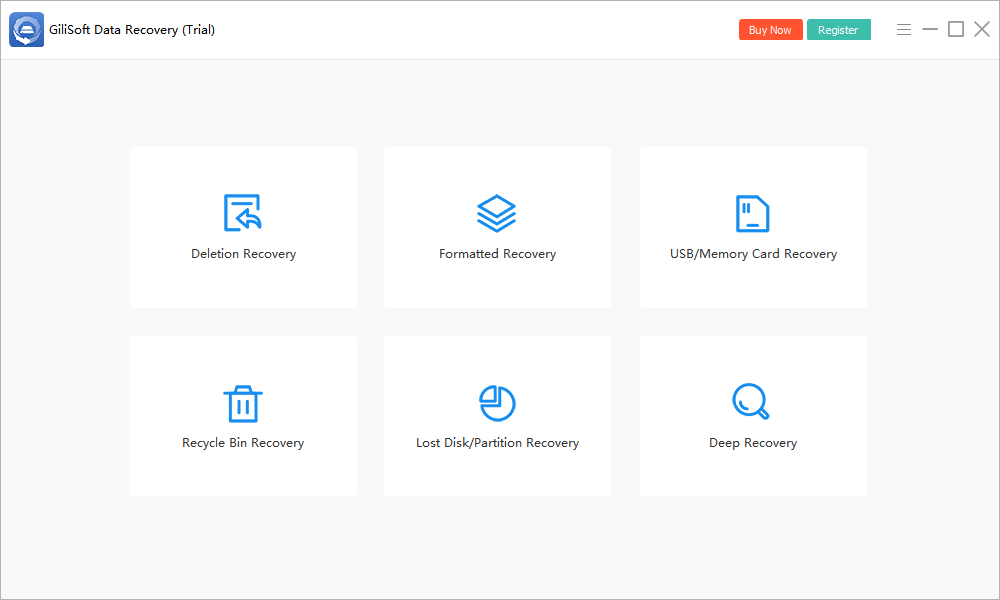
- Open Deletion Recovery.
Launch GiliSoft Data Recovery from healthy storage and select the deleted-file mode.
- Select the document's original location.
Choose the original folder or underlying drive. Check whether Desktop or Documents was redirected to OneDrive before deciding what local source to scan.
- Start the scan.
Keep the source available and avoid new writes while results are collected.
- Review supported previews and file details.
Use names, paths, dates, sizes, and file types where available, but verify content after export.
- Recover to another physical drive.
Save priority results away from the source, then open them in their normal application and back up verified files.

Check the installed trial's current recovery limits. A deeper scan may find additional candidates on healthy storage, but it cannot reconstruct overwritten data. See the Data Recovery User Guide for other modes.
Verify the Recovered Document
- Keep the raw recovered DOCX or DOC unchanged and open a duplicate.
- Check page count, the first and final paragraphs, tables, images, headers, footnotes, and comments.
- Review tracked changes, fields, links, and embedded objects where the document used them.
- If Word offers to repair content, save the repaired document under a different name and note anything it removed.
- Compare the result with a PDF, printout, email attachment, or earlier approved copy.
A correct filename and icon do not prove that the internal document package is complete.
Why a Word Document May Not Be Recoverable
AutoRecover may not retain a file after a deliberate Don't Save action, and version history requires the document to have been stored in a supported cloud location. Disk recovery depends on the local content still being accessible.
New writes, SSD TRIM, formatting, and storage damage can prevent recovery. A scanner also cannot retrieve a cloud-only document that was never downloaded to the disk.
Deleted Word Document Recovery FAQ
How do I recover a Word document that was never saved?
Open Word and check Document Recovery or the supported Recover Unsaved Documents route. This is different from scanning a saved document that was later deleted.
Can I recover an earlier version of a Word file?
If the document is stored in OneDrive or SharePoint, inspect Version History. File History may also hold an earlier local copy if it protected the folder before the loss.
Why is AutoRecover missing my document?
AutoRecover depends on application settings and retained temporary data. Choosing Don't Save or later cleanup can remove a recoverable copy. It is not a replacement for versioned backups.
Can GiliSoft recover a permanently deleted DOCX file?
It may find a deleted local document if usable data remains accessible. Recovery is not guaranteed. Scan the original storage and verify the exported document after saving it elsewhere.
What should I check in a recovered Word document?
Review page count, beginning and end, tables, images, headers, footnotes, tracked changes, and embedded objects. Preserve the raw recovered file and work on a copy if Word proposes repairs.